• Login
    • Search
    • Categories
    • Recent
    • Tags
    • Users
    • Groups
    • Rules
    • Help

    Do more on the web, with a fast and secure browser!

    Download Opera browser with:

    • built-in ad blocker
    • battery saver
    • free VPN
    Download Opera

    how do i get my passwords from my sync stuff and how do i sync my things to opera sync?

    Opera GX
    3
    17
    899
    Loading More Posts
    • Oldest to Newest
    • Newest to Oldest
    • Most Votes
    Reply
    • Reply as topic
    Log in to reply
    This topic has been deleted. Only users with topic management privileges can see it.
    • leocg
      leocg Moderator Volunteer @techguy1224 last edited by

      @techguy1224 So doing what I said should be enough.

      Reply Quote 0
        F T 2 Replies Last reply
      • F
        fitzydj @leocg last edited by

        @leocg Just out of interest does the Op have to use an Opera Browser to access the data at sync.opera.com please?

        Reply Quote 0
          1 Reply Last reply
        • T
          techguy1224 @leocg last edited by

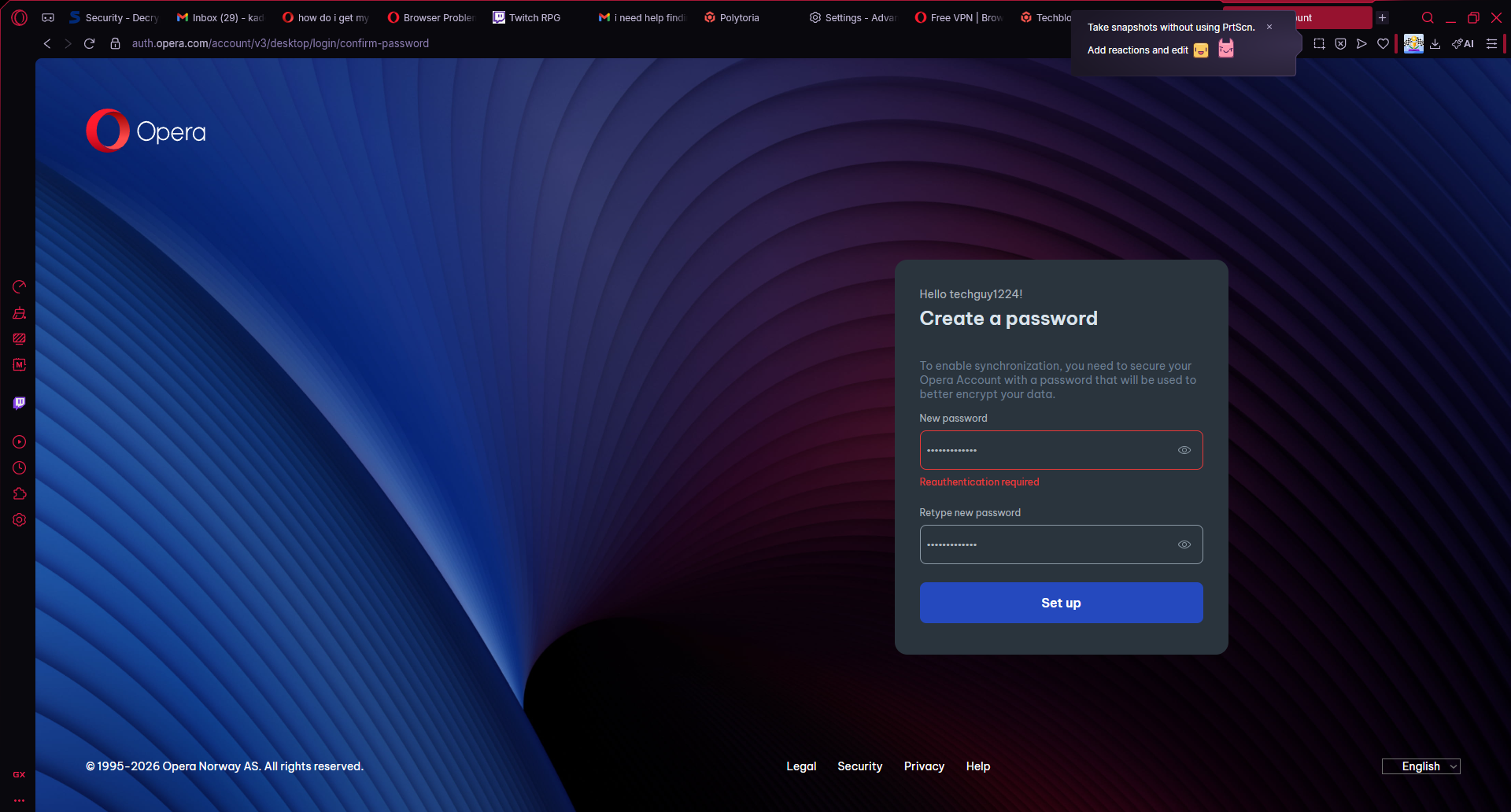
          @leocg i tried doing it but for some reason it says reauthentication requiredimage_2026-03-07_142911920.png see anything i can do to fix it?

          Reply Quote 0
            leocg 1 Reply Last reply
          • leocg
            leocg Moderator Volunteer @techguy1224 last edited by

            @techguy1224 You are using the same account you were using before?

            Reply Quote 0
              T 1 Reply Last reply
            • T
              techguy1224 @leocg last edited by

              @leocg same Google account I used

              Reply Quote 0
                leocg 1 Reply Last reply
              • leocg
                leocg Moderator Volunteer @techguy1224 last edited by

                @techguy1224 It may be a/the problem. For passwords synchronisation to work and for Opera to be able to decrypt the information, your Opera account needs to have a password.

                Reply Quote 0
                  T 1 Reply Last reply
                • T
                  techguy1224 @leocg last edited by

                  @leocg how can I do that? With a Google account?

                  Reply Quote 0
                    leocg 1 Reply Last reply
                  • leocg
                    leocg Moderator Volunteer @techguy1224 last edited by

                    @techguy1224 Go to https://auth.opera.com/account/edit-profile/security and set a password.

                    Reply Quote 0
                      T 1 Reply Last reply
                    • T
                      techguy1224 @leocg last edited by

                      @leocg so if I set this password up and get it working it will save everything? All my passwords before I deleted opera gx?

                      Reply Quote 0
                        leocg 1 Reply Last reply
                      • leocg
                        leocg Moderator Volunteer @techguy1224 last edited by

                        @techguy1224 It will save your passwords from now on. Don't know about the current ones.

                        Reply Quote 0
                          1 Reply Last reply
                        • First post
                          Last post

                        Computer browsers

                        • Opera for Windows
                        • Opera for Mac
                        • Opera for Linux
                        • Opera beta version
                        • Opera USB

                        Mobile browsers

                        • Opera for Android
                        • Opera Mini
                        • Opera Touch
                        • Opera for basic phones

                        • Add-ons
                        • Opera account
                        • Wallpapers
                        • Opera Ads

                        • Help & support
                        • Opera blogs
                        • Opera forums
                        • Dev.Opera

                        • Security
                        • Privacy
                        • Cookies Policy
                        • EULA
                        • Terms of Service

                        • About Opera
                        • Press info
                        • Jobs
                        • Investors
                        • Become a partner
                        • Contact us

                        Follow Opera

                        • Opera - Facebook
                        • Opera - Twitter
                        • Opera - YouTube
                        • Opera - LinkedIn
                        • Opera - Instagram

                        © Opera Software 1995-