• Login
    • Search
    • Categories
    • Recent
    • Tags
    • Users
    • Groups
    • Rules
    • Help

    Do more on the web, with a fast and secure browser!

    Download Opera browser with:

    • built-in ad blocker
    • battery saver
    • free VPN
    Download Opera

    Remove new search selection bar

    Opera for Android
    6
    25
    1686
    Loading More Posts
    • Oldest to Newest
    • Newest to Oldest
    • Most Votes
    Reply
    • Reply as topic
    Log in to reply
    This topic has been deleted. Only users with topic management privileges can see it.
    • cska133
      cska133 @RandallT last edited by

      @RandallT
      So from which Opera version can I remove the Choose_Search_Engine Button? Current version now is 94.1?

      Reply Quote 0
        RandallT 1 Reply Last reply
      • RandallT
        RandallT @cska133 last edited by

        @cska133 button is still there but in 94.1 it doesn't fill it own bar in addition but is just an icon on standard search bar

        Reply Quote 0
          cska133 1 Reply Last reply
        • cska133
          cska133 @RandallT last edited by

          @RandallT you wrote it is removed?! Can you post screenshot of how the search area looks now

          Reply Quote 0
            RandallT 1 Reply Last reply
          • RandallT
            RandallT @cska133 last edited by

            @cska133 searchbar is just set on mine as a single bar with the Google icon on left of bar followed by space to type search and to the right a microphone button. I don't have any other bars cluttering up the space like when the search selection bar had its own none movable bar.

            Reply Quote 0
              cska133 2 Replies Last reply
            • cska133
              cska133 @RandallT last edited by

              @RandallT no chance to send screenshot? 😕

              Reply Quote 0
                1 Reply Last reply
              • cska133
                cska133 @RandallT last edited by

                I can not understand what was added in earier versions and where it on the searchbar ? and what was removed in the current version 94.
                Can someone explain, screenshots will be very helpfull. Thanks

                Reply Quote 0
                  leocg 1 Reply Last reply
                • leocg
                  leocg Moderator Volunteer @cska133 last edited by

                  @cska133 Here, nothing has changed.

                  Reply Quote 0
                    cska133 1 Reply Last reply
                  • cska133
                    cska133 @leocg last edited by

                    @leocg i dont see screenshot. Or what do you mean with "nothing has changed"?

                    Reply Quote 0
                      1 Reply Last reply
                    • leocg
                      leocg Moderator Volunteer last edited by

                      @cska133 I mean that I didn't notice any changes regarding the subject.

                      Reply Quote 0
                        cska133 1 Reply Last reply
                      • cska133
                        cska133 @leocg last edited by

                        @leocg could you post scrennshot of how the whole search bar looks like now

                        Reply Quote 0
                          leocg 1 Reply Last reply
                        • leocg
                          leocg Moderator Volunteer @cska133 last edited by

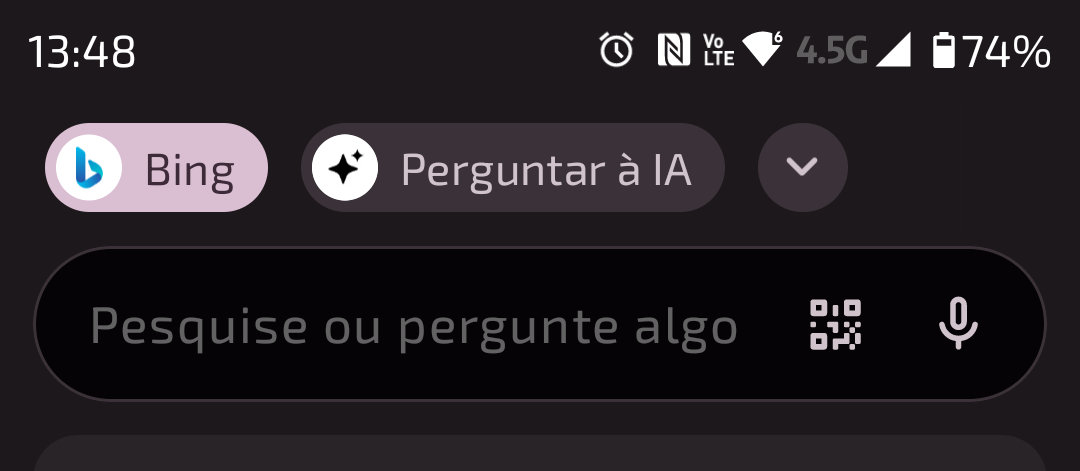
                          @cska133 Here:

                          Screenshot_20260124-134816.png

                          Reply Quote 0
                            cska133 1 Reply Last reply
                          • cska133
                            cska133 @leocg last edited by

                            @leocg so buttons "bing" "AI" and the Arrow are on a additional separate toolbar???

                            Reply Quote 0
                              leocg 1 Reply Last reply
                            • leocg
                              leocg Moderator Volunteer @cska133 last edited by

                              @cska133 Yes

                              Reply Quote 0
                                cska133 1 Reply Last reply
                              • cska133
                                cska133 @leocg last edited by

                                @leocg oh wow, this is really bad, what for another toolbar to fill up the screen and make the visible contend less 😞
                                Nothing of these buttons can be removed?

                                Reply Quote 0
                                  leocg 1 Reply Last reply
                                • leocg
                                  leocg Moderator Volunteer @cska133 last edited by

                                  @cska133 Not that I know.

                                  Reply Quote 0
                                    1 Reply Last reply
                                  • First post
                                    Last post

                                  Computer browsers

                                  • Opera for Windows
                                  • Opera for Mac
                                  • Opera for Linux
                                  • Opera beta version
                                  • Opera USB

                                  Mobile browsers

                                  • Opera for Android
                                  • Opera Mini
                                  • Opera Touch
                                  • Opera for basic phones

                                  • Add-ons
                                  • Opera account
                                  • Wallpapers
                                  • Opera Ads

                                  • Help & support
                                  • Opera blogs
                                  • Opera forums
                                  • Dev.Opera

                                  • Security
                                  • Privacy
                                  • Cookies Policy
                                  • EULA
                                  • Terms of Service

                                  • About Opera
                                  • Press info
                                  • Jobs
                                  • Investors
                                  • Become a partner
                                  • Contact us

                                  Follow Opera

                                  • Opera - Facebook
                                  • Opera - Twitter
                                  • Opera - YouTube
                                  • Opera - LinkedIn
                                  • Opera - Instagram

                                  © Opera Software 1995-