• Login
    • Search
    • Categories
    • Recent
    • Tags
    • Users
    • Groups
    • Rules
    • Help

    Do more on the web, with a fast and secure browser!

    Download Opera browser with:

    • built-in ad blocker
    • battery saver
    • free VPN
    Download Opera

    Remove new search selection bar

    Opera for Android
    6
    22
    1603
    Loading More Posts
    • Oldest to Newest
    • Newest to Oldest
    • Most Votes
    Reply
    • Reply as topic
    Log in to reply
    This topic has been deleted. Only users with topic management privileges can see it.
    • RandallT
      RandallT @BrandonMe last edited by

      @BrandonMe agree, i am getting used to ff now, been using opera for a while so will take some adjusting. Shame really.

      Reply Quote 0
        1 Reply Last reply
      • Acebufs
        Acebufs last edited by

        More than that I think having the bar be a search bar by default is asinine.

        I Want To Type In An Address
        I don't want a search engine.

        The bar shld start with https://
        why is the new tab a search page????

        Is there no way to disable that

        Reply Quote 0
          leocg 1 Reply Last reply
        • leocg
          leocg Moderator Volunteer @Acebufs last edited by

          @Acebufs You don't have a search bar by default, you still have the same address/search bar bar that you have been using in the last decade, at least.
          The difference is that now you can see what is the default search engine and you can also ask Opera AI.

          Reply Quote 0
            RandallT 1 Reply Last reply
          • RandallT
            RandallT @leocg last edited by

            @leocg you have an extra bar you cannot remove. You can take the ai off it but it still leaves the search engine choice. Why can this extra bar nit be optional. I don't want to have it in my face as don't often change it.

            Reply Quote 0
              1 Reply Last reply
            • RandallT
              RandallT @Popcorn537 last edited by

              @Popcorn537 new update removes the stoopid extra bar. Thanks to someone with sense at ooera

              Reply Quote 0
                cska133 1 Reply Last reply
              • cska133
                cska133 @RandallT last edited by

                @RandallT
                So from which Opera version can I remove the Choose_Search_Engine Button? Current version now is 94.1?

                Reply Quote 0
                  RandallT 1 Reply Last reply
                • RandallT
                  RandallT @cska133 last edited by

                  @cska133 button is still there but in 94.1 it doesn't fill it own bar in addition but is just an icon on standard search bar

                  Reply Quote 0
                    cska133 1 Reply Last reply
                  • cska133
                    cska133 @RandallT last edited by

                    @RandallT you wrote it is removed?! Can you post screenshot of how the search area looks now

                    Reply Quote 0
                      RandallT 1 Reply Last reply
                    • RandallT
                      RandallT @cska133 last edited by

                      @cska133 searchbar is just set on mine as a single bar with the Google icon on left of bar followed by space to type search and to the right a microphone button. I don't have any other bars cluttering up the space like when the search selection bar had its own none movable bar.

                      Reply Quote 0
                        cska133 2 Replies Last reply
                      • cska133
                        cska133 @RandallT last edited by

                        @RandallT no chance to send screenshot? 😕

                        Reply Quote 0
                          1 Reply Last reply
                        • cska133
                          cska133 @RandallT last edited by

                          I can not understand what was added in earier versions and where it on the searchbar ? and what was removed in the current version 94.
                          Can someone explain, screenshots will be very helpfull. Thanks

                          Reply Quote 0
                            leocg 1 Reply Last reply
                          • leocg
                            leocg Moderator Volunteer @cska133 last edited by

                            @cska133 Here, nothing has changed.

                            Reply Quote 0
                              cska133 1 Reply Last reply
                            • cska133
                              cska133 @leocg last edited by

                              @leocg i dont see screenshot. Or what do you mean with "nothing has changed"?

                              Reply Quote 0
                                1 Reply Last reply
                              • leocg
                                leocg Moderator Volunteer last edited by

                                @cska133 I mean that I didn't notice any changes regarding the subject.

                                Reply Quote 0
                                  cska133 1 Reply Last reply
                                • cska133
                                  cska133 @leocg last edited by

                                  @leocg could you post scrennshot of how the whole search bar looks like now

                                  Reply Quote 0
                                    leocg 1 Reply Last reply
                                  • leocg
                                    leocg Moderator Volunteer @cska133 last edited by

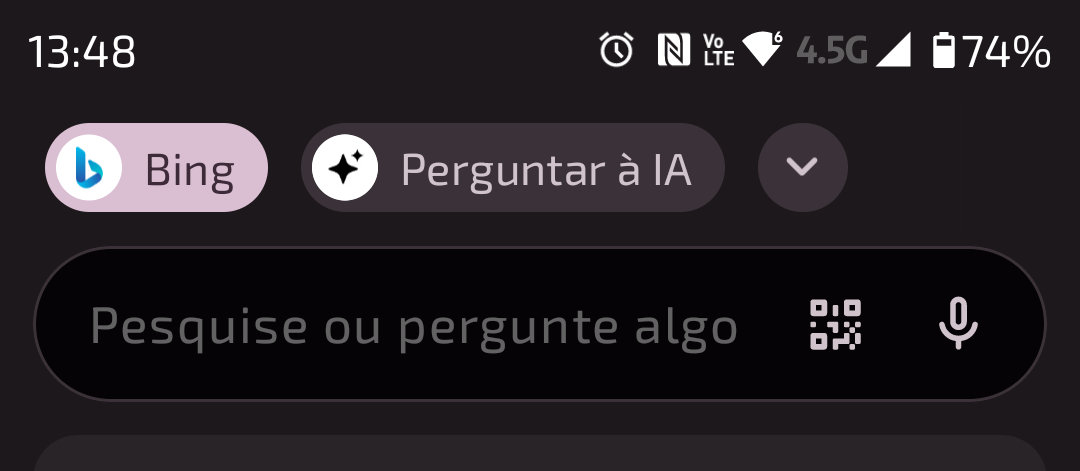
                                    @cska133 Here:

                                    Screenshot_20260124-134816.png

                                    Reply Quote 0
                                      cska133 1 Reply Last reply
                                    • cska133
                                      cska133 @leocg last edited by

                                      @leocg so buttons "bing" "AI" and the Arrow are on a additional separate toolbar???

                                      Reply Quote 0
                                        1 Reply Last reply
                                      • First post
                                        Last post

                                      Computer browsers

                                      • Opera for Windows
                                      • Opera for Mac
                                      • Opera for Linux
                                      • Opera beta version
                                      • Opera USB

                                      Mobile browsers

                                      • Opera for Android
                                      • Opera Mini
                                      • Opera Touch
                                      • Opera for basic phones

                                      • Add-ons
                                      • Opera account
                                      • Wallpapers
                                      • Opera Ads

                                      • Help & support
                                      • Opera blogs
                                      • Opera forums
                                      • Dev.Opera

                                      • Security
                                      • Privacy
                                      • Cookies Policy
                                      • EULA
                                      • Terms of Service

                                      • About Opera
                                      • Press info
                                      • Jobs
                                      • Investors
                                      • Become a partner
                                      • Contact us

                                      Follow Opera

                                      • Opera - Facebook
                                      • Opera - Twitter
                                      • Opera - YouTube
                                      • Opera - LinkedIn
                                      • Opera - Instagram

                                      © Opera Software 1995-