• Login
    • Search
    • Categories
    • Recent
    • Tags
    • Users
    • Groups
    • Rules
    • Help

    Do more on the web, with a fast and secure browser!

    Download Opera browser with:

    • built-in ad blocker
    • battery saver
    • free VPN
    Download Opera

    How Do I Make Multiple Profile On Mac Os

    Opera GX
    6
    9
    459
    Loading More Posts
    • Oldest to Newest
    • Newest to Oldest
    • Most Votes
    Reply
    • Reply as topic
    Log in to reply
    This topic has been deleted. Only users with topic management privileges can see it.
    • Zunbileg
      Zunbileg last edited by

      How Do I Make Multiple Profile On Mac Os?

      there are many tutorials on windows but mac....

      Reply Quote 0
        leocg zack990 2 Replies Last reply
      • leocg
        leocg Moderator Volunteer @Zunbileg last edited by

        @Zunbileg There isn't the profiles section in settings page?

        Reply Quote 0
          1 Reply Last reply
        • burnout426
          burnout426 Volunteer last edited by

          For macOS, you might have to goto the URL opera://settings/early_bird, enable Early Bird, enable "Revived GX Profiles" and restart Opera.

          Then, you can create new profiles at the URL opera://settings/profiles or "Menu -> Profiles -> Add".

          Reply Quote 0
            alexs77 1 Reply Last reply
          • alexs77
            alexs77 @burnout426 last edited by

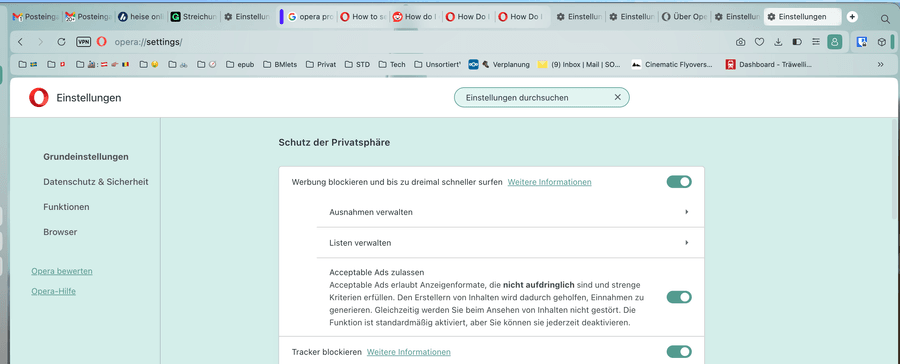
            @burnout426 Does this still work for you? I'm using "Opera One(Version: 124.0.5705.65) (arm64)" and opera://settings/early_bird doesn't bring me anywhere; well, it takes me to the start of the settings, but that's it.
            f79f2fcb-2c08-4100-b5f3-8cd3a4fc2819-image.png

            Reply Quote 0
              Dorczaa leocg 2 Replies Last reply
            • Dorczaa
              Dorczaa @alexs77 last edited by

              @alexs77 You need Opera GX for that.

              Reply Quote 0
                1 Reply Last reply
              • leocg
                leocg Moderator Volunteer @alexs77 last edited by

                @alexs77 That's because you seem to be using Opera One and not Opera GX

                Reply Quote 0
                  alexs77 1 Reply Last reply
                • alexs77
                  alexs77 @leocg last edited by alexs77

                  @leocg Indeed 😞 I overlooked that this is for GX. My bad and sorry.

                  However…

                  On GX, it also doesn't work, does it?

                  I'm using:

                  • Mozilla/5.0 (Macintosh; Intel Mac OS X 10_15_7) AppleWebKit/537.36 (KHTML, like Gecko) Chrome/140.0.0.0 Safari/537.36 OPR/124.0.0.0
                  • Update-Stream: Early Access
                  • Core: 124.0.5705.89
                  • Betriebssystem: macOS Version 26.1 (Build 25B78) 26.1.0 arm64
                  • Chromium-Version: 140.0.7339.249

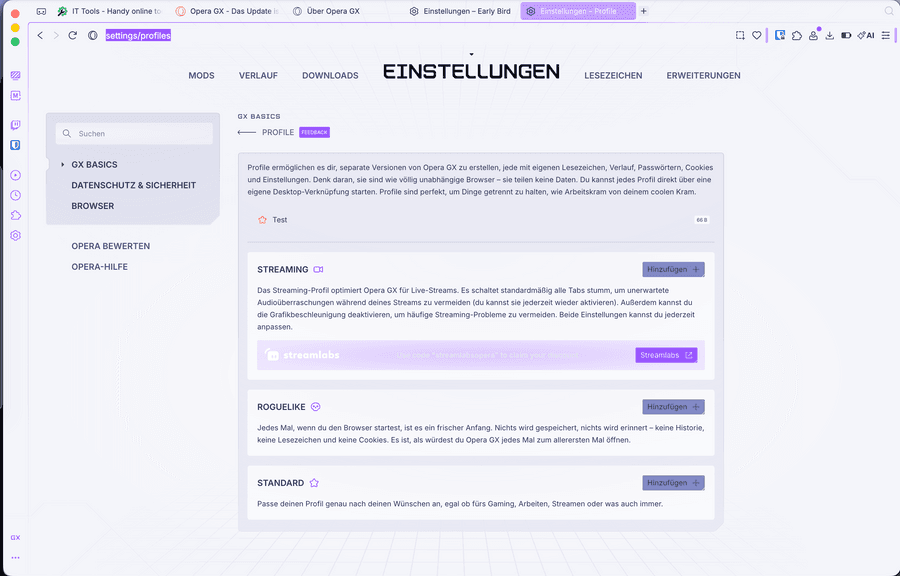
                  opera://settings/early_bird doesn't show "Revived GX Profiles" anymore. Should it? When I go to opera://settings/profiles, I see this: imgur.com/a/HLAIpZu
                  3fa7b1d1-7515-4a37-a435-ce95fe2f256b-grafik.png

                  Reply Quote 0
                    1 Reply Last reply
                  • zack990
                    zack990 @Zunbileg last edited by

                    @Zunbileg On a Mac it’s basically the same idea as profiles, Apple just calls them user accounts.

                    If you want a separate space for work, gaming, or someone else in the house, go to System Settings then Users and Groups. Hit the little add button, pick the type of account, give it a name and password, and you’re done.

                    Each account stays completely separate, so it’s a simple way to keep things organized.

                    Reply Quote 0
                      alexs77 1 Reply Last reply
                    • alexs77
                      alexs77 @zack990 last edited by

                      @zack990 Uh?

                      You're trying to "suggest" that someone should use seperate user accounts on macOS?

                      That's hardly the same as a seperate profile on the browser.

                      What's next? Get a different family on a different continent if you want to seperate things?

                      You can't be serious with your suggetion, can you? Or did I misunderstand you?

                      If you really want to suggest to use different user accounts on macOS to work around this short coming of Opera (in comparison to Firefox, Vivaldi, …): How do you copy-paste text between the different sessions that often occur at the very same time?

                      Your suggestion is anything but simple. Another point: how do you sync application settings of applications that don't need to be seperatered?

                      Reply Quote 0
                        1 Reply Last reply
                      • First post
                        Last post

                      Computer browsers

                      • Opera for Windows
                      • Opera for Mac
                      • Opera for Linux
                      • Opera beta version
                      • Opera USB

                      Mobile browsers

                      • Opera for Android
                      • Opera Mini
                      • Opera Touch
                      • Opera for basic phones

                      • Add-ons
                      • Opera account
                      • Wallpapers
                      • Opera Ads

                      • Help & support
                      • Opera blogs
                      • Opera forums
                      • Dev.Opera

                      • Security
                      • Privacy
                      • Cookies Policy
                      • EULA
                      • Terms of Service

                      • About Opera
                      • Press info
                      • Jobs
                      • Investors
                      • Become a partner
                      • Contact us

                      Follow Opera

                      • Opera - Facebook
                      • Opera - Twitter
                      • Opera - YouTube
                      • Opera - LinkedIn
                      • Opera - Instagram

                      © Opera Software 1995-