• Login
    • Search
    • Categories
    • Recent
    • Tags
    • Users
    • Groups
    • Rules
    • Help

    Do more on the web, with a fast and secure browser!

    Download Opera browser with:

    • built-in ad blocker
    • battery saver
    • free VPN
    Download Opera

    [Compilation]Discussions About Missing Speed Dial/Home Page Button In Opera One

    Appearance
    106
    238
    183063
    Loading More Posts
    • Oldest to Newest
    • Newest to Oldest
    • Most Votes
    Reply
    • Reply as topic
    Log in to reply
    This topic has been deleted. Only users with topic management privileges can see it.
    • G
      Gateau @cpking last edited by

      @cpking

      Agreed. And not only that.

      The new speed dial button opens in a new tab instead of in the existing tab as before. My bookmark button "opera://startpageshared", which I pin on the bookmarks bar, restores the old function.

      Reply Quote 3
        M 1 Reply Last reply
      • T
        Telinnor last edited by

        Today the new Opera One got installed and the speed dial button is gone.
        When i open a new tab the speed dial opens as normal, but i want open it manually.

        Reply Quote 1
          1 Reply Last reply
        • ?
          A Former User last edited by leocg

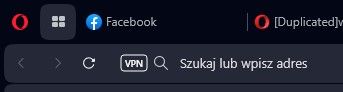
          Hello! How to bring back a start page button in address bar?

          2.PNG

          The new Opera 101.0.4843.25 is removed it.

          1.PNG

          Reply Quote 5
            tastodd 1 Reply Last reply
          • ?
            A Former User last edited by

            you can add it as bookmark, it is only known way: add bookmark with adress: opera://startpage
            it is my first bookmark
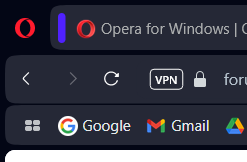
            Snímka obrazovky 2023-07-26 183059.png

            Reply Quote 0
              1 Reply Last reply
            • tastodd
              tastodd @Guest last edited by

              @shikuren The "start page button" has been moved to the sidebar

              Reply Quote -1
                ? ? A stolis 4 Replies Last reply
              • ?
                A Former User @tastodd last edited by

                @tastodd

                At the bottom, for good measure. The finest touch of UI Design. 🙌

                Reply Quote 0
                  1 Reply Last reply
                • ?
                  A Former User @tastodd last edited by

                  @tastodd said in Start Page button is missing in Opera 101.0.4843.25:

                  The "start page button" has been moved to the sidebar

                  Thanks, but It's so unusual. I have never used the sidebar. Why the Opera refused the Start Page/Home button in the address bar?

                  Reply Quote 4
                    1 Reply Last reply
                  • M
                    modemjunkie @Gateau last edited by modemjunkie

                    @gateau Great. But when I paste opera://startpageshared into the address field it opens the start page but I don't see any way to pin it. Or make a bookmark. How do we create that on our machines? Thanks.

                    len

                    Reply Quote 1
                      G 1 Reply Last reply
                    • R
                      Richard127gm @leocg last edited by

                      @leocg They do, however, have a start button. Maybe they should allow actual users to decide whether they want such a button or not. Why should I have to close a current tab then open another, to get the start page? It's a waste of time and effort (albeit a small one). Imposing your choices on users is a sure way to lose them.

                      Reply Quote 3
                        D leocg 3 Replies Last reply
                      • G
                        Gateau @modemjunkie last edited by Gateau

                        @modemjunkie

                        Use a temporary bookmark button, say www.yahoo.com, pin it on the favorites toolbar and right-click on it to replace the address with "chrome://startpageshared" or "opera://startpageshared".

                        Reply Quote 0
                          M S 2 Replies Last reply
                        • C
                          cragmc last edited by

                          After update today, the speed dial button in the bar is missing - looked like 4 small rectangles. What up?

                          Reply Quote 5
                            P B 2 Replies Last reply
                          • T
                            tennthomas last edited by

                            So stupid to move the Speed Dial button from the toolbar to the bottom of the side bar. Just put the damn thing back where it was and quit randomly moving stuff around. Ffs.

                            Reply Quote 3
                              1 Reply Last reply
                            • M
                              modemjunkie @Gateau last edited by

                              @gateau That did it. Thanks.

                              Reply Quote 1
                                1 Reply Last reply
                              • K
                                kangdev last edited by

                                deng yesterday i got auto update from opera, 101.0.4843.25 ..
                                and im missing the speed dial button near the vpn button.. so they remove it zzz

                                Reply Quote 1
                                  1 Reply Last reply
                                • D
                                  darkwind23 @Richard127gm last edited by

                                  @richard127gm It's not the perfect solution but you can "pin" starting page to the card barstart.jpg

                                  Reply Quote -1
                                    pindos 1 Reply Last reply
                                  • pindos
                                    pindos @darkwind23 last edited by

                                    @darkwind23 It is not the solution at all! This way doesn't provide the functionality of Start button (or Speed Dial button) that opens Speed Dial in active page.
                                    They put Speed Dial button to Sidebar now. Very strange decision, to my mind. I never used this bar.

                                    Reply Quote 2
                                      R 1 Reply Last reply
                                    • R
                                      radecek152 @pindos last edited by

                                      @pindos This is how I did it and it works great, the older version of opera was better at this

                                      Reply Quote 1
                                        1 Reply Last reply
                                      • A
                                        andrew84 @tastodd last edited by

                                        @tastodd said in Start Page button is missing in Opera 101.0.4843.25:

                                        The "start page button" has been moved to the sidebar

                                        Why moved? It was there all the time.

                                        Reply Quote 1
                                          tastodd 1 Reply Last reply
                                        • leocg
                                          leocg Moderator Volunteer @Richard127gm last edited by

                                          @richard127gm They don't have that button.

                                          Reply Quote -2
                                            1 Reply Last reply
                                          • leocg
                                            leocg Moderator Volunteer @Richard127gm last edited by

                                            @richard127gm By the way, I always close the tabs, so it's the default behavior for me.

                                            Reply Quote 0
                                              1 Reply Last reply
                                            • First post
                                              Last post

                                            Computer browsers

                                            • Opera for Windows
                                            • Opera for Mac
                                            • Opera for Linux
                                            • Opera beta version
                                            • Opera USB

                                            Mobile browsers

                                            • Opera for Android
                                            • Opera Mini
                                            • Opera Touch
                                            • Opera for basic phones

                                            • Add-ons
                                            • Opera account
                                            • Wallpapers
                                            • Opera Ads

                                            • Help & support
                                            • Opera blogs
                                            • Opera forums
                                            • Dev.Opera

                                            • Security
                                            • Privacy
                                            • Cookies Policy
                                            • EULA
                                            • Terms of Service

                                            • About Opera
                                            • Press info
                                            • Jobs
                                            • Investors
                                            • Become a partner
                                            • Contact us

                                            Follow Opera

                                            • Opera - Facebook
                                            • Opera - Twitter
                                            • Opera - YouTube
                                            • Opera - LinkedIn
                                            • Opera - Instagram

                                            © Opera Software 1995-