• Login
    • Search
    • Categories
    • Recent
    • Tags
    • Users
    • Groups
    • Rules
    • Help

    Do more on the web, with a fast and secure browser!

    Download Opera browser with:

    • built-in ad blocker
    • battery saver
    • free VPN
    Download Opera

    Google photos not working

    Opera for Windows
    10
    28
    14874
    Loading More Posts
    • Oldest to Newest
    • Newest to Oldest
    • Most Votes
    Reply
    • Reply as topic
    Log in to reply
    This topic has been deleted. Only users with topic management privileges can see it.
    • T
      tareqtareq last edited by

      i am facing the problem too for few days.
      the problem get solved if i Disable the option "Block third-party cookies
      Prevent third-party websites from saving and reading cookie data", and reload the page again. but after if i again Enable it, the page shows me "ERR_TOO_MANY_REDIRECTS".its really annoying. same thing i faced while browsing Gmail.but Gmail works perfectly now. whats the issue??

      Reply Quote 0
        1 Reply Last reply
      • ?
        A Former User @leocg last edited by

        @leocg

        No it does not. One of the suggestions to get it to work but try it in VPN mode but that doesn't work either.

        Reply Quote 0
          1 Reply Last reply
        • ?
          A Former User @leocg last edited by

          @leocg
          Thanks for the clarification. I clicked on it and then on the Update button but it finished as fast as I clicked it, so I don't think it updated anything. And I still have the same problem with Google Photos.

          Reply Quote 0
            leocg 1 Reply Last reply
          • leocg
            leocg Moderator Volunteer @Guest last edited by

            Did you check the suggestion about cookies?

            Reply Quote 0
              1 Reply Last reply
            • ?
              A Former User @Guest last edited by

              @morlaine i get the same screen.

              Reply Quote 0
                1 Reply Last reply
              • A
                aivalight last edited by aivalight

                Have the same issue for several weeks!
                Tried everything what was suggested above, didn't help.
                Have to use another browser.
                I've found this page https://photos.google.com/browser-not-supported/

                Reply Quote 0
                  1 Reply Last reply
                • ?
                  A Former User last edited by

                  As it happens Google's own Chrome was hit this same way. Not every user seems to have the problem - Opera, Chrome, and all Chromium based browsers run into this. But not all of their users experience it. Sadly, Google, Opera, etc., have responded poorly to this bug.

                  WORKING SOLUTION:

                  You want to go to Settings, Content, Cookies, and instead of a destructive clearing, you want to Allow:

                  GoTo opera://settings/content/cookies?search=Content+settings

                  OR

                  opera://settings/content?search=Content+settings
                  (then find Cookies)

                  OR

                  Goto opera://settings
                  (then look for Content Settings, then Cookies)

                  Clicky triangle to open Cookies panel.

                  Under the Allow section, select ADD.

                  Refer to the tab where you got your original ERR_TOO_MANY_REDIRECTS error.
                  You'll see a URL just below the error. That's what you plug into the Cookies-Allow section.

                  We should not have to fudge around like this, but, blame the Chromium makers and Google:

                  In the case of our GMail problem you want to Allow mail.google.com
                  Or if it's an accounts problem, then allow accounts.google.com
                  You get the idea.
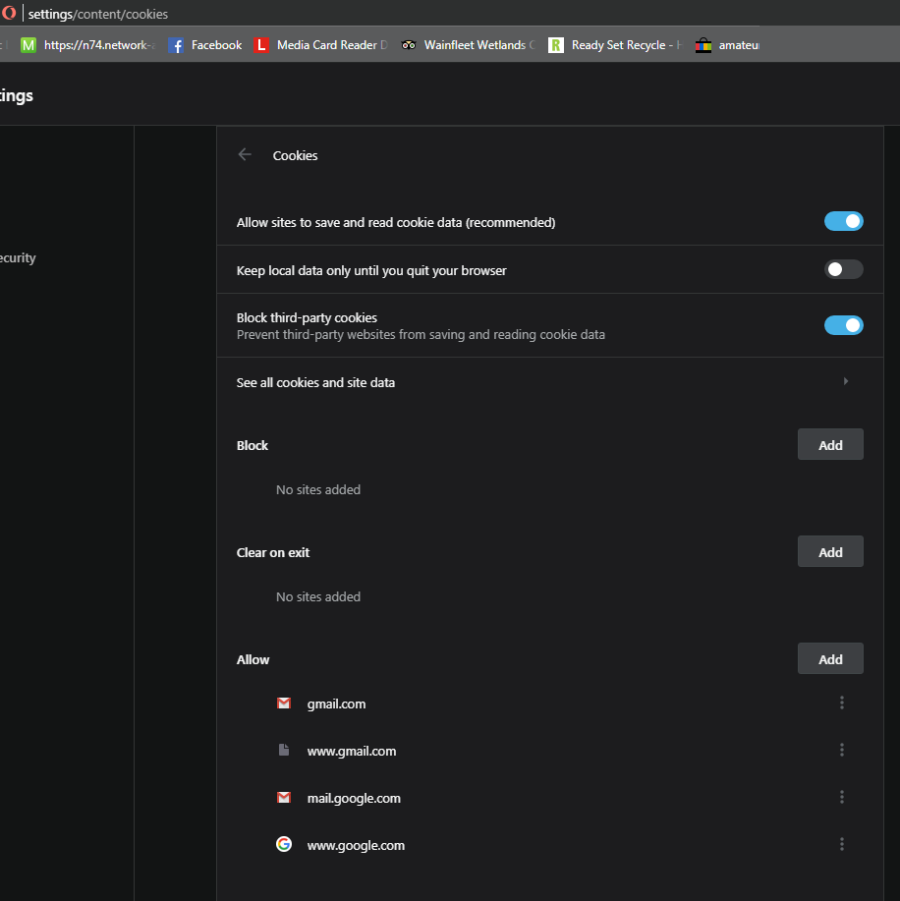
                  0_1552102205185_81b17ccf-6cc5-4e47-8cc2-7cd907a0e418-image.png

                  Reply Quote 0
                    T T 2 Replies Last reply
                  • T
                    tareqtareq @Guest last edited by

                    @veganamigansagan said in Google photos not working:

                    opera://settings/content?search=Content+settings

                    thank you for your idea and suggestion.

                    Reply Quote 0
                      1 Reply Last reply
                    • ?
                      A Former User last edited by

                      @veganamigansagan said in Google photos not working:

                      veganamigansagan

                      veganamigansagan Thank you so much. Finally a solution that works and works more than once. I hate it when I have to use a different browser other than Opera. Opera is the best without a doubt and seems to get better all the time. Keep up the good work guys.

                      Reply Quote 0
                        1 Reply Last reply
                      • T
                        tjall @Guest last edited by tjall This post is deleted!
                        Reply Quote 0
                          1 Reply Last reply
                        • First post
                          Last post

                        Computer browsers

                        • Opera for Windows
                        • Opera for Mac
                        • Opera for Linux
                        • Opera beta version
                        • Opera USB

                        Mobile browsers

                        • Opera for Android
                        • Opera Mini
                        • Opera Touch
                        • Opera for basic phones

                        • Add-ons
                        • Opera account
                        • Wallpapers
                        • Opera Ads

                        • Help & support
                        • Opera blogs
                        • Opera forums
                        • Dev.Opera

                        • Security
                        • Privacy
                        • Cookies Policy
                        • EULA
                        • Terms of Service

                        • About Opera
                        • Press info
                        • Jobs
                        • Investors
                        • Become a partner
                        • Contact us

                        Follow Opera

                        • Opera - Facebook
                        • Opera - Twitter
                        • Opera - YouTube
                        • Opera - LinkedIn
                        • Opera - Instagram

                        © Opera Software 1995-
