@swimboy Eureka! It turns out it was caused by AdBlock. I hope this works for anyone else reading this with the same issue. DavidB
S
Posts made by swimboy
-
RE: Facebook pages with posts does not load completely anymoreGeneral
-
RE: Facebook pages with posts does not load completely anymoreGeneral
@misterrr I have exactly the same problem - what was working fine is now broken. I use Opera One(version: 102.0.4880.46) (x86_64) with OS Mac 10.14.6 (Mojave), I've tried playing with the settings in Facebook without improvement. A quick test with Safari does not show the problem. I use AdBlocker. I tried disabling AdBlocker without benefit, but perhaps I need to close and reopen Opera when I test this? Grateful for any suggestions. DavidB
-
RE: Opera excluded by mapping softwareOpera for Mac
@leocg
I've altered the Opera 'Settings' to allow hardware acceleration and the problem has resolved itself.There is a nearby option :
"Allow use of computer's dedicated GPU". This is currently OFF. Should it be ON?I believe that I had turned off the hardware acceleration because it created problems for some websites (though I cannot immediately recall which ones). What are the relevant arguments?
-
RE: Opera excluded by mapping softwareOpera for Mac
@leocg Hardware acceleration is disabled. I'm not familiar with 'html5test.com' but it tells me that WEBGL and WEBGL2 are both ticked. The other link produces the following:
Graphics Feature Status
Canvas: Software only, hardware acceleration unavailable
Flash: Software only. Hardware acceleration disabled
Flash Stage3D: Software only. Hardware acceleration disabled
Flash Stage3D Baseline profile: Software only. Hardware acceleration disabled
Compositing: Software only. Hardware acceleration disabled
Metal: Disabled
Multiple Raster Threads: Enabled
Out-of-process Rasterization: Disabled
OpenGL: Disabled
Hardware Protected Video Decode: Disabled
Rasterization: Software only. Hardware acceleration disabled
Skia Renderer: Disabled
Video Decode: Software only. Hardware acceleration disabled
WebGL: Software only, hardware acceleration unavailable
WebGL2: Software only, hardware acceleration unavailableProblems Detected for Hardware GPU
Gpu compositing has been disabled, either via blacklist, about:flags or the command line. The browser will fall back to software compositing and hardware acceleration will be unavailable.
Disabled Features: gpu_compositing
Log Messages
GpuProcessHost: The GPU process crashed!Does this offer a clue?
-
RE: Opera excluded by mapping softwareOpera for Mac
@operaoperandi Thanks. That leaves "Mojave" or operator error! Can anyone try this with Mojave, just to twist the knife?
-
RE: Opera excluded by mapping softwareOpera for Mac
@leocg As my post mentions, I am on MacOS Mojave using Opera for Mac and I see the problem. You have confirmed that the problem is not in Opera for Windows. I have confirmed the problem is not in another browser (Safari). What we need, to avoid suggestions of operator error, is for someone using Opera in a MacOS to attempt to reproduce the problem.
-
Opera excluded by mapping softwareOpera for Mac
Using Opera 71.0.3770.271 on MacOS Mojave
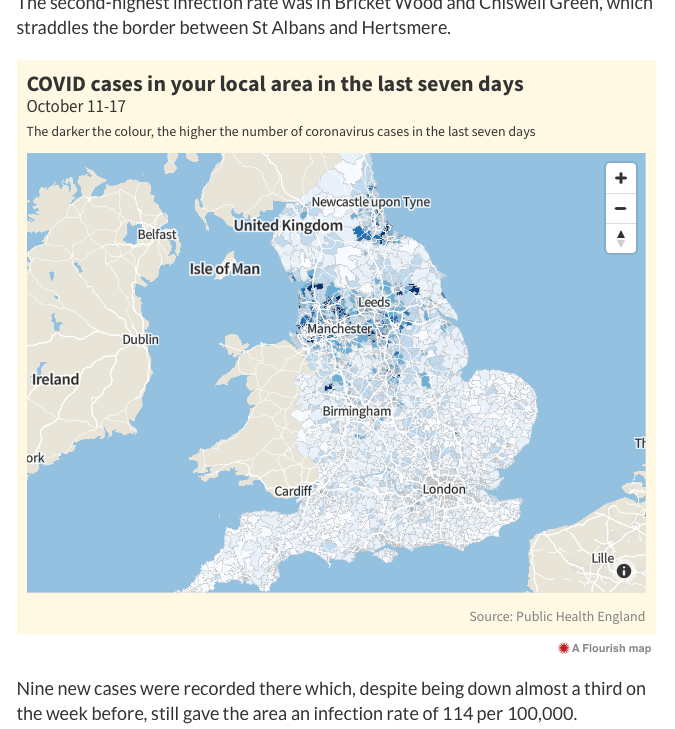
On the St Albans local newspaper website, I try to open a graphical display including a zoomable map. I get told I should use a modern browser! Safari works.
The website/page is https://www.hertsad.co.uk/news/herts-coronavirus-stats-show-mixed-picture-1-6892674.
Is there something I should do to make these displays visible?
This is what is shown in Safari:
-
RE: [Solved]Suddenly 'Ridewithgps.com' is broken in OperaOpera for Mac
@swimboy
(from the OP)I think I have cracked it!
In Opera/Preferences/Privacy there is an on/off option (which I vaguely remember altering in the past 10 days):
"Block ads and surf the web up to three times faster”When I turned this off, Ridewithgps once again worked as expected.
Thanks for your interest; this thread can now be closed.
David
-
RE: [Solved]Suddenly 'Ridewithgps.com' is broken in OperaOpera for Mac
(from the OP)
Still no improvement on latest Opera download of version 66.0.3515.103 18/2/20 -
[Solved]Suddenly 'Ridewithgps.com' is broken in OperaOpera for Mac
18/2/20
A week ago Ridewithgps.com was working fine. Yesterday it was broken. Their Support suggested trying another browser - Safari works fine.I have Opera 66.0.3515.7 and MacOS X 10.14.6 (Mojave)
Can anyone confirm this symptom? Or suggest a fix?
I've tried re-booting.
TIA David
-
RE: Opera for old iPad with IOS 9.3.5Lounge
@leocg Yes I did, but the somewhat generic pages suggest that Opera Mini is only available for Android.
-
Opera for old iPad with IOS 9.3.5Lounge
Hi
I've been given an old iPad which claims that IOS 9.3.5 is "up-to-date".
I've tried to down load Opera (I'm a big fan of Opera on my iMac) but I keep getting failure messages such as "can't download this file".
Is there any version of Opera I could download or use for this old iPad?
Thanks
David
- Opera for Mac
-
is Flash safe?Opera for Mac
Historically, the advice has been that Flash was buggy/insecure and was not needed because videos were becoming HTML5 (or somesuch). Now, having removed Flash from my iMac (el capitan) system, I am getting "Flash needs updating" messages, even from the BBC news website.
Is it now generally considered safe to have Flash running in MacOS ?
Thanks for your comments.
David
-
HTTPS/SSL Manage Certificates - lots of duplicate (null?) entriesOpera for Mac
When I try to manage certificates I see (under Keychain Access) the following oddities:
-
Under login I see 3 lines of the form com.apple.idms.prd etc, 2 of which are identified as revoked. Can I and should I delete the 2 revoked entries?
-
Under the category heading I see 1047 items listed, predominantly duplicates with no sub-entries:
2 entries "<key> public key no dates
<key> private key no dates7 entries "Apple ID {a constant email address} key public key no dates
4 entries "Apple ID {a constant email address} key private key no dates
of the 4 above, the last 3 have a sub entry as follows
com.apple.idms.appleid.prd.{constant very long certificate number} certificate expiry dates,various 2017The remaining (over 1000) entries are nearly identical, without sub-items and of the general form:
iMessage encryption key public key
private key
iMessage signing key public key
private keyI'm running El Capitan because Sierra was unusably unstable, and I wonder if there is anything for me to be concerned about in the information above.
Thanks
David
-
-
RE: Opera Next and Adobe ReaderOpera for Windows
Thanks Christoph142 - Your fix worked for Opera 26 with Win 8.1 too. Anyone know why we all had the problem?
-
RE: Revoked Certicate - what can I do next?Opera for Mac
Vindication! The tech support guy has sent the following email:Hi Mr Batten
"Thank you for your email.
Because of an administrative error our SSL certificate renewal for
www.truecallcontrol.co.uk was not applied correctly and as a result it has
expired.Getting this sorted out has a real challenge, but the site is now up and
running.Many apologies for the inconvenience that this has caused.
Best regards"
In previous conversations they had been adamant that 'There is no problem - it is your fault' and I would have knuckled under without the support from this forum.
My thanks to you all.
David
-
RE: Revoked Certicate - what can I do next?Opera for Mac
Thanks aeyoun for that positive statement. I have sent a screenshot of the full error page and the text of your comment to the site operators in the hope that they will take a hard look at what is going on.
In the event that this all turns out to be my fault, I'll tell the judge "aeyoun made me do it"!
I'll keep everyone informed of any developments.
Meanwhile, given that I rely on the site on a daily basis, and will use other browsers to force my way past the warning ... can anyone suggest how I can set Mac/Opera to 'permit' me to visit the page anyway?
Thanks to all,
David -
RE: Revoked Certicate - what can I do next?Opera for Mac
I've checked. There are no outstanding updates.
I'm at a loss to know what to do now. And in fact I've just tried accessing the page with Opera Beta for Mac and it just dumps me in a blank screen; and I tried my WinXP laptop running Opera 11 (Presto) and it, too, finds a certificate problem on that page.
The situation as I see it is that there is possibly a real problem with the web page certificates (which their support people are denying) but that all browsers except Opera/Mac have a facility to 'press on regardless'. Unless there is an option I've missed in Opera/Mac?
-
RE: Revoked Certicate - what can I do next?Opera for Mac
I guess I didn't understand the 'really' part ....
Anyway, the system reportsSystem Software Overview:
System Version: OS X 10.9.4 (13E28)
Kernel Version: Darwin 13.3.0Is there anything more I can tell you?
I suspect there is some corruption or deficiency within my system, since no-one else is reporting errors. But I've only had the Mac 6 months and I'm floundering here.
Thanks again.