I solved it, the send QR code is called My Flow in the settings
M
Latest posts made by Mali-123
-
RE: How to disable Invisible custom button wrapper blocking controls on YouTube ShortsOpera GX
-
How to disable Invisible custom button wrapper blocking controls on YouTube ShortsOpera GX
Windows version:
Windows 10 64-bitOpera version:
Opera GX LVL 7 (127.0.5778.96)Page where the issue occurs:
https://www.youtube.com/shorts/Screenshot:
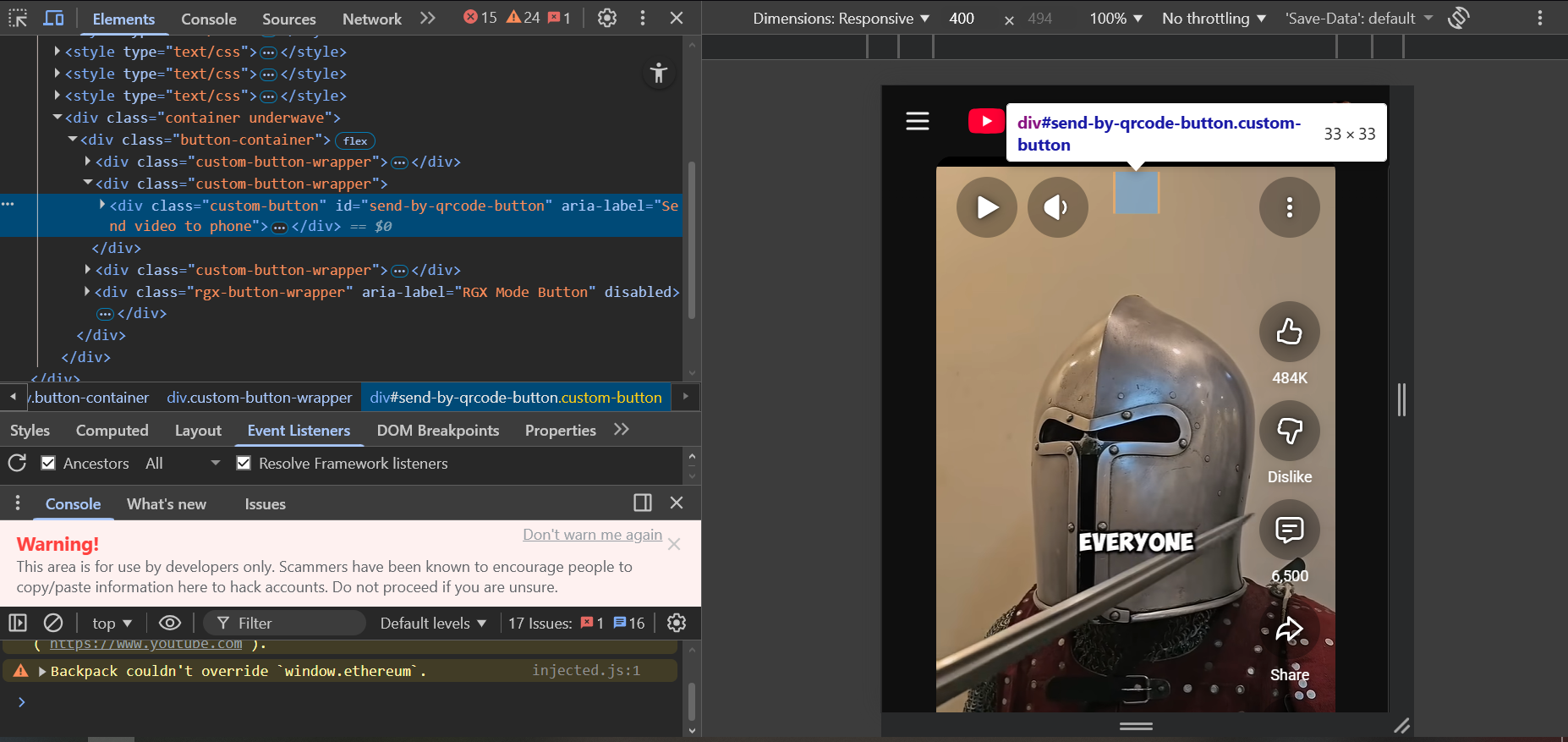
When watching YouTube Shorts in Opera GX, there appears to be an invisible overlay element that blocks interaction with the video controls.
After inspecting the page using developer tools, the element appears inside a container structure similar to:
<div class="button-container">
<div class="custom-button-wrapper">
<div class="custom-button" id="send-by-qrcode-button"></div>
</div>
</div>The custom button wrapper seems to create an invisible clickable area on top of the video player. Even though nothing is visually shown, the element still captures mouse input.
Because of this, it sometimes interferes with interaction with the YouTube Shorts volume slider, making it difficult or impossible to adjust the volume when the cursor passes through the area occupied by the invisible element.
As a temporary workaround, I have been manually deleting these elements through the browser console using developer tools. However, this only fixes the issue temporarily for the current page, and the elements reappear after refreshing. Repeating this process becomes frustrating during normal browsing.