• Login
    • Search
    • Categories
    • Recent
    • Tags
    • Users
    • Groups
    • Rules
    • Help

    Do more on the web, with a fast and secure browser!

    Download Opera browser with:

    • built-in ad blocker
    • battery saver
    • free VPN
    Download Opera

    How to disable Invisible custom button wrapper blocking controls on YouTube Shorts

    Opera GX
    opera gx youtube bug
    3
    4
    125
    Loading More Posts
    • Oldest to Newest
    • Newest to Oldest
    • Most Votes
    Reply
    • Reply as topic
    Log in to reply
    This topic has been deleted. Only users with topic management privileges can see it.
    • M
      Mali-123 last edited by

      Windows version:
      Windows 10 64-bit

      Opera version:
      Opera GX LVL 7 (127.0.5778.96)

      Page where the issue occurs:
      https://www.youtube.com/shorts/

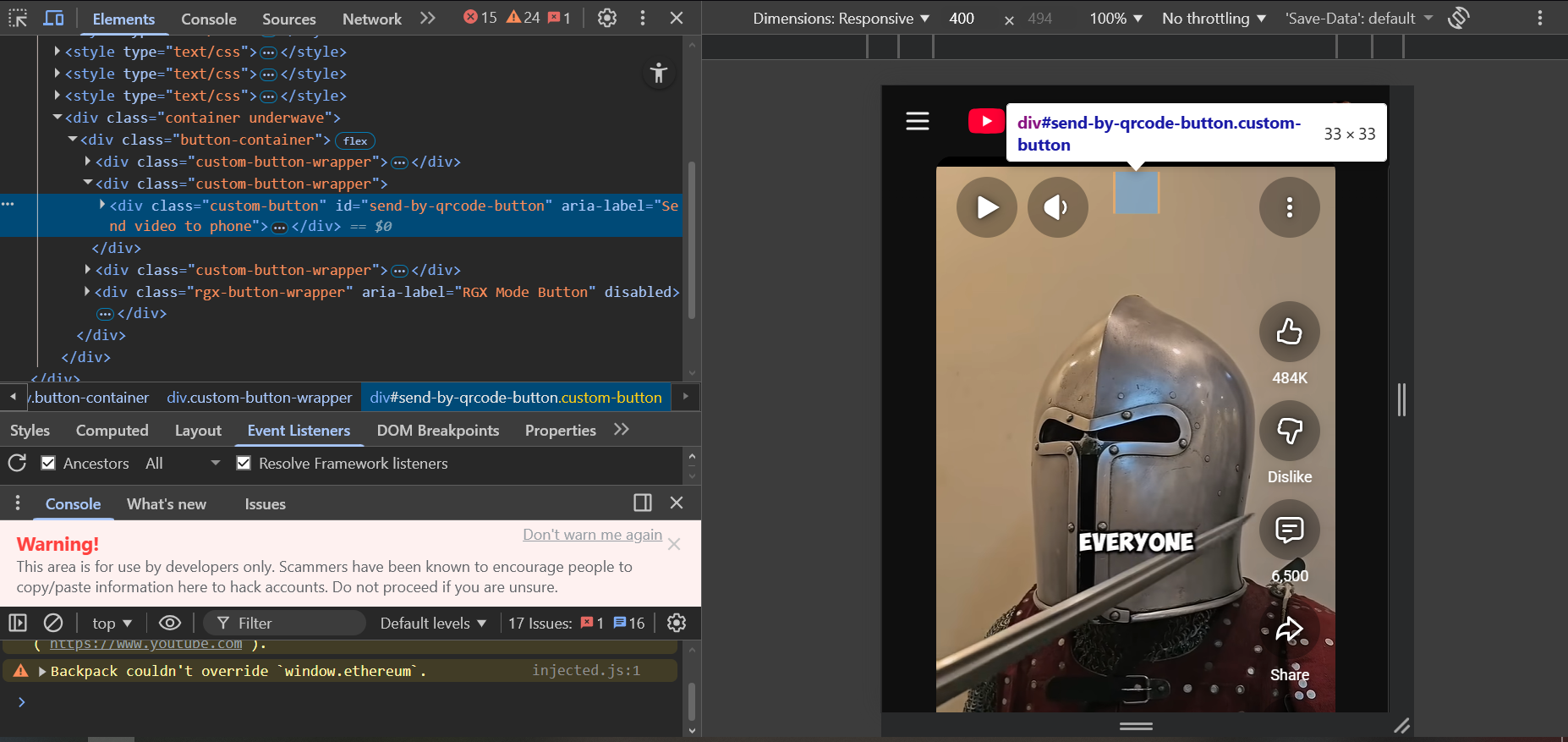
      Screenshot:
      f4d1f5ff-b7b7-453c-b0f2-f89242ec7baf-image.png

      When watching YouTube Shorts in Opera GX, there appears to be an invisible overlay element that blocks interaction with the video controls.

      After inspecting the page using developer tools, the element appears inside a container structure similar to:

      <div class="button-container">
      <div class="custom-button-wrapper">
      <div class="custom-button" id="send-by-qrcode-button"></div>
      </div>
      </div>

      The custom button wrapper seems to create an invisible clickable area on top of the video player. Even though nothing is visually shown, the element still captures mouse input.

      Because of this, it sometimes interferes with interaction with the YouTube Shorts volume slider, making it difficult or impossible to adjust the volume when the cursor passes through the area occupied by the invisible element.

      As a temporary workaround, I have been manually deleting these elements through the browser console using developer tools. However, this only fixes the issue temporarily for the current page, and the elements reappear after refreshing. Repeating this process becomes frustrating during normal browsing.

      Reply Quote 0
        1 Reply Last reply
      • M
        Mali-123 last edited by

        I solved it, the send QR code is called My Flow in the settings

        Reply Quote 0
          Dorczaa 1 Reply Last reply
        • Dorczaa
          Dorczaa @Mali-123 last edited by

          @Mali-123 No it's not. It's called "Video pickup"

          Reply Quote 0
            1 Reply Last reply
          • burnout426
            burnout426 Volunteer last edited by

            Note that you can goto the URL opera://settings/web_modding and add User CSS for the site you want to hide certain elements.

            For example, you can do:

            div.button-container {
                display: none !important;
            }
            
            Reply Quote 0
              1 Reply Last reply
            • First post
              Last post

            Computer browsers

            • Opera for Windows
            • Opera for Mac
            • Opera for Linux
            • Opera beta version
            • Opera USB

            Mobile browsers

            • Opera for Android
            • Opera Mini
            • Opera Touch
            • Opera for basic phones

            • Add-ons
            • Opera account
            • Wallpapers
            • Opera Ads

            • Help & support
            • Opera blogs
            • Opera forums
            • Dev.Opera

            • Security
            • Privacy
            • Cookies Policy
            • EULA
            • Terms of Service

            • About Opera
            • Press info
            • Jobs
            • Investors
            • Become a partner
            • Contact us

            Follow Opera

            • Opera - Facebook
            • Opera - Twitter
            • Opera - YouTube
            • Opera - LinkedIn
            • Opera - Instagram

            © Opera Software 1995-