@Barrgi Its a cat and mouse game. Facebook rolls out new code and if the extension is not updated then that is it.
I switched to Adguard and with Google AI added custom Rules to Adguard and will see how that goes.
Apart from the Ads, I dont want Groups you may like, People you may know and Suggested Reels.
F
Posts made by fitzydj
-
RE: F.B.(FluffBusting)PurityOpera add-ons
-
RE: Forum Language Setting option.Feedback for the Forums
@leocg Thank you for the reply. I have now unfollowed the foreign language sections.
I assume that posts in the other areas of the Forum that are not in English will still appear in my notifications? -
Forum Language Setting option.Feedback for the Forums
Would it be possible to implement a forum setting that a user can select a default language and only see threads in the default language?
I am not multi lingual and I just block the threads not in English. - Opera for Windows
-
RE: AdguardOpera add-ons
Just swapped over from uBlock Origin. I asked Google to help me optimise the settings and so far it is running well. YouTube no issues.
-
RE: Opera on Windows 11 won't open profile, have tried everythingOpera for Windows
@lbbirds I run Brave, Edge and Opera never had an issue Windows 11 Pro.
Re your old data if you had Opera Sync running, just log into your Opera Account and enable Synchronisation. -
Vector Graphics for Speed DialsSuggestions and feature requests
I was hoping that Speed Dial could be updated so Vector Graphics could be imported as custom images for Speed Dial tiles.
With 4K monitors it would help to give the Speed Dial a nice sharp look.
Group Speed Dial for Firefox can import SVG files and the Speed Dials are lifted to another level. -
Create a new folder in Other Speed DialsOpera for Windows
Is there a way to create a new folder in Other Speed Dials please?
Running Opera One(version: 134.0.5954.46).
I have a folder in My Other Speed Dials not named after a Device and I vaguely remember creating a folder and copying my Desktop Speed Dials to the folder in an older version of Opera. -
RE: WebGL is not working with Opera oneGeneral
@LeonidasA said in WebGL is not working with Opera one:
Komoot routes and maps page
No issue for me, Windows 11 Pro, Opera One (version: 134.0.5954.26)
-
RE: 2fa reset helpOpera account
@Destroyed021 From a security Point of View you should not post an email address in the forum.
-
RE: endless checking that I’m not a robot.Opera for Windows
@proshor There are not a lot of people in the forum complaining about Opera and Yandex so it is your setup.
The reason I posted to uninstall Opera and use an older version I assumed that Yandex worked previously with Opera in your setup.
I have not read in your post that this was your first try to use Opera and Yandex or that you a new Opera User. Trying to remote help is impossible if essential information is missing.If you have Mobile Data on your phone disconnect the Computer from your main internet and share the Mobile Date Connection and try Yandex. If Yandex works then it it something to do with the main connection if not it is something on the PC and Opera.
Have you tried a Private Browsing Window in Opera?Copy and Paste from below into Google
When I use Yandex on my Windows 10 Computer in Opera Browser I get flagged as a Robot but I have no issues using Chrome Browser. Both Browsers are the latest version.
Opera has no extensions running, Opera Adblocker and VPN are disabled.
I have cleared browsing data, a clean reinstall of Windows 10 and Opera. -
RE: endless checking that I’m not a robot.Opera for Windows
@proshor
If Chrome is okay, it is something in your Opera setup.
Last resort install Revo uninstaller free and totally blow Opera away.
https://get.opera.com/ftp/pub/opera/desktop/ grab an older version if you remember one that worked with Yandex issues, install and see if the issue is resolved. -
RE: endless checking that I’m not a robot.Opera for Windows
@proshor I used Brave, Edge and Opera all on Windows 11 went to the Yandex site no issues.
Is your Internet on a Static IP? If not reboot the router and see what happens -
RE: endless checking that I’m not a robot.Opera for Windows
@proshor In the Settings Menu when you select Privacy and Security, in main window there is a Title
Privacy protection
Block ads and surf the web up to three times faster
Block trackers
Make sure these 2 settings are off.
I use uBlock Origin as my Blocker including while using Yandex and they work fine together in my situation.
If you still have trouble try another Browser for Yandex and if you have issues with the other Browser it is more than likely a system issue. -
RE: endless checking that I’m not a robot.Opera for Windows
@proshor Is Opera's Ad Blocker turned Off?
It is an extension and installed by default.
Open Settings click Privacy and Security, under turn off the two options under Privacy Protection.
You could try clearing you dns cache.
Yandex works fine in my location. -
RE: endless checking that I’m not a robot.Opera for Windows
@proshor Are you using a VPN? If not I would be looking at extensions.
- Opera for Windows
-
RE: Can't pass Cloudflare with VPN and adblocker enabledOpera for Windows
@andrew84 uBlock was updated and works fine here on Windows 11 Pro. I am using Opera One Opera One(version: 133.0.5932.85) uBlock Origin Version 1.72.2.
I have Cloudflare as the DNS Server in my Router and in Opera settings..
There are settings in Opera under Privacy Protection
"Block ads and surf the web up to three times faster" and "Block Trackers" which I have switched off.
I have also turned off Operas built in AdBlocker. -
RE: Can't pass Cloudflare with VPN and adblocker enabledOpera for Windows
@slacky775 I have gone back to uBlock Origin, I had a few issues with the Opera Ad Blocker.
-
RE: uBlock OriginOpera add-ons
uBlock Origin Version 1.72.2 updated July 8 has been working fine for me in Opera One Windows 11.
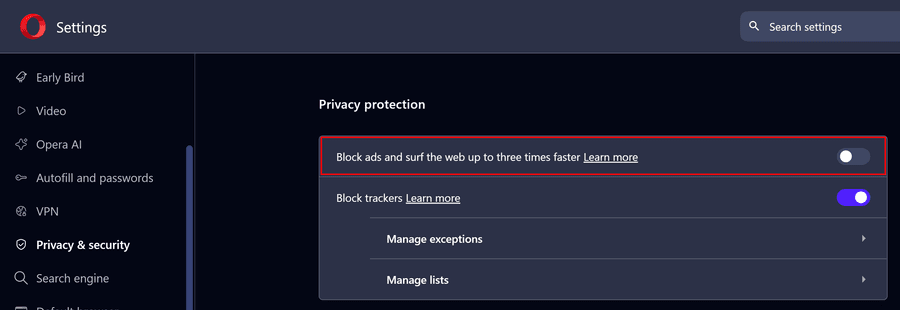
Check your Opera Settings /Privacy & security /Privacy protection Block ads and surf the web up to three times faster is Off as per the image, highlighted in the red frame. My understanding is the setting is part of the Opera AdBlocker and You Tube detects it.