I'm unable to open new tab. This problem appears after upgrade Opera, Occurs very often when I try to press button on the top of the screen. There is an empty (death) sector that I'm not able to click. I have highlighted on red color:

Top of the button is a most frequent part of it. Please, revert old style button ASAP.
J
Best posts made by junkers
-
Can't open new tab by clicking on the very top of the + buttonOpera for Windows
-
RE: Can't open new tab by clicking on the very top of the + buttonOpera for Windows
88.0.4412.53 is here and still same problem. Is someone from Opera developers read this?
-
RE: Can't open new tab by clicking on the very top of the + buttonOpera for Windows
Next update: 88.0.4412.74
I've lost hope to solve this problem.
-
RE: Can't open new tab by clicking on the very top of the + buttonOpera for Windows
@nnddcc It's so pitty! Opera doesn't listen their users...
- Opera for Windows
Latest posts made by junkers
-
RE: How Vertical Tabs work in Opera OneBlogs
https://forums.opera.com/topic/89191/allow-vertical-tabs-and-sidebar-to-be-moved-to-the-right-side
Nice to hear an agreement -
RE: Option to place Vertical Tabs on the right side of the screenRequests
Hey mohamedsalah, it’s mostly about ergonomics. Since the scrollbar is on the right and most users are right-handed, the right side feels much more natural and accessible. The left side is better suited for fixed, less frequently used options. Also, as andrew84 mentioned, there's a more detailed topic about this here, so let's continue the discussion there!
-
RE: Allow vertical tabs and sidebar to be moved to the right sideSuggestions and feature requests
@MohammedAlbaker
I agree. Moving this to the right side would be a major breakthrough. For a right-handed user, having browser tabs there is highly intuitive. -
Option to place Vertical Tabs on the right side of the screenRequests
First of all, I would like to praise the new Vertical Tabs feature in the latest update. Funnily enough, just a few months ago, I was actually thinking about this exact concept myself. While the current implementation is not precisely how I envisioned it, you did an amazing job, and you deserve huge respect for moving the browser in the right direction! It is a fantastic feature, and as far as I know, no other browser offers such a refined implementation yet.
I am writing to formally request a small but highly impactful layout improvement to perfect this feature. It would be incredibly useful to have an optional setting that allows users to permanently dock the Vertical Tabs panel on the right side of the screen instead of the left.
Having the tabs on the right side aligns perfectly with the workflow and would greatly improve accessibility while browsing.
Thank you for your continuous work on improving Opera, and I hope you will consider adding this toggle option in a future update. - Opera for Windows
-
RE: Speed Dial folder thumbnails do not show names properly (text not visible)Opera for Windows
@andrew84
True. Over 2 weeks and still nothing happened... -
Speed Dial folder thumbnails do not show names properly (text not visible)Opera for Windows
I noticed an issue with the Speed Dial folders in the Opera browser. When I group Speed Dials into a folder, the names under the individual items inside the folder become nearly unreadable or completely invisible.
Here is a screenshot below showing the problem.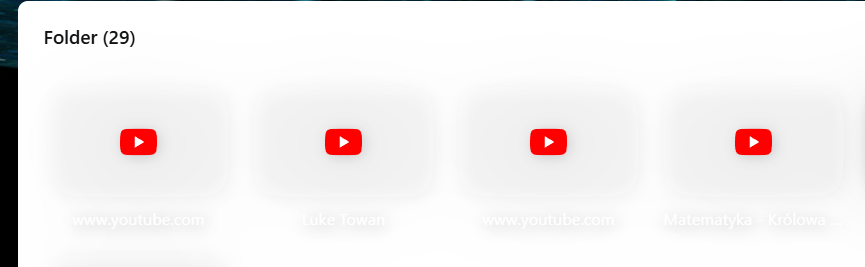
As you can see, the text under each thumbnail (e.g. site names or titles) is very faint or missing, especially when there's a white background. This makes it difficult to know which shortcut is which without opening each one manually.
It would be great if the text could have more contrast or a background to improve visibility.
Browser version: 134.0.6998.205
Operating System: Win11Thank you for looking into this!
- Opera for Windows
-
[Solved]Grouped speed dials titles are not visibleOpera for Windows
Grouped speed dials titles are not visible
In the light mode, a background and a font, both have the same color...

-
RE: Can't open new tab by clicking on the very top of the + buttonOpera for Windows
@nnddcc
I confirm it works.
Thank you