+1
 "New look"
R
Best posts made by ricardob
- Opera GX
-
RE: Opera 91 StableBlogs
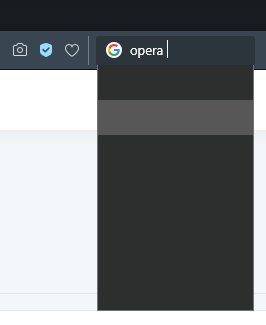
After upgrading, is someone else having search bar suggestions invisible (not truly blank, looks like font and background with same color):
-
RE: [Request]Adjust the Outline Border to Inside the Browser, Not the WindowOpera GX
This is the "New GX Look".
I would like an option to disable it. Too bad it is being forcefully imposed now. I hate forced things that affects personal tastes.
Opera GX was the last refuge against Opera One bad UI. Not anymore, it seems.
-
RE: Opera introduces Lucid Mode to improve video qualityBlogs
Just like we can hide the pop-out button when we disable that option, imo it would make sense the Lucid Mode mouseover-button to be hidden when we disable it in Settings.
-
RE: [Duplicated][Implemented][Suggestion]Add an option to disable the new theme!Opera GX
@Techno-Kaj
This procedure will revert:Via Settings, Enable Widgets (opera://settings/widgets_settings)
Open the speed dial
Open the widgets menu on the speed dial (its at the top right)
There should be a bar on the top asking feedback about the new UI
Next in it, click on the back button [icon of backspace key]
There will be a prompt, optionally give feedback
Click on "revert and restart"
Let the browser restart with the old UI -
RE: Opera 98 StableBlogs
- There's a new strange blank space (with a feedback smiley) on Speed Dial before icons, making all speed-dial items align to the bottom of the page. This change in speed-dial also reduced performance on window resizing. Is it related to this: "DNA-106699 [Win] Enable use of Opera GX splash screen in Opera generic"?
- Dark theme, popup that shows login selection is again using wrong colors.
- Again a new release using outdated Chromium, two actively exploited security updates behind.
-
Changelog?Opera GX
Today we celebrate 1 month since the last update made to the GX changelog. Is everything ok with @themaciekk ?
-
RE: Opera 98 StableBlogs
@leocg said in Opera 98 Stable:
@ricardob Regarding 1, probably not.
Regarding 3, check the changelog.
Was about to answer about unpatched things, but who cares? Opera nowadays is all about breaking UI and bloating the browser with things like "AI", wallpapers and paying hollywood guys for marketing purposes.
- Blogs
-
RE: Opera unveils integrated browser AI: AriaBlogs
Tony Stark doesn't approve devs working on Aria instead of fixing bugs.


Latest posts made by ricardob
-
RE: Opera 137 StableBlogs
@burnout426 said in Opera 137 Stable:
Basing Opera on the extended stable channel of Chromium for both Opera Stable and Developer makes things easier for Opera and keeps them more stable.
Ideally, yes, but they are not basing it on extended stable channel. If that were the case, they would move from version 152 to 156.
-
RE: Cannot find the delete on exit tabOpera GX
Interestingly, it still works if you have enabled it in previous v130. It seems just the config page has been removed.
- Opera GX
-
RE: Installer for 128.0.5807.51 is missing iconOpera GX
Looks like the installer executable was changed to a 7z SFX, imo this is the cause of the issue with the icon. Also, it takes more time to start the installer UI and it now extract things to %TEMP% instead of running from memory.
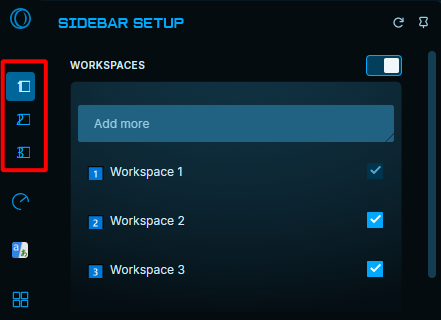
After upgrading to 128, I also noticed a bug with workspace icons not being displayed correctly in the sidebar, maybe related to the unicode chars I use as icons:
-
RE: Installer for 128.0.5807.51 is missing iconOpera GX
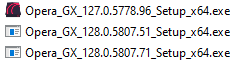
Today's release too Opera_GX_128.0.5807.71_Setup_x64.exe
-
Installer for 128.0.5807.51 is missing iconOpera GX
Opera_GX_128.0.5807.51_Setup_x64.exe / Opera_GX_128.0.5807.51_Setup.exe have no icon.

-
RE: Changelog?Opera GX
Today we celebrate two major versions (123, 124) and several minor versions since the last update made to the GX changelog.
-
Changelog?Opera GX
Today we celebrate 1 month since the last update made to the GX changelog. Is everything ok with @themaciekk ?
-
RE: [Duplicated][Implemented][Suggestion]Add an option to disable the new theme!Opera GX
@Techno-Kaj
This procedure will revert:Via Settings, Enable Widgets (opera://settings/widgets_settings)
Open the speed dial
Open the widgets menu on the speed dial (its at the top right)
There should be a bar on the top asking feedback about the new UI
Next in it, click on the back button [icon of backspace key]
There will be a prompt, optionally give feedback
Click on "revert and restart"
Let the browser restart with the old UI -
RE: [Compilation]Discussions on the new Opera GX UI/LayoutOpera GX
@Nyaruko02 said in [Compilation]Discussions on the new Opera GX UI/Layout:
I like the old version better. I'm not a fan of this box box thingy new update. How do i revert my operaGX to the previous version?
If you have already upgraded to version 114.0.5282.218, this procedure will revert:
Via Settings, Enable Widgets (opera://settings/widgets_settings)
Open the speed dial
Open the widgets menu on the speed dial (its at the top right)
There should be a bar on the top asking feedback about the new UI
Next in it, click on the back button [icon of backspace key]
There will be a prompt, optionally give feedback
Click on "revert and restart"
Let the browser restart with the old UI