• Login
    • Search
    • Categories
    • Recent
    • Tags
    • Users
    • Groups
    • Rules
    • Help

    Do more on the web, with a fast and secure browser!

    Download Opera browser with:

    • built-in ad blocker
    • battery saver
    • free VPN
    Download Opera

    I'm missing the "Create search engine" entry

    Opera for Windows
    5
    8
    1835
    Loading More Posts
    • Oldest to Newest
    • Newest to Oldest
    • Most Votes
    Reply
    • Reply as topic
    Log in to reply
    This topic has been deleted. Only users with topic management privileges can see it.
    • O
      Olifant last edited by

      In Opera One and Opera Developer is the right click entry on a search field "Create search engine" gone.
      It is still present in Opera GX and Opera Air.

      Reply Quote 0
        1 Reply Last reply
      • burnout426
        burnout426 Volunteer last edited by

        Confirmed.

        Reply Quote 0
          rif 1 Reply Last reply
        • rif
          rif @burnout426 last edited by

          I can confirm also.

          Opera One(version: 132.0.5905.112)

          Reply Quote 0
            1 Reply Last reply
          • burnout426
            burnout426 Volunteer last edited by

            It seems the feature has been removed for some reason.

            However, when you visit supported sites like Youtube that tell browsers how to search the site, you will see that a search engine for it is now automatically added to the opera://settings/searchEngines page where all you have to do is click "Activate" for it, and then edit its keyword if you want.

            You can get to the opera://settings/searchEngines page fast by right-clicking in the address field and choosing "Edit search engines". Or, you can bookmark the opera://settings/searchEngines URL as a speed dial or bookmark.

            Reply Quote 2
              rif A 2 Replies Last reply
            • rif
              rif @burnout426 last edited by

              @burnout426
              Thanks for this.

              My most used search has always been on maps.google.com. After reading your post and the description of how it works now I was surprised that a search wasn't created. Especially after noticing that a search that I had to activate was created for drive.google.com (I was able to create my own search for that site).

              Reply Quote 1
                1 Reply Last reply
              • O
                Olifant last edited by

                OMG
                The "easiest" way for me now is to open Vivaldi:

                • right-click on a the search field
                • Add as Search Engine...
                  and transfer the values ​​to Opera.
                Reply Quote 0
                  1 Reply Last reply
                • A
                  andrew84 @burnout426 last edited by

                  @burnout426 said in I'm missing the "Create search engine" entry:

                  when you visit supported sites like Youtube that tell browsers how to search the site, you will see that a search engine for it is now automatically added

                  I don't understang the logic at all...
                  I don't understand why it was changed this way. If doing like this, there should be just option whether to automatically add engines or not while visiting sites.

                  Btw, here even not active engines are displayed in the right click menu...
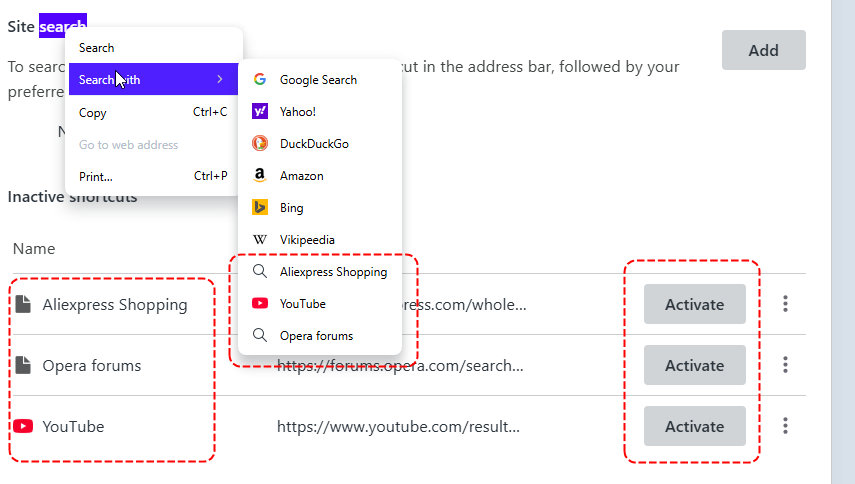
                  2026-07-14_003213.png

                  So instead of adding/editing search engine during the creating is need first activate it (but actually it's already active partially, for the context menu) an then edit.
                  Another one 'genius' implementation of the well working feature.

                  Reply Quote 0
                    1 Reply Last reply
                  • B
                    bellla52 last edited by This post is deleted!
                    Reply Quote 0
                      1 Reply Last reply
                    • First post
                      Last post

                    Computer browsers

                    • Opera for Windows
                    • Opera for Mac
                    • Opera for Linux
                    • Opera beta version
                    • Opera USB

                    Mobile browsers

                    • Opera for Android
                    • Opera Mini
                    • Opera Touch
                    • Opera for basic phones

                    • Add-ons
                    • Opera account
                    • Wallpapers
                    • Opera Ads

                    • Help & support
                    • Opera blogs
                    • Opera forums
                    • Dev.Opera

                    • Security
                    • Privacy
                    • Cookies Policy
                    • EULA
                    • Terms of Service

                    • About Opera
                    • Press info
                    • Jobs
                    • Investors
                    • Become a partner
                    • Contact us

                    Follow Opera

                    • Opera - Facebook
                    • Opera - Twitter
                    • Opera - YouTube
                    • Opera - LinkedIn
                    • Opera - Instagram

                    © Opera Software 1995-