• Login
    • Search
    • Categories
    • Recent
    • Tags
    • Users
    • Groups
    • Rules
    • Help

    Do more on the web, with a fast and secure browser!

    Download Opera browser with:

    • built-in ad blocker
    • battery saver
    • free VPN
    Download Opera

    Can't Enable Push Notification for Twitter/X

    General
    3
    11
    339
    Loading More Posts
    • Oldest to Newest
    • Newest to Oldest
    • Most Votes
    Reply
    • Reply as topic
    Log in to reply
    This topic has been deleted. Only users with topic management privileges can see it.
    • G
      Galaxyrelic last edited by

      Twitter/X keeps saying the browser is unsupported for notifications and that it doesn’t support push notifications, even though, last I checked, on other websites, push notifications can be turned on and work.
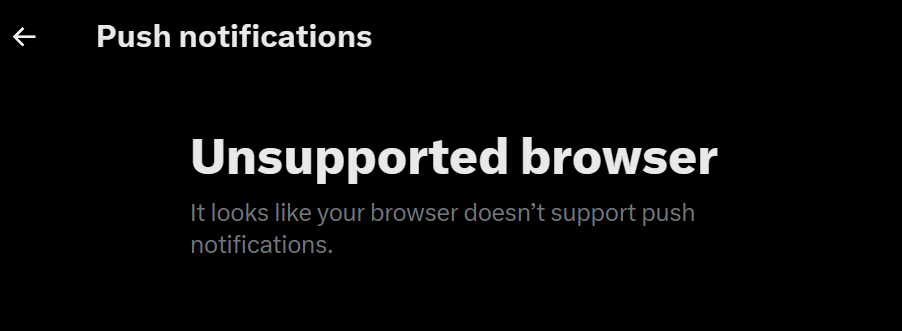
      344e33d0-0a66-4b80-bcd0-92fdebf8119e-image.png

      I also have permission enabled in the browser for that website.
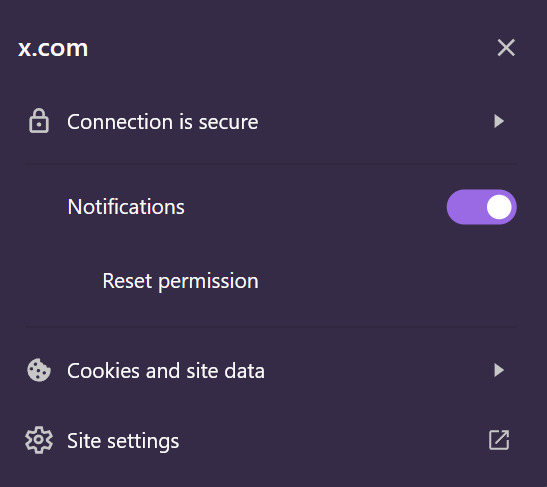
      49e2ba87-7340-436d-afbf-769f287922a7-image.png

      Reply Quote 0
        leocg 2 Replies Last reply
      • leocg
        leocg Moderator Volunteer @Galaxyrelic last edited by

        @Galaxyrelic Opera, Opera GX or Opera Air?

        Reply Quote 0
          1 Reply Last reply
        • leocg
          leocg Moderator Volunteer @Galaxyrelic last edited by

          @Galaxyrelic What does X/Twitter support says about that?

          Reply Quote 0
            1 Reply Last reply
          • burnout426
            burnout426 Volunteer last edited by

            It's working fine here in Opera 130.0.5847.92 64-bit on Windows 11 23H2. Make sure your Opera is updated as there was a bug with this a while ago that was fixed.

            Reply Quote 0
              G 1 Reply Last reply
            • G
              Galaxyrelic @burnout426 last edited by Galaxyrelic

              @burnout426 I just updated to 130.0.5847.92 for Opera, and it is not working for me.
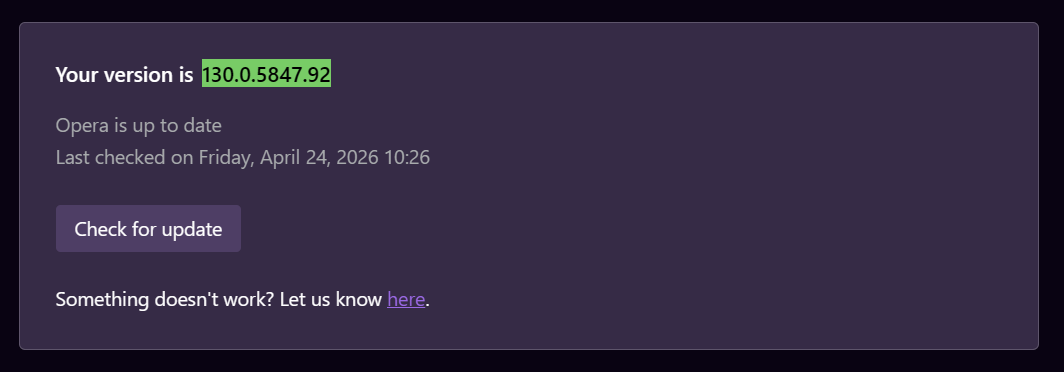
              64bdb0c0-d739-409e-af0c-756274c44a27-image.png

              @leocg Opera, and I have not reached out to Twitter/X support yet, as I was waiting to see if it was something with the browser, since when I tried to turn it on, it said "unsupported browser" because it does not support push notifications.

              I will contact Twitter/X support later today.

              Reply Quote 0
                burnout426 leocg 2 Replies Last reply
              • burnout426
                burnout426 Volunteer @Galaxyrelic last edited by

                @Galaxyrelic Any difference with Opera's adblocking and tracking protection off at the URL opera://settings/privacyProtection?

                With all your extensions off at the URL opera://extensions?

                Does it work fine in a test standalone installation?

                Reply Quote 0
                  G 1 Reply Last reply
                • G
                  Galaxyrelic @burnout426 last edited by

                  @burnout426 It works in a test standalone installation. What should I do now to repair it on my main browser and not through the standalone installation?

                  Reply Quote 0
                    leocg 1 Reply Last reply
                  • Moved from Opera for Windows by  leocg leocg 
                  • leocg
                    leocg Moderator Volunteer @Galaxyrelic last edited by

                    @Galaxyrelic The message means that x/Twitter doesn't support Opera, that's why I asked about their answer.

                    Reply Quote 0
                      1 Reply Last reply
                    • leocg
                      leocg Moderator Volunteer @Galaxyrelic last edited by

                      @Galaxyrelic Try disabling all extensions

                      Reply Quote 0
                        1 Reply Last reply
                      • G
                        Galaxyrelic last edited by

                        Hey! I have since gotten it to work by uninstalling and reinstalling it, as turning off extensions and other things did not work.

                        Thank you everyone for your help!

                        Reply Quote 1
                          1 Reply Last reply
                        • burnout426
                          burnout426 Volunteer last edited by

                          Glad you got it. I'll leave what I was just going to post for others:

                          If disabling your extensions doesn't help, here are some other things to try:

                          You can goto the URL opera://settings/content/all, type x.com in the search field and click "Delete displayed data". Then, repeat for twitter.com for good measure. Then, goto the URL opera://settings/clearBrowserData and clear "Cached images and files" for all time.

                          Then, goto the URL opera://settings/content/notifications, make sure the default behavior is set to "Sites can ask to send notifications". Then, remove any x.com entries from the allow list by click the 3 dots next to each entry found and clicking "Remove".

                          Then, restart Opera, log back in to x.com, go to the push notification settings, enable them, click "allow" when asked and see if notifications get enabled as expected.

                          If that doesn't work, goto the URL opera://settings/clearBrowserData, switch to "advanced" and clear just "site settings" for all time and then try again.

                          If that doesn't work, you can goto the URL opera://settings/reset and reset just Opera's settings. You won't lose your data, but you might lose your opened tabs.

                          Also, in "Settings -> System -> Notifications" in Windows, make sure "Notifications" are enabled, make sure "Do not disturb" is disabled and make sure "Opera Browser" is in the list. Then, click on "Opera Browser" and make all the notification settings for it are correct. If Opera doesn't show up in the notification app list, in Opera, goto https://cleverpush.com/en/test-notifications/, click "Greetings", allow notifications and click "Greetings" again. Then, close out of Settings in Windows and go back in to the Notification settings.

                          You can also restart Windows if needed.

                          Reply Quote 0
                            1 Reply Last reply
                          • First post
                            Last post

                          Computer browsers

                          • Opera for Windows
                          • Opera for Mac
                          • Opera for Linux
                          • Opera beta version
                          • Opera USB

                          Mobile browsers

                          • Opera for Android
                          • Opera Mini
                          • Opera Touch
                          • Opera for basic phones

                          • Add-ons
                          • Opera account
                          • Wallpapers
                          • Opera Ads

                          • Help & support
                          • Opera blogs
                          • Opera forums
                          • Dev.Opera

                          • Security
                          • Privacy
                          • Cookies Policy
                          • EULA
                          • Terms of Service

                          • About Opera
                          • Press info
                          • Jobs
                          • Investors
                          • Become a partner
                          • Contact us

                          Follow Opera

                          • Opera - Facebook
                          • Opera - Twitter
                          • Opera - YouTube
                          • Opera - LinkedIn
                          • Opera - Instagram

                          © Opera Software 1995-
