• Login
    • Search
    • Categories
    • Recent
    • Tags
    • Users
    • Groups
    • Rules
    • Help

    Do more on the web, with a fast and secure browser!

    Download Opera browser with:

    • built-in ad blocker
    • battery saver
    • free VPN
    Download Opera

    Unable to locate personal news setting

    General
    2
    4
    177
    Loading More Posts
    • Oldest to Newest
    • Newest to Oldest
    • Most Votes
    Reply
    • Reply as topic
    Log in to reply
    This topic has been deleted. Only users with topic management privileges can see it.
    • V
      vfel46 last edited by vfel46

      G'day,

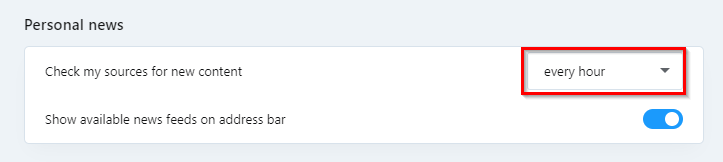
      I am having trouble locating the personal news settings in opera settings. I believe this is due to a redesign of the settings page.

      Previously you could scroll through all the settings at once, but now with the updated design where you select the settings section on the left of the settings page, I cannot find it.

      Here is a screenshot of the settings I am looking for:
      alt text

      I am using version 128.0.5807.66 on Windows 11.

      Thanks in advance for any help you can provide.

      Reply Quote 0
        Mlipka 1 Reply Last reply
      • Moved from Opera for Windows by  leocg leocg 
      • Mlipka
        Mlipka Opera @vfel46 last edited by

        Hi @vfel46

        Settings were revamped recently to align better with chromium. I believe it might be confusing at the beginning but overtime should feel better.

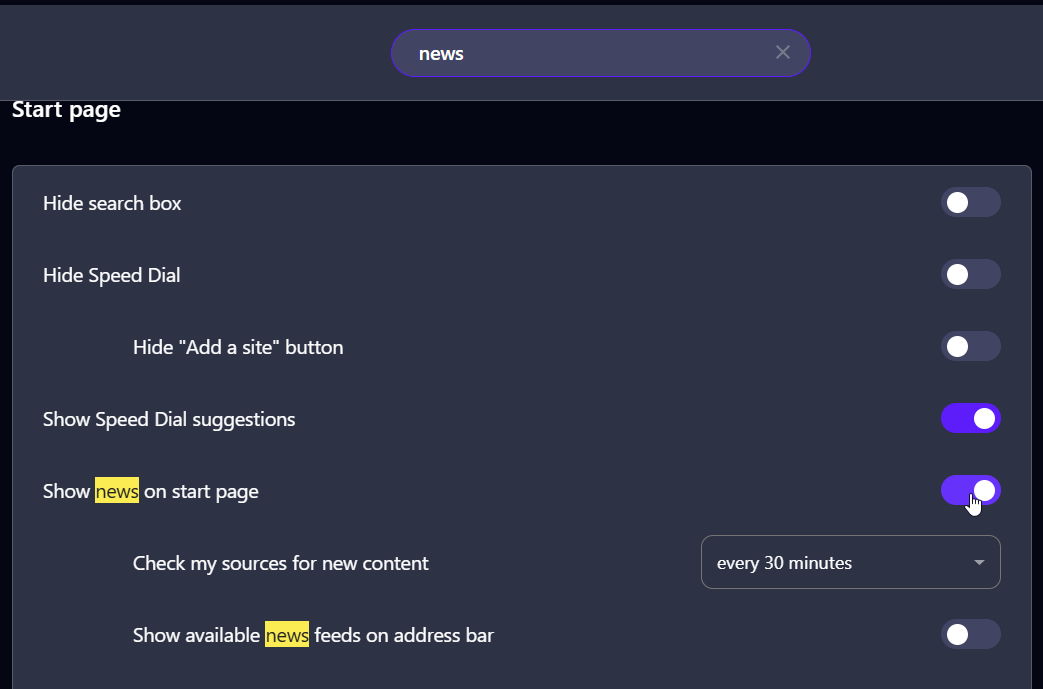
        Can you type "news", scroll down a bit a see if you can see this:

        e28546ad-354c-4558-a022-81d45ea58963-image.png

        Reply Quote 0
          V 1 Reply Last reply
        • V
          vfel46 @Mlipka last edited by

          @Mlipka
          Thanks for the help.
          I was able to find the setting, however I believe there can be some improvement in their placement.

          It is a bit strange that the personal news settings are grouped under start page news as they are a feature that can be used independently. If you could only access personal news on the start page, it would make sense to have the settings where they are now. But that is not the case.

          Since I do not wish to have news on my start page, preferring only to use the personal news tab as required, I find the setting location a bit unintuitive. To change personal news settings you have to select and then unselect the start page news settings.

          I feel like the personal news settings would fit much better under the 'features' tab with the other opera features.

          I hope you will give my feedback some consideration - I have been very pleased with opera so far.

          Thanks again.

          Reply Quote 0
            Mlipka 1 Reply Last reply
          • Mlipka
            Mlipka Opera @vfel46 last edited by

            @vfel46

            I see your point. It's actually a fine suggestion.
            We're currently not working on the settings but if we will in the future, we might consider this.

            Thanks for feedback and glad you can enjoy news again 🙂

            Reply Quote 0
              1 Reply Last reply
            • First post
              Last post

            Computer browsers

            • Opera for Windows
            • Opera for Mac
            • Opera for Linux
            • Opera beta version
            • Opera USB

            Mobile browsers

            • Opera for Android
            • Opera Mini
            • Opera Touch
            • Opera for basic phones

            • Add-ons
            • Opera account
            • Wallpapers
            • Opera Ads

            • Help & support
            • Opera blogs
            • Opera forums
            • Dev.Opera

            • Security
            • Privacy
            • Cookies Policy
            • EULA
            • Terms of Service

            • About Opera
            • Press info
            • Jobs
            • Investors
            • Become a partner
            • Contact us

            Follow Opera

            • Opera - Facebook
            • Opera - Twitter
            • Opera - YouTube
            • Opera - LinkedIn
            • Opera - Instagram

            © Opera Software 1995-