• Login
    • Search
    • Categories
    • Recent
    • Tags
    • Users
    • Groups
    • Rules
    • Help

    Do more on the web, with a fast and secure browser!

    Download Opera browser with:

    • built-in ad blocker
    • battery saver
    • free VPN
    Download Opera

    Force dark page isn't working as should

    Opera GX
    2
    4
    70
    Loading More Posts
    • Oldest to Newest
    • Newest to Oldest
    • Most Votes
    Reply
    • Reply as topic
    Log in to reply
    This topic has been deleted. Only users with topic management privileges can see it.
    • gangstamo13
      gangstamo13 last edited by

      OS: Windows 10 Pro
      Opera GX version: LVL 7 (core: 125.0.5729.47)

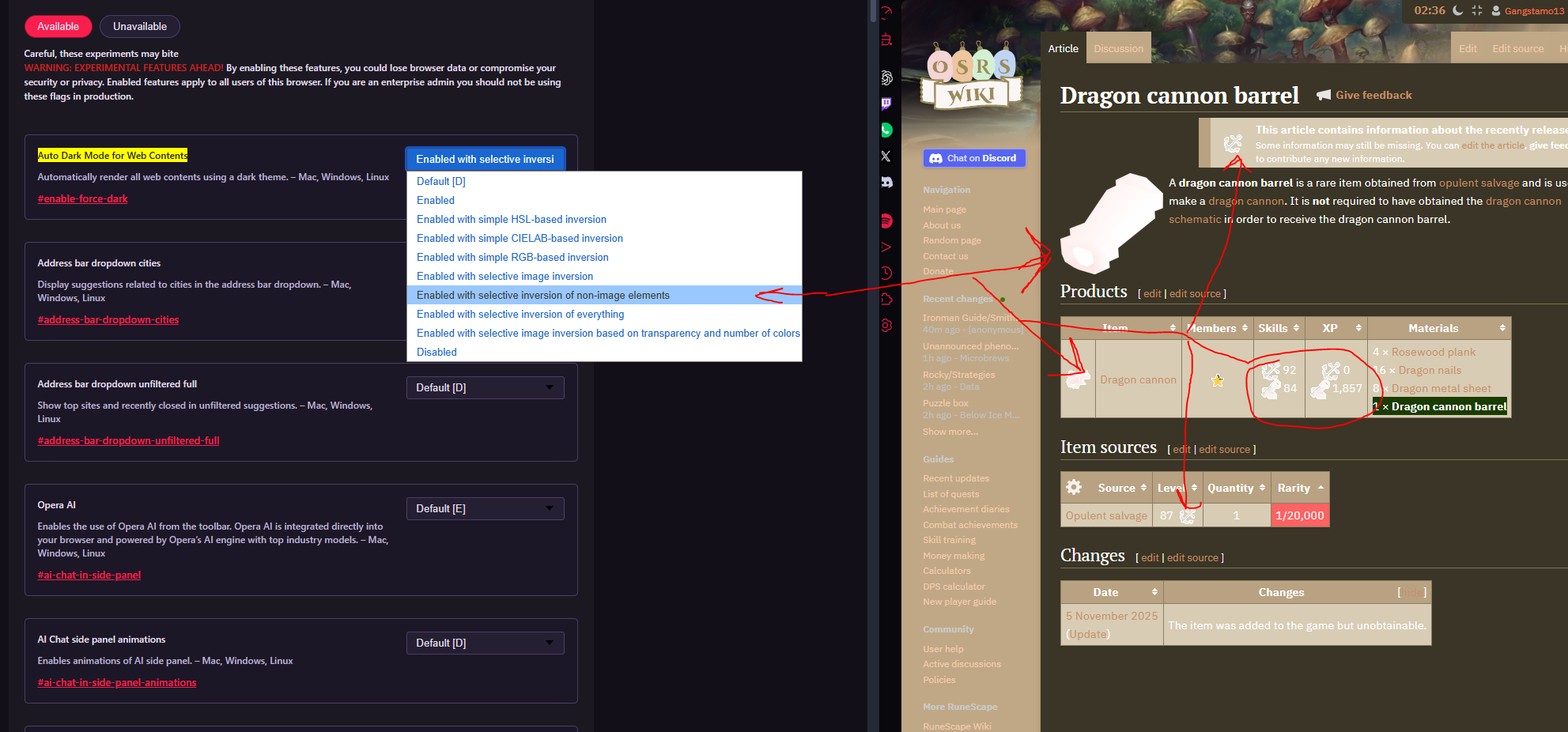
      After updating Opera GX, the “Force dark pages” feature no longer works as intended. Images are being affected even though the setting is configured to exclude them.

      Steps to reproduce

      • Navigate to:
        opera://flags/#enable-force-dark

      • Set Auto Dark Mode for Web Contents to:
        “Enabled with selective inversion of non-image elements.”

      Actual Behavior vs. Expected

      On the current version, images are incorrectly inverted or altered. This issue appears on almost any page containing images.

      For example, I tested the following page:
      https://oldschool.runescape.wiki/w/Dragon_cannon_barrel

      The image below shows the incorrect behavior on this page:
      bugged.png

      Comparison with previous version

      I reverted Opera GX to the last version I used where this feature worked correctly:
      LVL 7 (core: 124.0.5705.61) and disabled auto-updates.

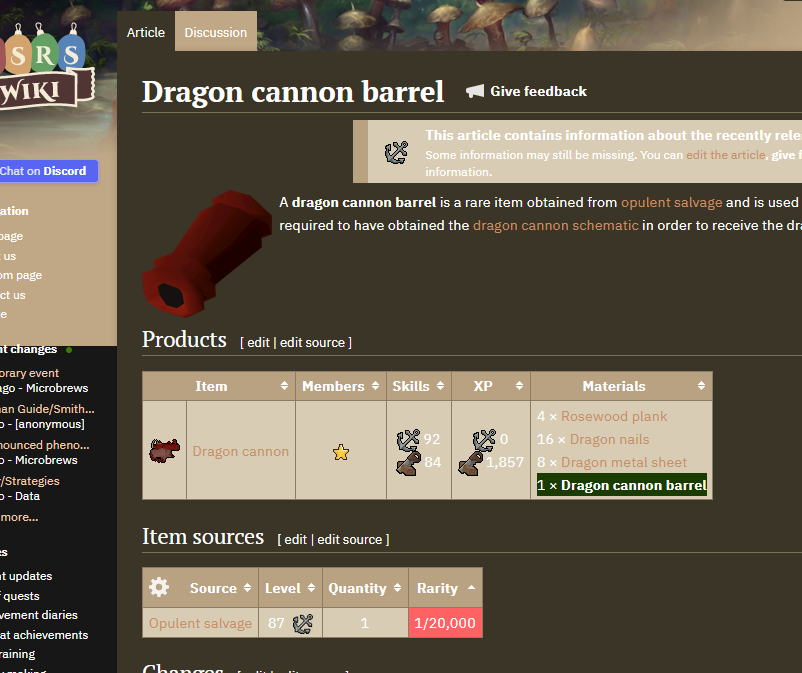
      Opening the same page on this older version shows the expected behavior, with images unaffected:
      normal.png

      Reply Quote 0
        leocg 1 Reply Last reply
      • leocg
        leocg Moderator Volunteer @gangstamo13 last edited by

        @gangstamo13 How things behave when you turn on that flag on other Chromium browsers?

        Reply Quote 0
          gangstamo13 1 Reply Last reply
        • gangstamo13
          gangstamo13 @leocg last edited by

          @leocg I tested this on the latest stable versions of Microsoft Edge, Brave, Google Chrome, and Opera GX, and the issue reproduces consistently across all of them.

          I have not tested older versions of those browsers, but an older Opera GX version (the one I'm using now, prior to its recent Chromium update) does not exhibit this issue and has worked correctly for me for several years using the same dark-mode configuration.

          This appears to point to a Chromium-level regression.

          Reply Quote 0
            leocg 1 Reply Last reply
          • leocg
            leocg Moderator Volunteer @gangstamo13 last edited by

            @gangstamo13 On Chrome Developer (version 145), the chrome://flags/#enable-force-dark flag has only Enable and Disable options. Don't know if it's a bug or some change.

            Reply Quote 0
              1 Reply Last reply
            • First post
              Last post

            Computer browsers

            • Opera for Windows
            • Opera for Mac
            • Opera for Linux
            • Opera beta version
            • Opera USB

            Mobile browsers

            • Opera for Android
            • Opera Mini
            • Opera Touch
            • Opera for basic phones

            • Add-ons
            • Opera account
            • Wallpapers
            • Opera Ads

            • Help & support
            • Opera blogs
            • Opera forums
            • Dev.Opera

            • Security
            • Privacy
            • Cookies Policy
            • EULA
            • Terms of Service

            • About Opera
            • Press info
            • Jobs
            • Investors
            • Become a partner
            • Contact us

            Follow Opera

            • Opera - Facebook
            • Opera - Twitter
            • Opera - YouTube
            • Opera - LinkedIn
            • Opera - Instagram

            © Opera Software 1995-
