• Login
    • Search
    • Categories
    • Recent
    • Tags
    • Users
    • Groups
    • Rules
    • Help

    Do more on the web, with a fast and secure browser!

    Download Opera browser with:

    • built-in ad blocker
    • battery saver
    • free VPN
    Download Opera

    Downloads give error "Interrupted: Disk full

    Opera for Windows
    3
    5
    289
    Loading More Posts
    • Oldest to Newest
    • Newest to Oldest
    • Most Votes
    Reply
    • Reply as topic
    Log in to reply
    This topic has been deleted. Only users with topic management privileges can see it.
    • Ally8777
      Ally8777 last edited by

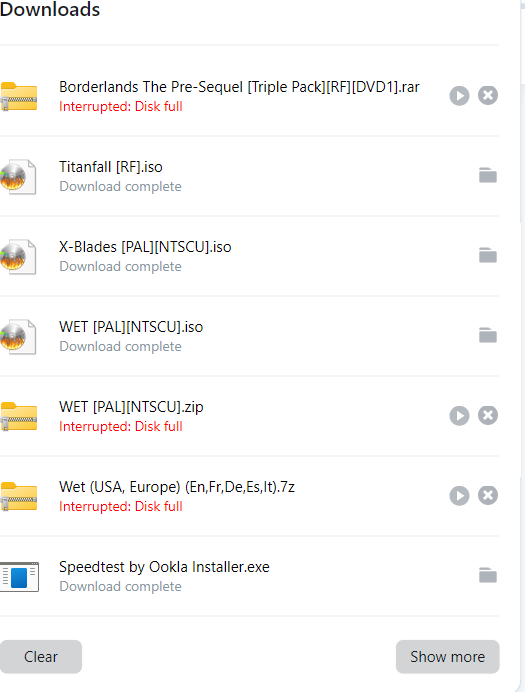
      943ecdf3-0511-446b-8bcb-f1eaee71804c-image.png

      If I download ISOs its ok but if i try 7z or .zip it says its full. There is plenty of space on my drive. Its a 320GB HDD i'm trying to use to store xbox 360 games. Its formatted Fat 32

      Reply Quote 0
        leocg burnout426 3 Replies Last reply
      • leocg
        leocg Moderator Volunteer @Ally8777 last edited by

        @Ally8777 Opera One, Opera GX or Opera Air?

        Reply Quote 0
          1 Reply Last reply
        • leocg
          leocg Moderator Volunteer @Ally8777 last edited by

          @Ally8777 It works in other browsers?
          .

          Reply Quote 0
            1 Reply Last reply
          • burnout426
            burnout426 Volunteer @Ally8777 last edited by burnout426

            @Ally8777 said in Downloads give error "Interrupted: Disk full:

            Its formatted Fat 32

            That might be the problem (not using NTFS). How big are the compressed files (rar, zip and 7z) that you're trying to download?

            How big are the iso files that successfully download?

            With Opera closed, try deleting everything you can in "C:\Windows\temp" and "C:\Users\yourusername\AppData\Local\temp" to clear up any temporary download files.

            Reply Quote 0
              1 Reply Last reply
            • burnout426
              burnout426 Volunteer last edited by

              What version of Windows and what version of Opera as shown at the URL opera://about?

              Reply Quote 0
                1 Reply Last reply
              • First post
                Last post

              Computer browsers

              • Opera for Windows
              • Opera for Mac
              • Opera for Linux
              • Opera beta version
              • Opera USB

              Mobile browsers

              • Opera for Android
              • Opera Mini
              • Opera Touch
              • Opera for basic phones

              • Add-ons
              • Opera account
              • Wallpapers
              • Opera Ads

              • Help & support
              • Opera blogs
              • Opera forums
              • Dev.Opera

              • Security
              • Privacy
              • Cookies Policy
              • EULA
              • Terms of Service

              • About Opera
              • Press info
              • Jobs
              • Investors
              • Become a partner
              • Contact us

              Follow Opera

              • Opera - Facebook
              • Opera - Twitter
              • Opera - YouTube
              • Opera - LinkedIn
              • Opera - Instagram

              © Opera Software 1995-