• Login
    • Search
    • Categories
    • Recent
    • Tags
    • Users
    • Groups
    • Rules
    • Help

    Do more on the web, with a fast and secure browser!

    Download Opera browser with:

    • built-in ad blocker
    • battery saver
    • free VPN
    Download Opera

    Green band on videos and crashes due to hardware acceleration

    General
    3
    11
    999
    Loading More Posts
    • Oldest to Newest
    • Newest to Oldest
    • Most Votes
    Reply
    • Reply as topic
    Log in to reply
    This topic has been deleted. Only users with topic management privileges can see it.
    • leocg
      leocg Moderator Volunteer @euuuuuuuuqqqq last edited by

      @euuuuuuuuqqqq Opera One, Opera GX or Opera Air?

      Reply Quote 0
        euuuuuuuuqqqq 1 Reply Last reply
      • euuuuuuuuqqqq
        euuuuuuuuqqqq @leocg last edited by

        @leocg

        Opera One

        Reply Quote 0
          1 Reply Last reply
        • Moved from Opera for Windows by  leocg leocg 
        • burnout426
          burnout426 Volunteer last edited by

          I see at https://www.amd.com/en/support/downloads/drivers.html/graphics/radeon-rx/radeon-rx-7000-series/amd-radeon-rx-7900-xtx.html that there's both 25.9.1 and 25.9.2. Which one are you using? You can try the opposite of the one you're currently using.

          Also, with "Use graphics acceleration when available" enabled at the URL opera://settings/system, you might have to adjust the Angle flag for your GPU. Try one of the D3D options for it and make sure to check opera://gpu like mentioned in the post.

          It looks like your Ryzen has a GPU on it too. In settings in Windows, you might have to goto "System -> Display -> Graphics", add Opera to the list and set it to high performance so that it uses your RTX.

          Reply Quote 0
            euuuuuuuuqqqq 1 Reply Last reply
          • euuuuuuuuqqqq
            euuuuuuuuqqqq @burnout426 last edited by

            @burnout426

            1 - I'm using version 25.9.1 WHQL for the GPU.

            • the problem started about 4 months ago, after a version of Opera.

            2 - I will configure this URL opera://settings/system.

            3 - I don't use the processor's GPU.
            *I always disable this GPU in the bios.

            All PC drivers, without exception, are up to date.

            Reply Quote 1
              1 Reply Last reply
            • euuuuuuuuqqqq
              euuuuuuuuqqqq last edited by euuuuuuuuqqqq

              ===> One detail, the green/blue stripe on video players is restricted to the player area and always follows the mouse cursor.

              Reply Quote 0
                burnout426 1 Reply Last reply
              • burnout426
                burnout426 Volunteer @euuuuuuuuqqqq last edited by

                @euuuuuuuuqqqq Oh, you can disable that at the URL opera://settings/lucidMode. Either disable the preview or disable lucid mode completely.

                Reply Quote 0
                  1 Reply Last reply
                • euuuuuuuuqqqq
                  euuuuuuuuqqqq last edited by leocg

                  I configured it using URL opera://flags/#use-angle > Choose ANGLE graphics backend > DXD11 and disabled Hardware Acceleration; for now the green/blue vertical stripe part is gone.

                  Now it remains to be seen about the Insufficient Memory problem that causes the browser to crash.

                  Reply Quote 0
                    burnout426 1 Reply Last reply
                  • burnout426
                    burnout426 Volunteer @euuuuuuuuqqqq last edited by

                    @euuuuuuuuqqqq Note that the Angle setting has no effect when hardware acceleration is disabled.

                    Reply Quote 0
                      euuuuuuuuqqqq 1 Reply Last reply
                    • euuuuuuuuqqqq
                      euuuuuuuuqqqq @burnout426 last edited by

                      @burnout426

                      For some reason the green/blue band no longer appeared and the slowness I had with disabled hardware acceleration (to remove the band) I no longer have.
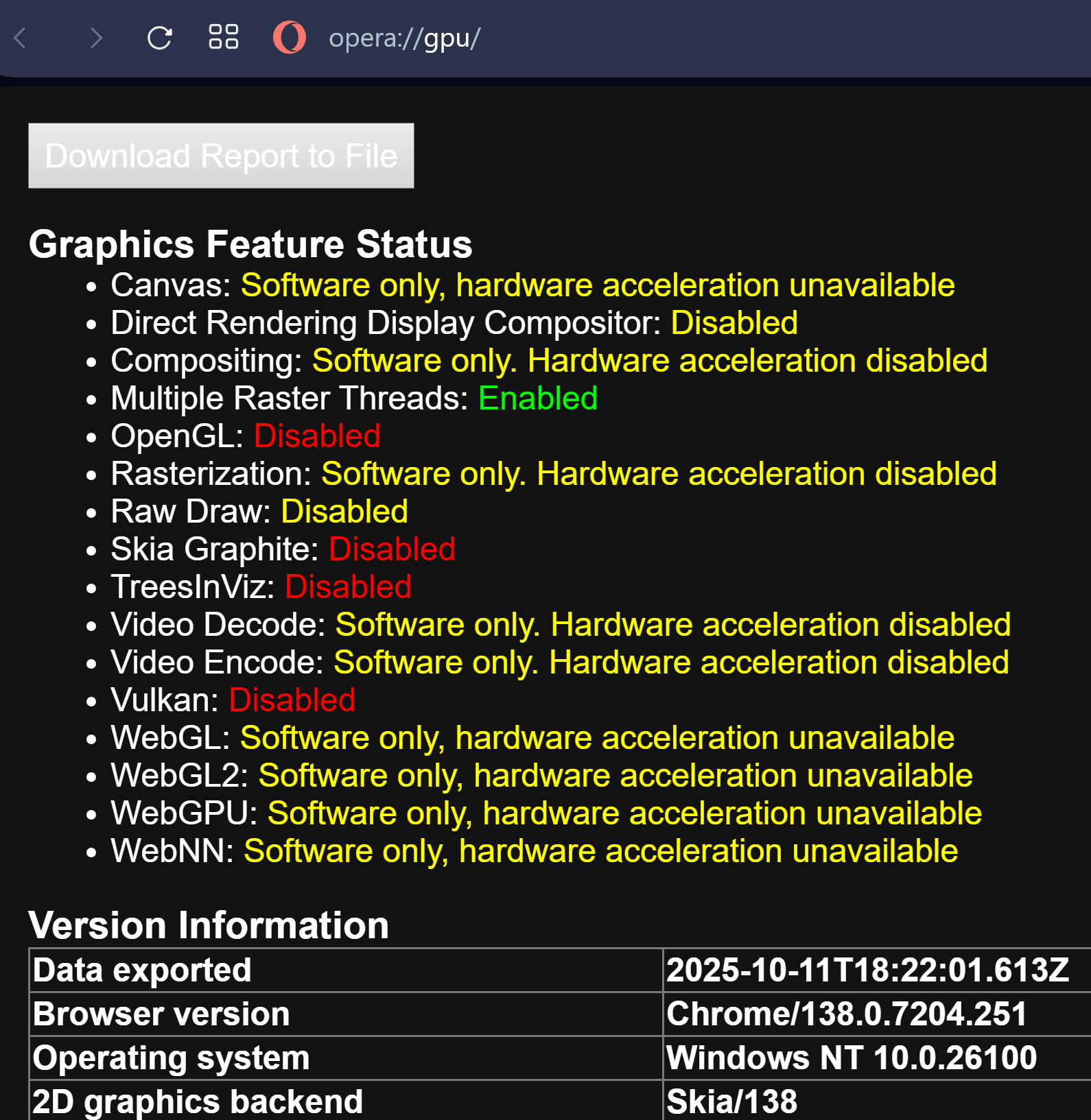
                      imagem_2025-10-11_152235297.png

                      Reply Quote 0
                        1 Reply Last reply
                      • euuuuuuuuqqqq
                        euuuuuuuuqqqq last edited by

                        Unfortunately, the insufficient memory problem continues.

                        Reply Quote 0
                          1 Reply Last reply
                        • First post
                          Last post

                        Computer browsers

                        • Opera for Windows
                        • Opera for Mac
                        • Opera for Linux
                        • Opera beta version
                        • Opera USB

                        Mobile browsers

                        • Opera for Android
                        • Opera Mini
                        • Opera Touch
                        • Opera for basic phones

                        • Add-ons
                        • Opera account
                        • Wallpapers
                        • Opera Ads

                        • Help & support
                        • Opera blogs
                        • Opera forums
                        • Dev.Opera

                        • Security
                        • Privacy
                        • Cookies Policy
                        • EULA
                        • Terms of Service

                        • About Opera
                        • Press info
                        • Jobs
                        • Investors
                        • Become a partner
                        • Contact us

                        Follow Opera

                        • Opera - Facebook
                        • Opera - Twitter
                        • Opera - YouTube
                        • Opera - LinkedIn
                        • Opera - Instagram

                        © Opera Software 1995-