• Login
    • Search
    • Categories
    • Recent
    • Tags
    • Users
    • Groups
    • Rules
    • Help

    Do more on the web, with a fast and secure browser!

    Download Opera browser with:

    • built-in ad blocker
    • battery saver
    • free VPN
    Download Opera

    SASSA status check page not loading properly in Opera

    General
    4
    7
    2116
    Loading More Posts
    • Oldest to Newest
    • Newest to Oldest
    • Most Votes
    Reply
    • Reply as topic
    Log in to reply
    This topic has been deleted. Only users with topic management privileges can see it.
    • M
      mystatus last edited by

      Hi everyone,

      I am facing a browser-specific issue in Opera when trying to access the sassa status check website.
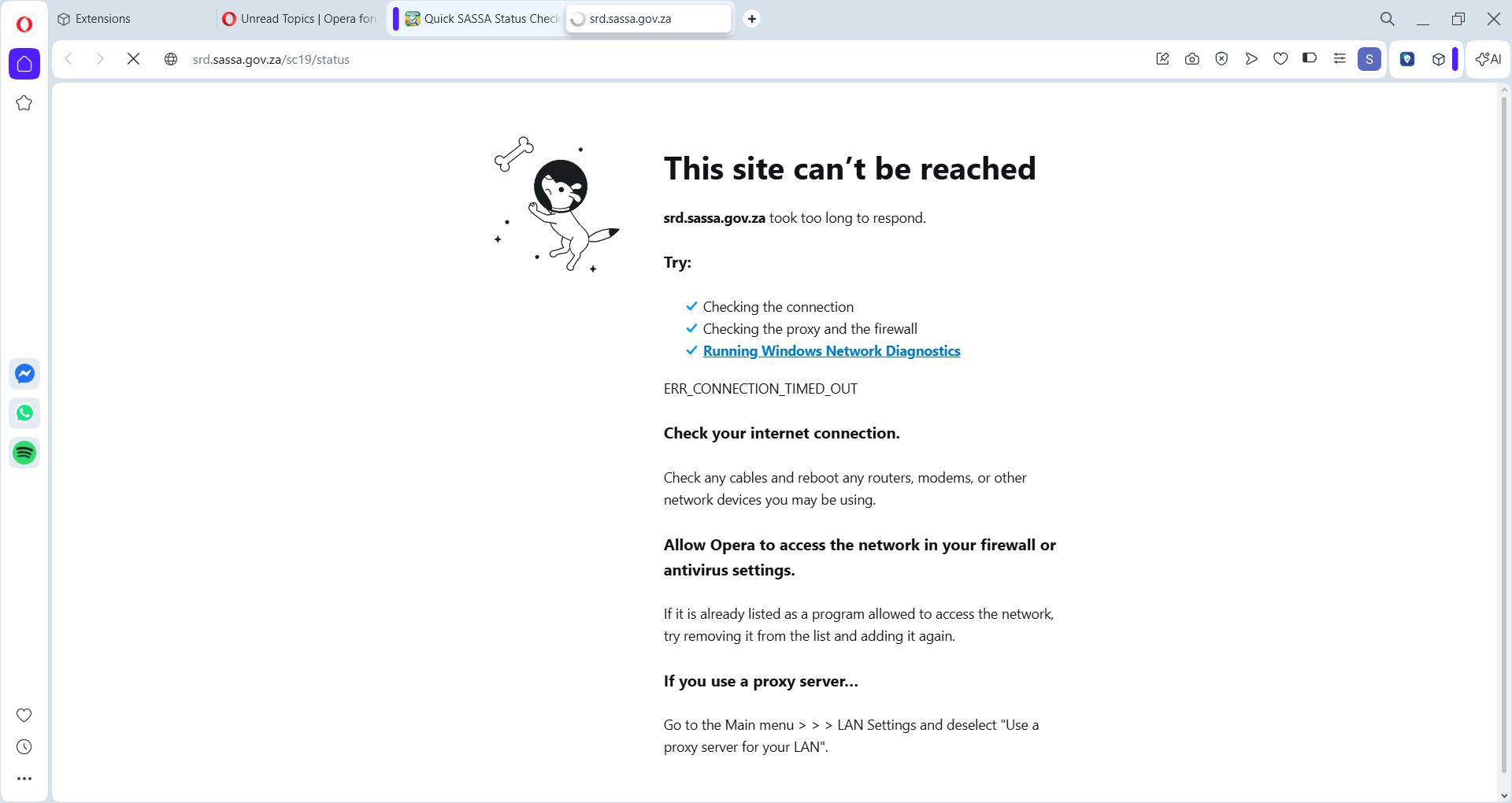
      Screenshot 2026-04-02 075348.png
      The problem is that the page either stays blank, keeps loading continuously, or sometimes fails to open completely.
      Itried:

      hard refresh
      clearing cache and cookies
      opening in a private window
      disabling Opera ad blocker
      turning off VPN
      checking JavaScript and cookie settings
      trying the same page in a normal tab and a private tab

      Even after these steps, the website still does not open correctly.

      Has anyone experienced something similar with this site or with government/service portals in Opera? I would appreciate any troubleshooting steps, browser settings, or fixes that might help.

      Thanks.

      Reply Quote 0
        leocg 1 Reply Last reply
      • leocg
        leocg Moderator Volunteer @mystatus last edited by

        @mystatus Page loads on other browsers?

        Reply Quote 0
          M 1 Reply Last reply
        • Mlipka
          Mlipka last edited by Mlipka

          The official website is https://srd.sassa.gov.za

          you linked https://srdsassastatus.co.za/ which is suspicious and not corresponding to your screenshot.

          Reply Quote 0
            1 Reply Last reply
          • M
            mystatus @leocg last edited by

            @leocg no brother i tried google chrome and edge but same problem

            Reply Quote 0
              leocg 1 Reply Last reply
            • M
              mystatus last edited by

              @Mlipka thank you for your valuable information but the picture i share in the post is for official website. Actually official site is not opening. the site https://srdsassastatus.co.za is just detail informational guide. It also link to the official website.

              Reply Quote 0
                1 Reply Last reply
              • leocg
                leocg Moderator Volunteer @mystatus last edited by

                @mystatus Then it's probably a site issue. Or a Chromium one.

                Reply Quote 0
                  1 Reply Last reply
                • K
                  kofisemba last edited by

                  I had a similar issue with the SASSA status page in Opera. Clearing the browser cache and cookies or opening the page in a private window can sometimes help. If it still does not load properly, trying Chrome or another browser may be worth a shot.

                  Reply Quote 0
                    1 Reply Last reply
                  • First post
                    Last post

                  Computer browsers

                  • Opera for Windows
                  • Opera for Mac
                  • Opera for Linux
                  • Opera beta version
                  • Opera USB

                  Mobile browsers

                  • Opera for Android
                  • Opera Mini
                  • Opera Touch
                  • Opera for basic phones

                  • Add-ons
                  • Opera account
                  • Wallpapers
                  • Opera Ads

                  • Help & support
                  • Opera blogs
                  • Opera forums
                  • Dev.Opera

                  • Security
                  • Privacy
                  • Cookies Policy
                  • EULA
                  • Terms of Service

                  • About Opera
                  • Press info
                  • Jobs
                  • Investors
                  • Become a partner
                  • Contact us

                  Follow Opera

                  • Opera - Facebook
                  • Opera - Twitter
                  • Opera - YouTube
                  • Opera - LinkedIn
                  • Opera - Instagram

                  © Opera Software 1995-