• Login
    • Search
    • Categories
    • Recent
    • Tags
    • Users
    • Groups
    • Rules
    • Help

    Do more on the web, with a fast and secure browser!

    Download Opera browser with:

    • built-in ad blocker
    • battery saver
    • free VPN
    Download Opera

    Pages not loading or loading incorrectly on Opera 135

    Opera for Windows
    27
    32
    1406
    Loading More Posts
    • Oldest to Newest
    • Newest to Oldest
    • Most Votes
    Reply
    • Reply as topic
    Log in to reply
    This topic has been deleted. Only users with topic management privileges can see it.
    • rick2
      rick2 @creatrix11 last edited by

      @creatrix11

      It's a bug, just disable "Acceptable Ads":
      https://forums.opera.com/post/409354

      Reply Quote 0
        1 Reply Last reply
      • leocg
        leocg Moderator Volunteer @JamesneedHelp last edited by

        @JamesneedHelp Try cleaning the cache. Try also disabling extensions

        Reply Quote 0
          1 Reply Last reply
        • leocg
          leocg Moderator Volunteer last edited by

          Disable Acceptable Ads: https://forums.opera.com/post/409354

          Reply Quote 0
            1 Reply Last reply
          • leocg
            leocg Moderator Volunteer @bobkaka3 last edited by

            @bobkaka3 See https://forums.opera.com/post/409354

            Reply Quote 0
              1 Reply Last reply
            • F
              fr05tb1te last edited by

              Having the same issue since I updated my Opera around 8 hours ago.

              Reply Quote 0
                1 Reply Last reply
              • S
                Saduria last edited by

                I disabled the opera adblock and use Ublock instead. It went back to normal

                Reply Quote 0
                  1 Reply Last reply
                • J
                  jesuismorasse last edited by

                  Hi,
                  I'm having issues with web pages on opera,
                  I tried restarting opera, restarting my computer, updating opera and my computer. I also tried setting back opera back to factory default settings and nothings working. Everythings fine if I go on another navigator like chrome or Edge. Please Help
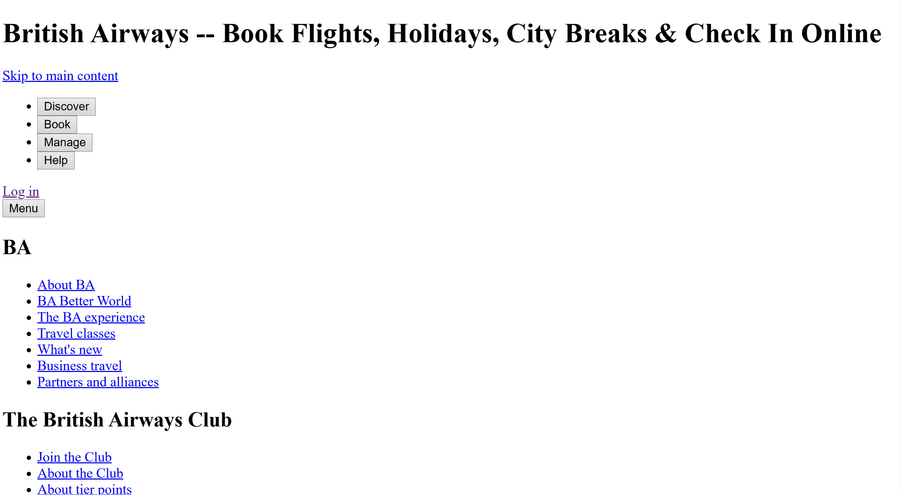
                  image_2026-09-12_111945953.png

                  Reply Quote 0
                    1 Reply Last reply
                  • E
                    Eremite270 last edited by

                    I have also been facing this same issue with the majority of the websites I visit, with the exception of Google and YouTube.

                    I tried contacting Opera about the issue, but I couldn't find any proper email address. The only email address I had was the one from which I was contacted regarding a bug I had previously reported

                    Since the same issue was also occurring on your "Report a Bug" page, I ended up emailing that address about it. It has now been four days, and I still haven't received any response.

                    I was seriously considering leaving Opera, but thankfully I found this post, and disabling "Acceptable Ads" actually fixed the problem for me. However, I have to say that Opera's customer support has been extremely disappointing.

                    The bug I reported two weeks ago still hasn't been fixed. I was told that the fix would be available by the end of the week, but there has still been no update. The bugs are BUG-28294 and BUG-28293.

                    What I don't understand is why, if "Acceptable Ads" has been causing such widespread problems for the past week, it wasn't disabled temporarily for everyone, or at the very least, why wasn't a notification or message provided to users explaining the issue and the workaround?

                    I literally had no way of contacting Opera about this. I had to spend nearly a week searching for a solution before I eventually came across these forums.

                    Opera is otherwise a browser I genuinely like using, which makes this situation even more frustrating. But when a widespread issue affects basic website functionality, users should not have to spend a week searching through forums just to discover a workaround, especially when there is seemingly no accessible way to contact support.

                    Reply Quote 0
                      1 Reply Last reply
                    • C
                      cbfunk last edited by

                      I resolved it with allowing 3rd party cookies located in Privacy & Security

                      Reply Quote 0
                        C 1 Reply Last reply
                      • C
                        cbfunk @cbfunk last edited by

                        @cbfunk said in Pages not loading or loading incorrectly on Opera 135:

                        I resolved it with allowing 3rd party cookies located in Privacy & Security

                        I still have the Opera Adblocker active.
                        But the 3rd Party cookie permission had inexplicably turned itself off during the latest update.

                        Reply Quote 0
                          1 Reply Last reply
                        • First post
                          Last post

                        Computer browsers

                        • Opera for Windows
                        • Opera for Mac
                        • Opera for Linux
                        • Opera beta version
                        • Opera USB

                        Mobile browsers

                        • Opera for Android
                        • Opera Mini
                        • Opera Touch
                        • Opera for basic phones

                        • Add-ons
                        • Opera account
                        • Wallpapers
                        • Opera Ads

                        • Help & support
                        • Opera blogs
                        • Opera forums
                        • Dev.Opera

                        • Security
                        • Privacy
                        • Cookies Policy
                        • EULA
                        • Terms of Service

                        • About Opera
                        • Press info
                        • Jobs
                        • Investors
                        • Become a partner
                        • Contact us

                        Follow Opera

                        • Opera - Facebook
                        • Opera - Twitter
                        • Opera - YouTube
                        • Opera - LinkedIn
                        • Opera - Instagram

                        © Opera Software 1995-
