• Login
    • Search
    • Categories
    • Recent
    • Tags
    • Users
    • Groups
    • Rules
    • Help

    Do more on the web, with a fast and secure browser!

    Download Opera browser with:

    • built-in ad blocker
    • battery saver
    • free VPN
    Download Opera

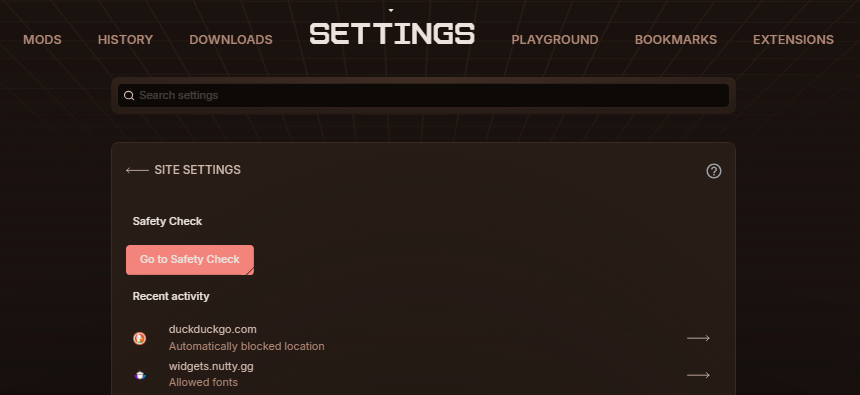
    Unable to open Opera "Safety Check"

    Opera for Windows
    2
    6
    419
    Loading More Posts
    • Oldest to Newest
    • Newest to Oldest
    • Most Votes
    Reply
    • Reply as topic
    Log in to reply
    This topic has been deleted. Only users with topic management privileges can see it.
    • L
      Laqster last edited by

      Hi, i've tried to access the safety check in setting in opera://settings/content as well as trying to directly open through opera://settings/safetyCheck. Clicking the button does not work, and going to the page directly sends to the home page.

      I've recently had a bout with malware on my system and am wondering if this is because they modified anything in my browser for this behavior to occur.

      Anything i can do? Thanks

      Reply Quote 0
        leocg 1 Reply Last reply
      • leocg
        leocg Moderator Volunteer @Laqster last edited by

        @Laqster What is that Safety Check?

        Reply Quote 0
          L 1 Reply Last reply
        • L
          Laqster @leocg last edited by

          @leocg Hey there, it's a button located within opera://settings/content on my browser. I've reached out to the subreddit wherein the responses said it could be leftover from chrome or an old update?

          ad023197-ec8e-4874-b6c3-3bb23eb2d4b0-image.png

          Reply Quote 0
            leocg 1 Reply Last reply
          • leocg
            leocg Moderator Volunteer @Laqster last edited by

            @Laqster It seems to be something from Chromium that wasn't hidden.

            Reply Quote 0
              L 1 Reply Last reply
            • L
              Laqster @leocg last edited by

              @leocg Thank you, that's a sound conclusion. I was suggested a standalone install and the button was not there. Glad it's more of a benign bug than anything malicious.

              Lastly, is there anything I could have messed up on my end or had accidentally injected?

              Reply Quote 0
                leocg 1 Reply Last reply
              • leocg
                leocg Moderator Volunteer @Laqster last edited by

                @Laqster Same version on both? Newest install probably got a version with a fix for it.

                Reply Quote 0
                  1 Reply Last reply
                • First post
                  Last post

                Computer browsers

                • Opera for Windows
                • Opera for Mac
                • Opera for Linux
                • Opera beta version
                • Opera USB

                Mobile browsers

                • Opera for Android
                • Opera Mini
                • Opera Touch
                • Opera for basic phones

                • Add-ons
                • Opera account
                • Wallpapers
                • Opera Ads

                • Help & support
                • Opera blogs
                • Opera forums
                • Dev.Opera

                • Security
                • Privacy
                • Cookies Policy
                • EULA
                • Terms of Service

                • About Opera
                • Press info
                • Jobs
                • Investors
                • Become a partner
                • Contact us

                Follow Opera

                • Opera - Facebook
                • Opera - Twitter
                • Opera - YouTube
                • Opera - LinkedIn
                • Opera - Instagram

                © Opera Software 1995-