• Login
    • Search
    • Categories
    • Recent
    • Tags
    • Users
    • Groups
    • Rules
    • Help

    Do more on the web, with a fast and secure browser!

    Download Opera browser with:

    • built-in ad blocker
    • battery saver
    • free VPN
    Download Opera

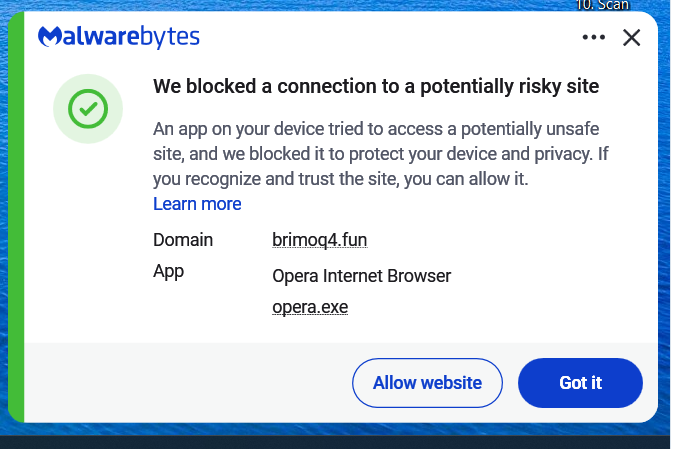
    Malwarebytes says that brimoq4.fun os trying to load

    General
    2
    22
    2968
    Loading More Posts
    • Oldest to Newest
    • Newest to Oldest
    • Most Votes
    Reply
    • Reply as topic
    Log in to reply
    This topic has been deleted. Only users with topic management privileges can see it.
    • D
      DavidKnight last edited by

      I just went to open this chat page and the message came up again. I have tried searching for brimoq4 on the PC drive but can't find it. Deleted sessions, caches etc. but it is still there.

      Reply Quote 0
        leocg 2 Replies Last reply
      • leocg
        leocg Moderator Volunteer @DavidKnight last edited by

        @DavidKnight Maybe it's just a link on a page you are opening? Or on a bookmark?

        Reply Quote 0
          1 Reply Last reply
        • leocg
          leocg Moderator Volunteer @DavidKnight last edited by

          @DavidKnight If you use any extensions, try disabling/uninstalling them.

          Reply Quote 0
            D 1 Reply Last reply
          • D
            DavidKnight @leocg last edited by DavidKnight

            @leocg df951f0c-60d1-4123-9e26-dc1d2be12242-Screenshot (22).png
            This is the message I get, it shows Opera is th app trying to access an unsafe site. Some times the message comes up when just opening Opera, even before I open any pages.

            Reply Quote 0
              leocg 2 Replies Last reply
            • leocg
              leocg Moderator Volunteer @DavidKnight last edited by

              @DavidKnight What is the reason for Malwarebytes to consider the page as unsafe?

              Reply Quote 0
                D 1 Reply Last reply
              • leocg
                leocg Moderator Volunteer @DavidKnight last edited by

                @DavidKnight Go to settings page and enable the option to alert you when a third party app tries to open a link. It's in the On Startup section.

                That way you can check if it isn't an app outside Opera trying to open the link.

                Reply Quote 0
                  D 1 Reply Last reply
                • D
                  DavidKnight @leocg last edited by DavidKnight

                  @leocg It says that it is a Trogan.

                  Reply Quote 0
                    leocg 1 Reply Last reply
                  • D
                    DavidKnight @leocg last edited by

                    @leocg OK I'll give that a try. Thank you.

                    Reply Quote 0
                      1 Reply Last reply
                    • leocg
                      leocg Moderator Volunteer @DavidKnight last edited by

                      @DavidKnight So it says that the web page may be malicious? Did you try to search about that address to see if there is more information about it?

                      Reply Quote 0
                        D 1 Reply Last reply
                      • D
                        DavidKnight @leocg last edited by DavidKnight

                        @leocg Yes I have, https://www.scam-detector.com/validator/brimoq4-fun-review/
                        It seems to have been attached to an extension Privacy Protector that I didn't install. This extension is mentioned in the link above. I have removed it now.

                        Reply Quote 0
                          1 Reply Last reply
                        • First post
                          Last post

                        Computer browsers

                        • Opera for Windows
                        • Opera for Mac
                        • Opera for Linux
                        • Opera beta version
                        • Opera USB

                        Mobile browsers

                        • Opera for Android
                        • Opera Mini
                        • Opera Touch
                        • Opera for basic phones

                        • Add-ons
                        • Opera account
                        • Wallpapers
                        • Opera Ads

                        • Help & support
                        • Opera blogs
                        • Opera forums
                        • Dev.Opera

                        • Security
                        • Privacy
                        • Cookies Policy
                        • EULA
                        • Terms of Service

                        • About Opera
                        • Press info
                        • Jobs
                        • Investors
                        • Become a partner
                        • Contact us

                        Follow Opera

                        • Opera - Facebook
                        • Opera - Twitter
                        • Opera - YouTube
                        • Opera - LinkedIn
                        • Opera - Instagram

                        © Opera Software 1995-