Option to Disable the Expanded Tab Hover Menu or Force Offset Position
-
mangojambo last edited by leocg
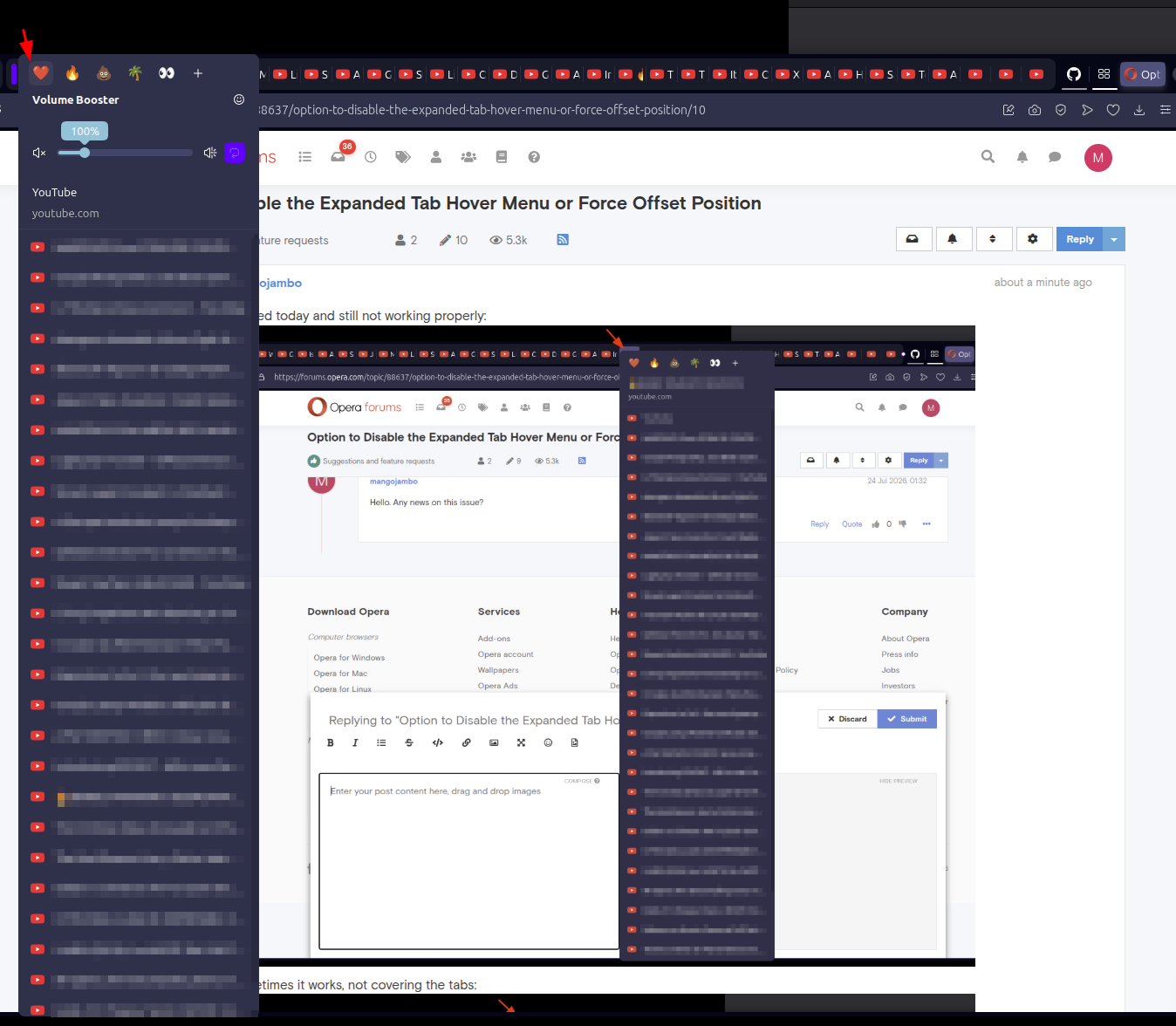
I am proposing a toggle to disable the vertical expanded "Tab Hover Menu" or a UI fix to ensure it never overlaps the tab bar. Currently, when multiple tabs from the same domain are open (especially with media extensions active), the tooltip expands into a long vertical list. As demonstrated in image_68ca12.jpg, this menu renders directly over the tabs, blocking the user from clicking or closing them.
Why this should be implemented:
Eliminating UI Collision: The primary function of a tab bar is navigation. When a hover element (the menu) covers the target (the tab), it creates a fundamental usability failure. A user trying to switch tabs quickly is instead forced to interact with a menu they didn't intend to open.
Productivity for Power Users: Users who keep many tabs open (e.g., developers or researchers) rely on muscle memory. Having a dynamic menu block the "Close" button or the tab itself, as seen in image_68ca12.jpg, causes frequent "misclicks" and frustration.
Visual Logic: Most browser tooltips appear below the point of interaction. Fixing this menu to always anchor below the tab bar, or allowing it to be turned off entirely, restores predictable behavior to the interface.
Investing in this fix will improve the experience for any user managing high-density tab environments and ensure that Opera’s UI remains an aid, not an obstacle, to navigation.
-

-
leocg Moderator Volunteer last edited by
@mangojambo What would be that Tab Hover Menu? The one that shows the name of the tab and list the other tabs from the same domain?
-
mangojambo last edited by
Hey Leocg. Thank you for the quick answer.
What would be that Tab Hover Menu? The one that shows the name of the tab and list the other tabs from the same domain?Yes, that is it. Here is the image:

It covers all the tabs. It would be better if it respected the height limit and didn't cover them.
-
leocg Moderator Volunteer last edited by
@mangojambo Here it doesn't cover the tabs, but I don't usually accumulate tabs, so I don't have that amount.
-
mangojambo last edited by
Yeah, that’s the problem: when you have a huge number of opened tabs, the behavior isn’t handled correctly. I know it could be considered an edge case, but still an annoying behavior: the menu size gets taller than the proper vertical limit.
-
leocg Moderator Volunteer last edited by
@mangojambo With how many tabs opened the problem starts to happen?
-
mangojambo last edited by
@leocg It depends on two things: the number of items in the list and the vertical size of the window. The menu list height is also small have to surpass the window height.
But their is a interesting behavior:- many tabs opened from the same domain;
- mouse over one of the tabs and the menu will cover it;
- but if you move the cursor to other tab from the same domain, the menu adjust it self for the right height, not covering the tabs bar anymore.
-
mangojambo last edited by
I tested today and still not working properly:

Sometimes it works, not covering the tabs:

Sorry for insisting on it, but this is quite annoying.
Best regards.
-
mangojambo last edited by
This one was worst one showing the volume slider, covering the tabs and I still can't clock on them: