• Login
    • Search
    • Categories
    • Recent
    • Tags
    • Users
    • Groups
    • Rules
    • Help

    Do more on the web, with a fast and secure browser!

    Download Opera browser with:

    • built-in ad blocker
    • battery saver
    • free VPN
    Download Opera

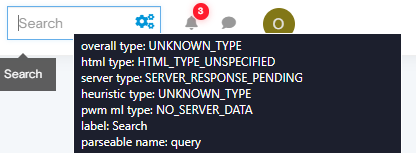
    Tooltip on mouseover in text field

    General
    tooltip mouseover
    3
    12
    818
    Loading More Posts
    • Oldest to Newest
    • Newest to Oldest
    • Most Votes
    Reply
    • Reply as topic
    Log in to reply
    This topic has been deleted. Only users with topic management privileges can see it.
    • O
      Overlook @leocg last edited by

      @leocg Opera One(version: 128.0.5807.77)

      Reply Quote 0
        1 Reply Last reply
      • Moved from Opera for computers by  leocg leocg 
      • O
        Overlook last edited by

        bump

        Reply Quote 0
          Mlipka 1 Reply Last reply
        • Mlipka
          Mlipka Opera @Overlook last edited by

          @Overlook Can you share a screenshot of this case?

          I don't follow what is happening on your end.

          Reply Quote 0
            O 1 Reply Last reply
          • O
            Overlook @Mlipka last edited by

            @Mlipka 9118d753-8d0b-4a6d-8842-d19e123f6550-image.png

            the tooltip contain a lot more of information (i didn't share it cause i've no idea what they refers to), but is very big, and appear in every text field on Opera

            Reply Quote 0
              leocg 2 Replies Last reply
            • leocg
              leocg Moderator Volunteer @Overlook last edited by

              @Overlook I don't see it happening here

              Reply Quote 0
                1 Reply Last reply
              • leocg
                leocg Moderator Volunteer @Overlook last edited by

                @Overlook Try disabling all extensions. Also try resetting flags.

                Reply Quote 0
                  O 1 Reply Last reply
                • O
                  Overlook @leocg last edited by

                  @leocg tried with every extensions off, tooltip still appears.
                  What about flags, where do i reset them?

                  As side note, tried with Opera GX and the tooltip doesnt appears

                  Reply Quote 0
                    leocg 1 Reply Last reply
                  • leocg
                    leocg Moderator Volunteer @Overlook last edited by

                    @Overlook Go to opera://flags and click on the reset button

                    Reply Quote 1
                      O 1 Reply Last reply
                    • O
                      Overlook @leocg last edited by

                      @leocg said in Tooltip on mouseover in text field:

                      opera://flags

                      Only "Address bar dropdown cities" was Enabled, i shutted it down and the tooltip seems gone!

                      Reply Quote 1
                        1 Reply Last reply
                      • Mlipka
                        Mlipka Opera last edited by

                        @Overlook, glad to hear that!

                        @leocg, great hints!

                        Reply Quote 0
                          1 Reply Last reply
                        • First post
                          Last post

                        Computer browsers

                        • Opera for Windows
                        • Opera for Mac
                        • Opera for Linux
                        • Opera beta version
                        • Opera USB

                        Mobile browsers

                        • Opera for Android
                        • Opera Mini
                        • Opera Touch
                        • Opera for basic phones

                        • Add-ons
                        • Opera account
                        • Wallpapers
                        • Opera Ads

                        • Help & support
                        • Opera blogs
                        • Opera forums
                        • Dev.Opera

                        • Security
                        • Privacy
                        • Cookies Policy
                        • EULA
                        • Terms of Service

                        • About Opera
                        • Press info
                        • Jobs
                        • Investors
                        • Become a partner
                        • Contact us

                        Follow Opera

                        • Opera - Facebook
                        • Opera - Twitter
                        • Opera - YouTube
                        • Opera - LinkedIn
                        • Opera - Instagram

                        © Opera Software 1995-