• Login
    • Search
    • Categories
    • Recent
    • Tags
    • Users
    • Groups
    • Rules
    • Help

    Do more on the web, with a fast and secure browser!

    Download Opera browser with:

    • built-in ad blocker
    • battery saver
    • free VPN
    Download Opera

    Remove new search selection bar

    Opera for Android
    8
    58
    12011
    Loading More Posts
    • Oldest to Newest
    • Newest to Oldest
    • Most Votes
    Reply
    • Reply as topic
    Log in to reply
    This topic has been deleted. Only users with topic management privileges can see it.
    • Z
      zerxx last edited by

      That's very poor UX. The worst part is that you can't change search engine by tapping on it, instead you need to tap the arrow button that is to the right of the Ask AI button!

      Reply Quote 0
        cska133 1 Reply Last reply
      • cska133
        cska133 @zerxx last edited by

        @zerxx asi wrote i dont have such new search bars/buttons. What device do you have?
        Please post a screenshot of how it looks like

        Reply Quote 0
          Z 1 Reply Last reply
        • Z
          zerxx @cska133 last edited by

          @cska133 It's the same on my phone and tablet, Opera 95.3. It shows up when you tap on the address field
          Screenshot_2026-03-09-19-31-06-67_4641ebc0df1485bf6b47ebd018b5ee76_1.jpg

          Reply Quote 0
            cska133 1 Reply Last reply
          • cska133
            cska133 @zerxx last edited by cska133

            @zerxx its crazy, i dont have that view. When I tap on the adress field I get the old behaviour still looking like this screenshot Screenshot_20260309-200701_Opera.jpg
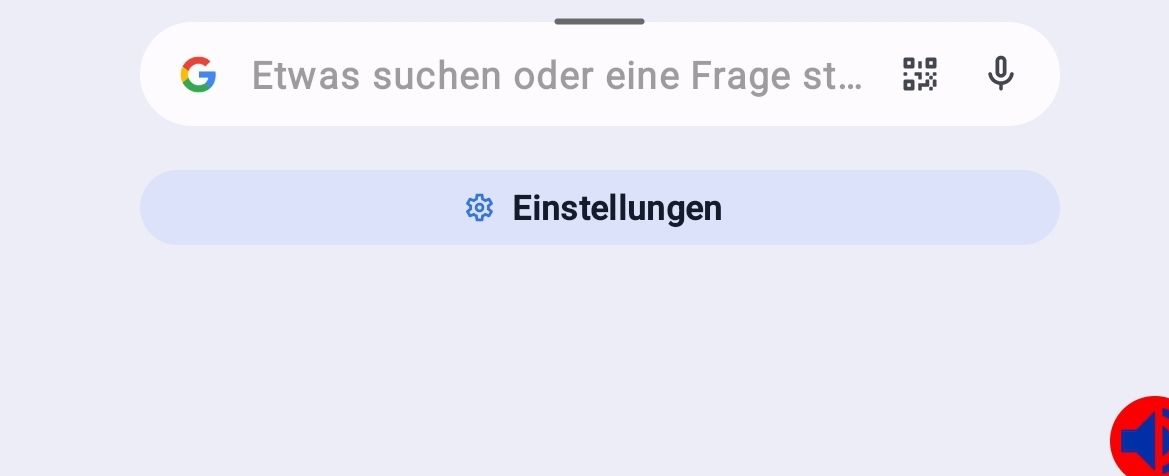
            Maybe is has something to do with the tab bar view. I do have tabs enabled and sitting on top of the search/address bar. How it is on you?

            Reply Quote 0
              cska133 1 Reply Last reply
            • cska133
              cska133 @cska133 last edited by cska133

              i think i got the aswer of at least my mysterium of why i dont have that view. It is because of the toggle of the setting "Opera AI" in the Opera settings. I have it disabled. When i enable it, than i get the same view and buttons over the search field as shown in the screenshot of @zerxx

              Reply Quote 0
                Z 1 Reply Last reply
              • Z
                zerxx @cska133 last edited by

                @cska133 I couldn't find that "Opera AI" toggle in settings. Is it hidden somewhere?

                Reply Quote 0
                  cska133 1 Reply Last reply
                • cska133
                  cska133 @zerxx last edited by

                  @zerxx hidden?! It is the first setting in the Opera settings. It is also present in many places in the settings. For example open Settings and right after that it should be the first settings option over the Vpn toggle. Also you can find it unter the search section in the settings, where search machine , search suggestions etc. Also i had default speed dial button on the start page in Opera, called Aks AI - it leads you than to the same place in the settings. But actually in you screenshot you post above, when you click on the Settings unter the search field, it should get you also there.
                  And last hint, in Opera settings you have search option where you can find settings. There is a search field in the Opera settings, type there AI and it should give the places in the settings where it is present. Maybe in your set language AI is called different, in German it is KI.
                  So did you find it now?

                  Reply Quote 0
                    1 Reply Last reply
                  • cska133
                    cska133 last edited by

                    @zerxx have you found it?

                    Reply Quote 0
                      Z 1 Reply Last reply
                    • Z
                      zerxx @cska133 last edited by

                      @cska133 I don't have it unfortunately. I'm in Russia, and since vpn setting is disabled based on the region, I guess it affects the AI toggle as well

                      Screenshot_2026-03-12-14-43-47-68_4641ebc0df1485bf6b47ebd018b5ee76_1.jpg

                      So the only way to get rid of that search / address bar screen currently is to rollback to v92 or similar

                      Reply Quote 0
                        cska133 1 Reply Last reply
                      • cska133
                        cska133 @zerxx last edited by

                        @zerxx i can not understand how one and the same version can have different implementations - one has some settings which others dont have, strange..

                        Reply Quote 0
                          leocg 1 Reply Last reply
                        • leocg
                          leocg Moderator Volunteer @cska133 last edited by

                          @cska133 Features that are not available on a region do not appear on settings page for those on that region.

                          Reply Quote 0
                            1 Reply Last reply
                          • First post
                            Last post

                          Computer browsers

                          • Opera for Windows
                          • Opera for Mac
                          • Opera for Linux
                          • Opera beta version
                          • Opera USB

                          Mobile browsers

                          • Opera for Android
                          • Opera Mini
                          • Opera Touch
                          • Opera for basic phones

                          • Add-ons
                          • Opera account
                          • Wallpapers
                          • Opera Ads

                          • Help & support
                          • Opera blogs
                          • Opera forums
                          • Dev.Opera

                          • Security
                          • Privacy
                          • Cookies Policy
                          • EULA
                          • Terms of Service

                          • About Opera
                          • Press info
                          • Jobs
                          • Investors
                          • Become a partner
                          • Contact us

                          Follow Opera

                          • Opera - Facebook
                          • Opera - Twitter
                          • Opera - YouTube
                          • Opera - LinkedIn
                          • Opera - Instagram

                          © Opera Software 1995-