• Login
    • Search
    • Categories
    • Recent
    • Tags
    • Users
    • Groups
    • Rules
    • Help

    Do more on the web, with a fast and secure browser!

    Download Opera browser with:

    • built-in ad blocker
    • battery saver
    • free VPN
    Download Opera

    How to turn off Auto fill-ins

    Opera for computers
    4
    6
    112
    Loading More Posts
    • Oldest to Newest
    • Newest to Oldest
    • Most Votes
    Reply
    • Reply as topic
    Log in to reply
    This topic has been deleted. Only users with topic management privileges can see it.
    • JimMayor
      JimMayor last edited by leocg

      I am not a touch-typer so the Opera attempting to fill in when I type a URL is absolutely frustrating! How do I turn that "feature" off?

      Reply Quote 0
        fitzydj leocg Nearmelab 3 Replies Last reply
      • fitzydj
        fitzydj @JimMayor last edited by

        @JimMayor
        This might do what you want

        To clear browsing data on exit in Opera, go to Settings, click on "Advanced," then select "Privacy & security." Under "Cookies and other site data," enable the option to "Clear cookies and site data when you quit Opera."

        Reply Quote 0
          1 Reply Last reply
        • leocg
          leocg Moderator Volunteer @JimMayor last edited by

          @JimMayor That's auto complete and not auto fill

          Reply Quote 0
            1 Reply Last reply
          • Nearmelab
            Nearmelab @JimMayor last edited by

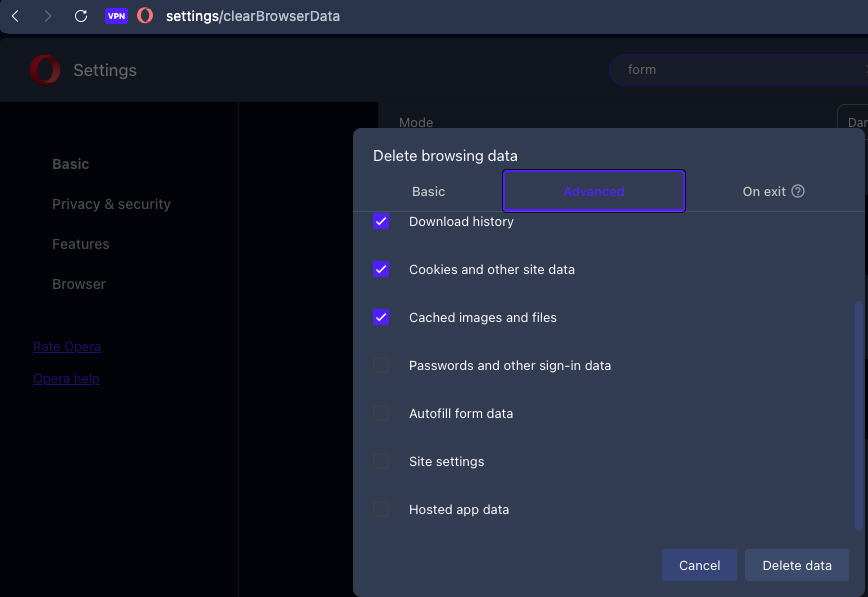
            @JimMayor , did you try to uncheck auto-fill form?

            9029605c-d8de-44fe-a16f-00b005c0e133-image.png

            Reply Quote 0
              JimMayor 1 Reply Last reply
            • JimMayor
              JimMayor @Nearmelab last edited by

              Thanks, Guys!

              I have done all of that and Opera still thinks it knows what I want to type when it doesn't. I guess in this life we must put up with computers that think they know what we really want. Give me the good old days.
              Reply Quote 0
                1 Reply Last reply
              • JimMayor
                JimMayor last edited by

                Oops, Guys! I failed to exit Opera. I do believe that works. Thank you!

                Reply Quote 1
                  1 Reply Last reply
                • First post
                  Last post

                Computer browsers

                • Opera for Windows
                • Opera for Mac
                • Opera for Linux
                • Opera beta version
                • Opera USB

                Mobile browsers

                • Opera for Android
                • Opera Mini
                • Opera Touch
                • Opera for basic phones

                • Add-ons
                • Opera account
                • Wallpapers
                • Opera Ads

                • Help & support
                • Opera blogs
                • Opera forums
                • Dev.Opera

                • Security
                • Privacy
                • Cookies Policy
                • EULA
                • Terms of Service

                • About Opera
                • Press info
                • Jobs
                • Investors
                • Become a partner
                • Contact us

                Follow Opera

                • Opera - Facebook
                • Opera - Twitter
                • Opera - YouTube
                • Opera - LinkedIn
                • Opera - Instagram

                © Opera Software 1995-