How do You Access Google Chrome Extensions?
-
Noname-stan last edited by
Hi! Just came back to Opera after Arc stopped updating and Spotify wouldn't work. I use a few Google extensions which are SpoPlus, Blockify, & Spotify Playback Speed. I can't seem to find the extensions menu for Google extensions and I don't think there's a Opera Add-on version of these 3.. ;-; I really wanna make sure Blockify works here and SpoPlus can be customized, so I just hope that there's a Google extensions menu, thanks!!
-

-
leocg Moderator Volunteer last edited by
@Noname-stan Just go to Chrome extensions store and install the extensions you want.
-
AugustMohr last edited by
@leocg
How?I have the same question as the OP but for different extensions. I've been looking for days and keep running around the same circles. It's supposed to be simple and direct, but what I am directed to does not exist.
The Opera Help page, https://help.opera.com/en/latest/customization/, says the Install Chrome extensions addon is required. But there is nothing by that name in the Opera Addons Store. Other sources, like you, @leocg, say or imply that this addon is not required, just click the Add to Opera button. in the Chrome Web Store. But I don't find any such button. The Chrome Web Store page says, for every extension I try, "To add this item to Chrome, please update your browser." But my Opera is up to date.
Has the most recent Chrome update broken this functionality such that the Chrome Web Store now requires something from the browser that Opera is not (yet) providing?
macOS Monterey
Version 12.7.6
Opera Version:83.0.4254.27 (x86_64)
Opera is up to date -
leocg Moderator Volunteer last edited by
@AugustMohr Current version of Opera is 125. Opera 83 is more than two years old and don't have native support for Chrome extensions as far as I can remember.
-
burnout426 Volunteer last edited by
In Opera, you just goto https://chromewebstore.google.com/detail/spoplus-edit-spotify-them/ijkboaojikgaanlgigobkmbpnjgjljnc?hl=en for example and click "Add to Opera".
-
burnout426 Volunteer last edited by
@AugustMohr said in How do You Access Google Chrome Extensions?:
The Opera Help page, https://help.opera.com/en/latest/customization/, says the Install Chrome extensions addon is required.
That's outdated info. Opera has built-in support from the Chrome webstore. No need to do anything special. you just go to the extension's page at chromewebstore.google.com and click "add to Opera". Of course, you need a modern version of Opera. 83 is way too old. You need 126 as said.
-
AugustMohr last edited by leocg
@burnout426 -- Thanks for the updated info. I have found the source of my confusion, which explains why so many people essentially said, "It just works; I don't know what your problem is."
When I go to Opera > About Opera I get:
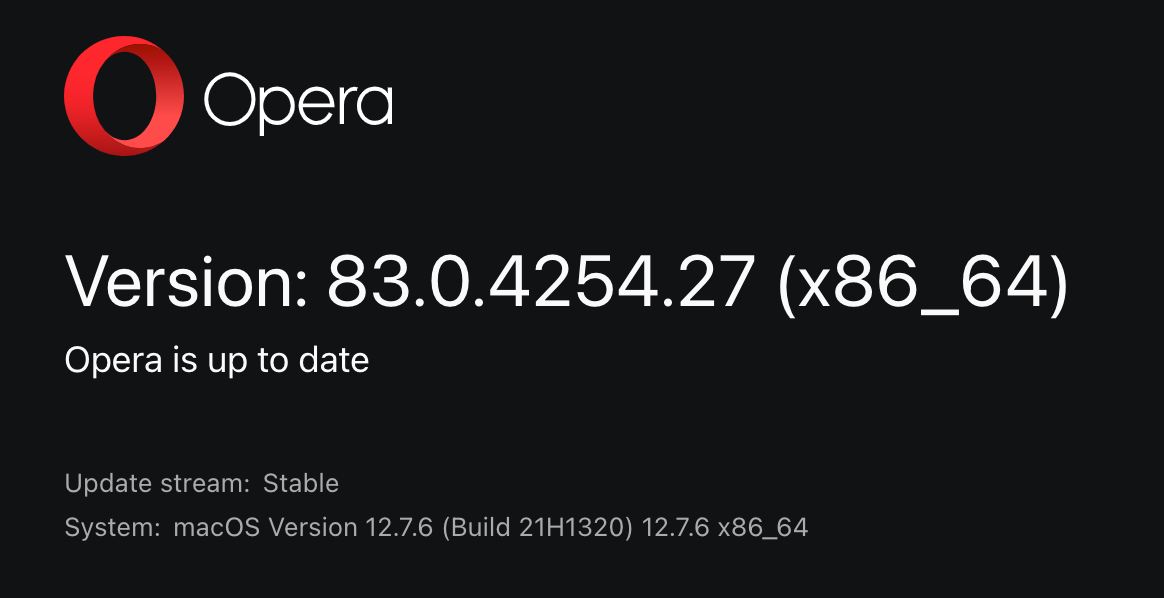
Opera itself is telling me that the version I have is "up to date". And I have been assuming that Opera is telling me the truth, because after all, who else would know better?
With your updated info I have figured out that Opera is lying to me.
What it probably means is that I've updated as far as I can under my current OS, 12.7.6, Monterey. But that is not what it says.
I have to be smarter than the Opera engineer who wrote that in order to figure out what they should have said to tell me what I need to know. Hence my confusion. (Of course, writing About pages is often assigned to Junior Engineers, but that is no excuse.)
Thanks for helping me figure it out. That's another vote for my upgrading past Monterey, which I now expect to do shortly after I get my backup system back in working order.
-
burnout426 Volunteer last edited by burnout426
@AugustMohr The updater for that old version of Opera probably isn't compatible with Opera's update server API anymore.
Also, that old version of Opera uses older formats of its profile files and a layout that's different than modern Opera. Upgrading your current Opera profile might turn out fine, but there's a chance that something could go wrong in the conversion process where you have to start with a fresh profile to resolve things.
Modern versions of Opera on macOS require macOS 12 Monterey or newer, so you should have no problem using the latest build which is 126.0.5750.43 at this moment. You'll just have to download the installer from https://www.opera.com/download.
You can always check https://support.google.com/chrome/a/answer/7100626?hl=en for system requires as that's what Opera follows.
-
AugustMohr last edited by AugustMohr
Thanks @burnout426,
Before I saw your note, I found another note from a Monterey user who had the same old version of Opera that would not update. They pointed to
https://get.opera.com/ftp/pub/opera/desktop/ where they said they could find more recent versions.So, from that page, I installed Opera version 90.0.4480.84. (Sidetrack: I first installed version 100, and went to the Chrome webstore. The "Install to Chrome" button was not greyed out, but when I used it, I got some kind of System Data Error. So I tried v90. I figured it might take a few installation cycles to find a version that worked.)
Opera v90 installed fine. I went to the Chrome Extensions and again the "Install to Chrome" button was active. This time it worked and I was able to install the extension I wanted.
Then Opera popped up a new page saying I'd been upgraded and apparently it had automatically upgraded me to v126, which appears to be working fine as well.
The bug was in v83, which erroneously told me I was up to date and thus would not upgrade me. You may be right that an old API that didn't receive the correct information may be the actual source of the error. But I'm not going to chase it. I'm at 126 and I have my extension loaded.
Thanks again.
