• Login
    • Search
    • Categories
    • Recent
    • Tags
    • Users
    • Groups
    • Rules
    • Help

    Do more on the web, with a fast and secure browser!

    Download Opera browser with:

    • built-in ad blocker
    • battery saver
    • free VPN
    Download Opera

    How to remove detected language?

    General
    3
    6
    909
    Loading More Posts
    • Oldest to Newest
    • Newest to Oldest
    • Most Votes
    Reply
    • Reply as topic
    Log in to reply
    This topic has been deleted. Only users with topic management privileges can see it.
    • A
      ashtraygrrl last edited by

      How do I remove this detected language feature?

      636ac897-c0e3-415d-9983-4185a5750b50-Opera Snapshot_2025-12-01_161028_102617.cargo.site.png
      Its so annoying, everytime I highlight something it ends up deleting.
      I've tried removing every preferred language and left only English
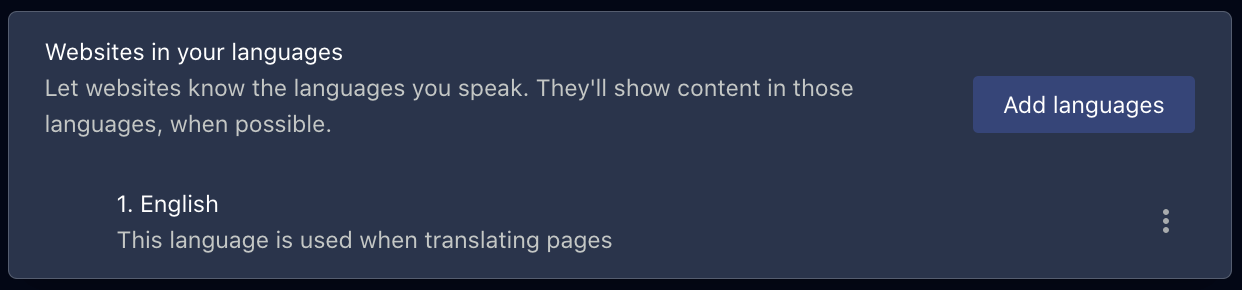
      d4197d46-c1b7-47d4-93f5-9f762d3d45e5-image.png and also tried deactivating pop-up(??) options, none of them worked.

      Help please??

      Reply Quote 0
        leocg D 3 Replies Last reply
      • leocg
        leocg Moderator Volunteer @ashtraygrrl last edited by

        @ashtraygrrl Opera One, Opera GX or Opera Air?

        Reply Quote 0
          A 1 Reply Last reply
        • leocg
          leocg Moderator Volunteer @ashtraygrrl last edited by

          @ashtraygrrl Doesn't seem to be an Opera feature, unless it's Mac specific.

          Reply Quote 0
            1 Reply Last reply
          • A
            ashtraygrrl @leocg last edited by ashtraygrrl

            @leocg opera one. Can you explain what do you mean with mac specific–do you mean my mac settings? Because I only use opera for my browser 😞

            Reply Quote 0
              leocg 1 Reply Last reply
            • Moved from Opera for Mac by  leocg leocg 
            • leocg
              leocg Moderator Volunteer @ashtraygrrl last edited by

              @ashtraygrrl I don't remember have seen it on Windows, so I guess it may be some kind of resource that only exists on Opera for Mac or it's something from an extension.

              Reply Quote 0
                1 Reply Last reply
              • D
                DrPapa @ashtraygrrl last edited by

                @ashtraygrrl It might be the Speed Translate extension. I deactivated it and stopped getting that pop-up

                Reply Quote 0
                  1 Reply Last reply
                • First post
                  Last post

                Computer browsers

                • Opera for Windows
                • Opera for Mac
                • Opera for Linux
                • Opera beta version
                • Opera USB

                Mobile browsers

                • Opera for Android
                • Opera Mini
                • Opera Touch
                • Opera for basic phones

                • Add-ons
                • Opera account
                • Wallpapers
                • Opera Ads

                • Help & support
                • Opera blogs
                • Opera forums
                • Dev.Opera

                • Security
                • Privacy
                • Cookies Policy
                • EULA
                • Terms of Service

                • About Opera
                • Press info
                • Jobs
                • Investors
                • Become a partner
                • Contact us

                Follow Opera

                • Opera - Facebook
                • Opera - Twitter
                • Opera - YouTube
                • Opera - LinkedIn
                • Opera - Instagram

                © Opera Software 1995-
