• Login
    • Search
    • Categories
    • Recent
    • Tags
    • Users
    • Groups
    • Rules
    • Help

    Do more on the web, with a fast and secure browser!

    Download Opera browser with:

    • built-in ad blocker
    • battery saver
    • free VPN
    Download Opera

    Cannot close tabs without moving the mouse

    Tab Islands, Tabs and Workspaces
    4
    30
    13906
    Loading More Posts
    • Oldest to Newest
    • Newest to Oldest
    • Most Votes
    Reply
    • Reply as topic
    Log in to reply
    This topic has been deleted. Only users with topic management privileges can see it.
    • burnout426
      burnout426 Volunteer last edited by

      A fix for this should be coming to Opera Developer (124). I have not tested it yet though to know if the fix actually works or not, but sounds hopeful.

      Reply Quote 0
        F H 2 Replies Last reply
      • F
        flaviu2 @burnout426 last edited by

        @burnout426
        That's a good news! Thank you.

        Reply Quote 0
          1 Reply Last reply
        • burnout426
          burnout426 Volunteer last edited by burnout426

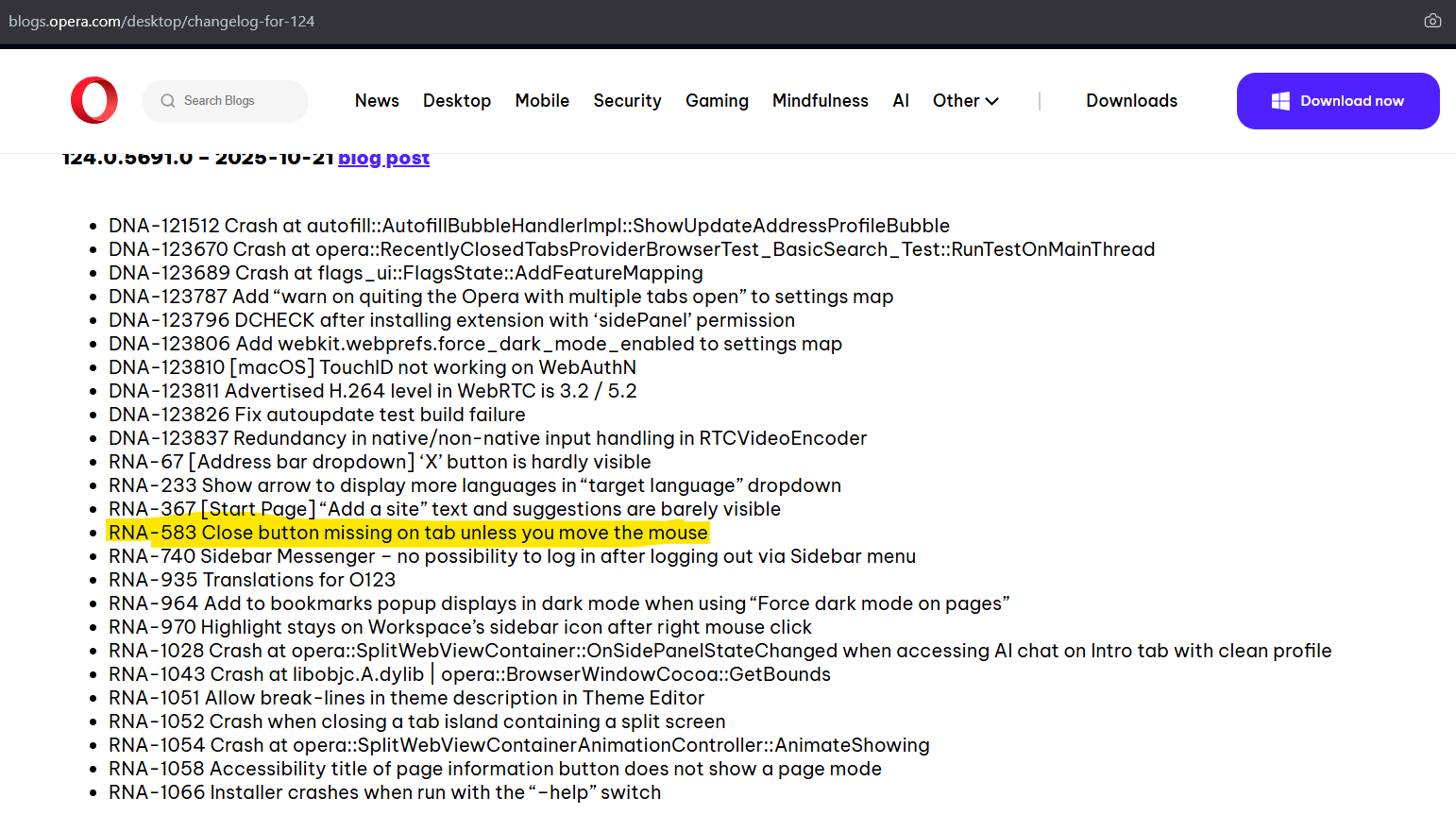
          Fix is listed in the changelog for https://blogs.opera.com/desktop/2025/10/opera-124-0-5691-0-developer-update/. Seems fixed to me.

          Reply Quote 0
            F 1 Reply Last reply
          • F
            flaviu2 @burnout426 last edited by flaviu2

            @burnout426
            Yes, I noticed:
            5d94f852-bbc8-4cb3-b921-31eb9ee02ef5-image.png
            but I don't have versison 124 yet.

            Reply Quote 1
              F 1 Reply Last reply
            • F
              flaviu2 @flaviu2 last edited by

              @flaviu2 said in Cannot close tabs without moving the mouse:

              but I don't have versison 124 yet.

              typo: version 124 yet.

              Reply Quote 0
                burnout426 1 Reply Last reply
              • burnout426
                burnout426 Volunteer @flaviu2 last edited by

                @flaviu2 You can download it from the "Opera Developer" section at https://www.opera.com/download. It uses a separate install path and separate profile etc., so you don't have to worry about it messing with Opera Stable. If you to install all of Opera Developer to just a folder, you can make a test standalone installation.

                Reply Quote 0
                  F 1 Reply Last reply
                • F
                  flaviu2 @burnout426 last edited by

                  @burnout426
                  Yes, I know, I am not in a hurry, I'll wait for standard update.

                  Reply Quote 0
                    burnout426 1 Reply Last reply
                  • burnout426
                    burnout426 Volunteer @flaviu2 last edited by

                    @flaviu2 OK. I tested multiple times and it does seem fixed.

                    Reply Quote 0
                      1 Reply Last reply
                    • H
                      hooram95 @burnout426 last edited by

                      @burnout426 said in Cannot close tabs without moving the mouse:

                      A fix for this should be coming to Opera Developer (124). I have not tested it yet though to know if the fix actually works or not, but sounds hopeful.

                      Thats really a great news bro.

                      Reply Quote 0
                        1 Reply Last reply
                      • F
                        flaviu2 last edited by

                        Version 124.0.5705.15 was installed today, and this bug has been solved. Thank you Opera!

                        Reply Quote 1
                          1 Reply Last reply
                        • Referenced by  F flaviu2 
                        • F
                          flaviu2 last edited by

                          This bug was solved in v.130, now, in 131.0.5877.5 this bug is present again.

                          Reply Quote 0
                            1 Reply Last reply
                          • F
                            flaviu2 last edited by

                            In the latest version, 131.0.5877.24, this bug vanished again. Hope to stay like it is now 🙂

                            Reply Quote 0
                              1 Reply Last reply
                            • First post
                              Last post

                            Computer browsers

                            • Opera for Windows
                            • Opera for Mac
                            • Opera for Linux
                            • Opera beta version
                            • Opera USB

                            Mobile browsers

                            • Opera for Android
                            • Opera Mini
                            • Opera Touch
                            • Opera for basic phones

                            • Add-ons
                            • Opera account
                            • Wallpapers
                            • Opera Ads

                            • Help & support
                            • Opera blogs
                            • Opera forums
                            • Dev.Opera

                            • Security
                            • Privacy
                            • Cookies Policy
                            • EULA
                            • Terms of Service

                            • About Opera
                            • Press info
                            • Jobs
                            • Investors
                            • Become a partner
                            • Contact us

                            Follow Opera

                            • Opera - Facebook
                            • Opera - Twitter
                            • Opera - YouTube
                            • Opera - LinkedIn
                            • Opera - Instagram

                            © Opera Software 1995-