• Login
    • Search
    • Categories
    • Recent
    • Tags
    • Users
    • Groups
    • Rules
    • Help

    Do more on the web, with a fast and secure browser!

    Download Opera browser with:

    • built-in ad blocker
    • battery saver
    • free VPN
    Download Opera

    YouTube automatic traslation

    Lounge
    4
    13
    5231
    Loading More Posts
    • Oldest to Newest
    • Newest to Oldest
    • Most Votes
    Reply
    • Reply as topic
    Log in to reply
    This topic has been deleted. Only users with topic management privileges can see it.
    • G
      gimobaram last edited by

      How do I stop YouTube automatic translation?.

      Reply Quote 0
        leocg 1 Reply Last reply
      • leocg
        leocg Moderator Volunteer @gimobaram last edited by

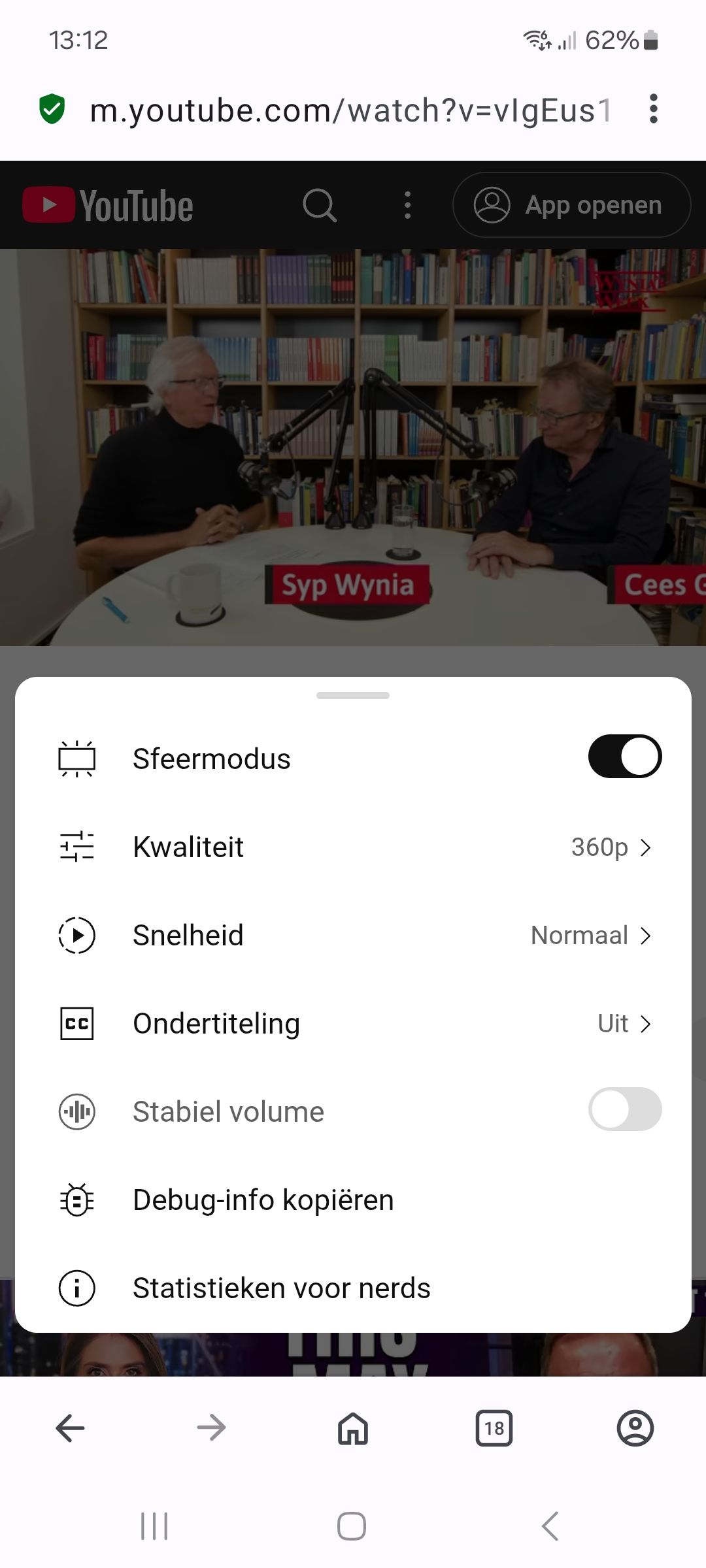
        @gimobaram Click on the gear on the YouTube player and disable it

        Reply Quote 0
          G 1 Reply Last reply
        • G
          gimobaram @leocg last edited by

          @leocg Thank you for your reply. But that is not possible.

          Reply Quote 0
            leocg 1 Reply Last reply
          • leocg
            leocg Moderator Volunteer @gimobaram last edited by

            @gimobaram Why it's not possible?

            Reply Quote 0
              G 1 Reply Last reply
            • G
              gimobaram @leocg last edited by

              @leocg This is what I get:Screenshot_20250904_131233_Opera.jpg )

              Reply Quote 0
                leocg 2 Replies Last reply
              • leocg
                leocg Moderator Volunteer @gimobaram last edited by

                @gimobaram It's usually under the subtitles option

                Reply Quote 0
                  G 1 Reply Last reply
                • G
                  gimobaram @leocg last edited by

                  @leocg Maybe I am lucky with next update.

                  Reply Quote 0
                    1 Reply Last reply
                  • leocg
                    leocg Moderator Volunteer @gimobaram last edited by

                    @gimobaram Do you have a link to a video with automatic dubbing?

                    Reply Quote 0
                      G 1 Reply Last reply
                    • G
                      gimobaram @leocg last edited by

                      @leocg https://www.youtube.com/watch?v=vIgEus1G844

                      Thank you in advance for your efforts.

                      Reply Quote 0
                        leocg 1 Reply Last reply
                      • leocg
                        leocg Moderator Volunteer @gimobaram last edited by leocg

                        @gimobaram It doesn't have automatic dubbing here.

                        Edit: I only see the automatic dubbing option when I open it in the YouTube app.

                        Reply Quote 0
                          G 1 Reply Last reply
                        • G
                          gimobaram @leocg last edited by

                          @leocg From now on I will open the podcasts on the YouTube app. Thank you for your help.

                          Reply Quote 0
                            1 Reply Last reply
                          • H
                            hartheritageestate last edited by

                            To turn off auto-translate, go to a video’s Settings → Subtitles/CC → Off or set captions to the original language.

                            Reply Quote 0
                              1 Reply Last reply
                            • R
                              Rydered05 last edited by

                              This is actually a common issue many users are facing right now, and unfortunately it still hasn’t been fully fixed by YouTube. The auto-translation or dubbing settings don’t always appear clearly, especially depending on the device or browser you’re using. In most cases, the only workaround is to manually switch it back each time either by changing the audio track to the original language or turning off subtitles/auto-translate in the settings. Until YouTube makes this more consistent, manually adjusting it is really the only reliable solution.
                              Reply Quote 0
                                1 Reply Last reply
                              • First post
                                Last post

                              Computer browsers

                              • Opera for Windows
                              • Opera for Mac
                              • Opera for Linux
                              • Opera beta version
                              • Opera USB

                              Mobile browsers

                              • Opera for Android
                              • Opera Mini
                              • Opera Touch
                              • Opera for basic phones

                              • Add-ons
                              • Opera account
                              • Wallpapers
                              • Opera Ads

                              • Help & support
                              • Opera blogs
                              • Opera forums
                              • Dev.Opera

                              • Security
                              • Privacy
                              • Cookies Policy
                              • EULA
                              • Terms of Service

                              • About Opera
                              • Press info
                              • Jobs
                              • Investors
                              • Become a partner
                              • Contact us

                              Follow Opera

                              • Opera - Facebook
                              • Opera - Twitter
                              • Opera - YouTube
                              • Opera - LinkedIn
                              • Opera - Instagram

                              © Opera Software 1995-