• Login
    • Search
    • Categories
    • Recent
    • Tags
    • Users
    • Groups
    • Rules
    • Help

    Do more on the web, with a fast and secure browser!

    Download Opera browser with:

    • built-in ad blocker
    • battery saver
    • free VPN
    Download Opera

    Can't click on Next button when trying to login to Sync

    Opera for Windows
    3
    3
    758
    Loading More Posts
    • Oldest to Newest
    • Newest to Oldest
    • Most Votes
    Reply
    • Reply as topic
    Log in to reply
    This topic has been deleted. Only users with topic management privileges can see it.
    • B
      bogege last edited by

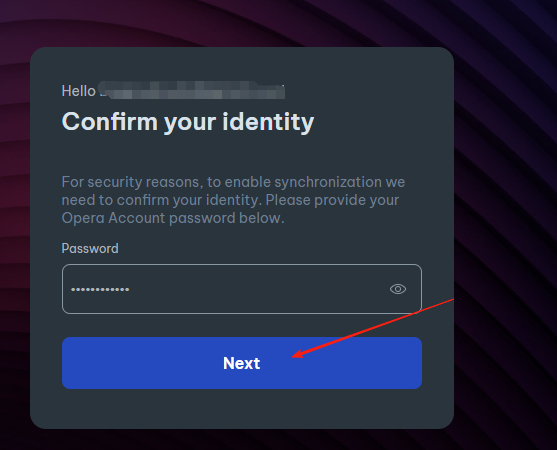
      For security reasons, to enable synchronization we need to confirm your identity. Please provide your Opera Account password below.

      He prompted me with this, but after I entered the password, I can't click 'Next'. There's no response when I click it. Why is that?
      b098f5e1-e4e7-4728-a73d-bd0fb61e6cd5-image.png

      Reply Quote 0
        leocg F 2 Replies Last reply
      • leocg
        leocg Moderator Volunteer @bogege last edited by

        @bogege Opera One, Opera GX or Opera Air?

        Reply Quote 0
          1 Reply Last reply
        • F
          fzmuhammad @bogege last edited by

          @bogege
          This usually occurs when Opera’s sync sign-in form can’t validate the password field properly, either due to a browser glitch, a network issue, or a script not loading.
          Here are the most common reasons and fixes:

          The form validation script didn’t load

          If your internet is slow or a content blocker (ad-block, tracker blocker, VPN, antivirus web shield) is running, Opera’s sign-in JavaScript might not have loaded, so the "Next" button stays inactive.

          Fix: Disable any extensions temporarily, refresh the page, and try again.

          Corrupted browser cache

          If the Opera sign-in page is cached incorrectly, the button can break.

          Fix: Clear cache + cookies for opera.com, restart Opera, and try again.

          Outdated Opera version

          Older builds sometimes have UI bugs with the account login modal.

          Fix: Update Opera to the latest version.

          Wrong field focus or invisible whitespace

          If the password box has trailing spaces or the cursor never actually registered a typed password, the “Next” button won’t activate.

          Fix: Retype the password carefully, no spaces, and ensure Caps Lock is correct.

          Server-side sync issue

          Sometimes Opera’s sync servers have temporary downtime, and the login form just won’t submit.

          Fix: Try again after a while or check Opera’s status page.

          If you want, I can also tell you a quick way to bypass the in-browser login and sign into your Opera account directly via the Opera web account page, which often works even when the in-app form is stuck.

          Do you want me to give you that direct login method?

          Reply Quote 0
            1 Reply Last reply
          • First post
            Last post

          Computer browsers

          • Opera for Windows
          • Opera for Mac
          • Opera for Linux
          • Opera beta version
          • Opera USB

          Mobile browsers

          • Opera for Android
          • Opera Mini
          • Opera Touch
          • Opera for basic phones

          • Add-ons
          • Opera account
          • Wallpapers
          • Opera Ads

          • Help & support
          • Opera blogs
          • Opera forums
          • Dev.Opera

          • Security
          • Privacy
          • Cookies Policy
          • EULA
          • Terms of Service

          • About Opera
          • Press info
          • Jobs
          • Investors
          • Become a partner
          • Contact us

          Follow Opera

          • Opera - Facebook
          • Opera - Twitter
          • Opera - YouTube
          • Opera - LinkedIn
          • Opera - Instagram

          © Opera Software 1995-
