• Login
    • Search
    • Categories
    • Recent
    • Tags
    • Users
    • Groups
    • Rules
    • Help

    Do more on the web, with a fast and secure browser!

    Download Opera browser with:

    • built-in ad blocker
    • battery saver
    • free VPN
    Download Opera

    [Solved]Can't Reset Passphrase

    Opera for Windows
    solved
    2
    16
    4195
    Loading More Posts
    • Oldest to Newest
    • Newest to Oldest
    • Most Votes
    Reply
    • Reply as topic
    Log in to reply
    This topic has been deleted. Only users with topic management privileges can see it.
    • A
      asker77 last edited by leocg

      This seems to be an old problem.

      I have no clue of what my passphrase was so I need to reset it. When I go to http://sync.opera.com/web/ it just takes me to a little video page which is no help whatsoever.

      Referring to using an old password is not a viable solution for this issue.

      Thank you.

      Reply Quote 0
        L 1 Reply Last reply
      • L
        leocg Moderator Volunteer @asker77 last edited by

        @asker77 Go to www.sync.opera.com and click on the reset passphrase link.

        After that, go to sync settings and change the passphrase.

        Reply Quote 0
          A 1 Reply Last reply
        • A
          asker77 @leocg last edited by

          @leocg

          Thank you, but there is no reset passphrase link on the page.

          Reply Quote 0
            L 1 Reply Last reply
          • L
            leocg Moderator Volunteer @asker77 last edited by

            @asker77 Are you logged in? Do you have any synced data?

            Anyway, did you try doing the second step?

            Reply Quote 0
              A 1 Reply Last reply
            • A
              asker77 @leocg last edited by

              @leocg

              Both machines are logged in.

              I've tried everything. I just continually get bounced back to the little video.

              Reply Quote 0
                L 1 Reply Last reply
              • L
                leocg Moderator Volunteer @asker77 last edited by

                @asker77 Forget about that part, did you try the second one?

                Reply Quote 0
                  A 1 Reply Last reply
                • A
                  asker77 @leocg last edited by

                  @leocg

                  Second one?

                  Reply Quote 0
                    L 1 Reply Last reply
                  • L
                    leocg Moderator Volunteer @asker77 last edited by

                    @asker77 Yep, the one that I mentioned above: https://forums.opera.com/post/326738

                    Reply Quote 0
                      A 1 Reply Last reply
                    • A
                      asker77 @leocg last edited by

                      @leocg

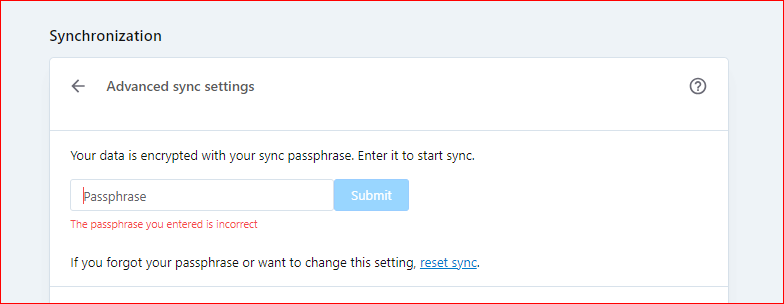
                      Yes. I've tried that many times.

                      Capture.PNG

                      Reply Quote 0
                        L 1 Reply Last reply
                      • L
                        leocg Moderator Volunteer @asker77 last edited by

                        @asker77 Don't try to login, be sure that you are logged out.

                        Than in Encryption settings, change or disable the passphrase.

                        Reply Quote 0
                          A 1 Reply Last reply
                        • A
                          asker77 @leocg last edited by

                          @leocg

                          I am unable to locate Encryption settings.

                          Reply Quote 0
                            L 1 Reply Last reply
                          • L
                            leocg Moderator Volunteer @asker77 last edited by

                            @asker77 You don't see it in opera://settings/syncSetup? It should be just below Pinboards selector.

                            Reply Quote 0
                              A 1 Reply Last reply
                            • A
                              asker77 @leocg last edited by

                              @leocg

                              Never did find it but somehow stumbled on to something but not sure where it was.

                              Anyway, Somehow I am logged in and syncing between the two computers. Now, How do I access sync tabs to the other computer?

                              On one computer I can see both computers. A Tabs page came from somewhere but I'm not sure from where.

                              On the other computer I can't see the tabs from the other computer.

                              Reply Quote 0
                                L 1 Reply Last reply
                              • L
                                leocg Moderator Volunteer @asker77 last edited by

                                @asker77 said:

                                How do I access sync tabs to the other computer

                                Click on the tabs icon in sidebar or go to opera://activity

                                Reply Quote 1
                                  A 1 Reply Last reply
                                • A
                                  asker77 @leocg last edited by asker77

                                  @leocg

                                  Thank you! Two more questions...how often does opera sync?

                                  And how to mark this thread as as solved?

                                  Thanks for sticking with me! You've been a big help!

                                  I remember back when Opera first came out. I cheer them on and hope that they get more attention sometime.

                                  Reply Quote 0
                                    L 1 Reply Last reply
                                  • L
                                    leocg Moderator Volunteer @asker77 last edited by

                                    @asker77 Not sure how often Opera syncs.

                                    Reply Quote 0
                                      1 Reply Last reply
                                    • Locked by  L leocg 
                                    • First post
                                      Last post

                                    Computer browsers

                                    • Opera for Windows
                                    • Opera for Mac
                                    • Opera for Linux
                                    • Opera beta version
                                    • Opera USB

                                    Mobile browsers

                                    • Opera for Android
                                    • Opera Mini
                                    • Opera Touch
                                    • Opera for basic phones

                                    • Add-ons
                                    • Opera account
                                    • Wallpapers
                                    • Opera Ads

                                    • Help & support
                                    • Opera blogs
                                    • Opera forums
                                    • Dev.Opera

                                    • Security
                                    • Privacy
                                    • Cookies Policy
                                    • EULA
                                    • Terms of Service

                                    • About Opera
                                    • Press info
                                    • Jobs
                                    • Investors
                                    • Become a partner
                                    • Contact us

                                    Follow Opera

                                    • Opera - Facebook
                                    • Opera - Twitter
                                    • Opera - YouTube
                                    • Opera - LinkedIn
                                    • Opera - Instagram

                                    © Opera Software 1995-