• Login
    • Search
    • Categories
    • Recent
    • Tags
    • Users
    • Groups
    • Rules
    • Help

    Do more on the web, with a fast and secure browser!

    Download Opera browser with:

    • built-in ad blocker
    • battery saver
    • free VPN
    Download Opera

    [Solved]Cant sign in to website using Opera GX

    Opera GX
    solved
    15
    41
    42044
    Loading More Posts
    • Oldest to Newest
    • Newest to Oldest
    • Most Votes
    Reply
    • Reply as topic
    Log in to reply
    This topic has been deleted. Only users with topic management privileges can see it.
    • ?
      A Former User @leocg last edited by

      @leocg No change, clicking login button keeps reloading/resetting the website.

      Reply Quote 1
        1 Reply Last reply
      • ?
        A Former User @leocg last edited by

        @leocg Todays update didnt help. Its still the same and not working.

        Reply Quote 1
          1 Reply Last reply
        • N
          neroshad last edited by

          Same thing, page just refreshes

          Reply Quote 1
            1 Reply Last reply
          • ?
            A Former User @leocg last edited by A Former User

            @leocg So I just installed LVL 2 (core: 68.0.3618.206) in a different location and now it works perfectly. I was trying to find any difference in the configurations between new and old, but as long as the old version executable is running, I cant start the new version executable - it will load the old instead.

            Once I quit the old version, auto update kicks in, installs the new version and breaks it again.

            Reply Quote 0
              1 Reply Last reply
            • ?
              A Former User last edited by

              I having the same issue. The page just refresh 😕

              Reply Quote 0
                1 Reply Last reply
              • W
                wuvusr last edited by

                Same(((

                Reply Quote 0
                  1 Reply Last reply
                • M
                  mgyahu @leocg last edited by

                  @leocg No change.

                  Reply Quote 0
                    1 Reply Last reply
                  • ?
                    A Former User @leocg last edited by

                    @leocg Private browsing is now working correctly (no change made that I am aware of), but of course each time the website is visited it will ask for login. Normal browsing still doesnt work.

                    Reply Quote 0
                      leocg ? M 3 Replies Last reply
                    • leocg
                      leocg Moderator Volunteer @Guest last edited by leocg

                      @jkels If it's working in a private window, it usually means that a extension or a setting is causing the problem.

                      Reply Quote -1
                        ? 1 Reply Last reply
                      • ?
                        A Former User @Guest last edited by

                        @jkels @leocg Private not working for me... like normal... @leocg u ask before how is the behavior in other browsers, work for me in the chromium edge.

                        Reply Quote 0
                          1 Reply Last reply
                        • ?
                          A Former User last edited by

                          @leocg I dont use any extensions outside of what is delivered with default installation, as for settings, the only thing I changed was the flag you suggested.
                          As mentioned before, version 68 runs fine.
                          I installed the most recent version on a new PC, but its not working there neither.
                          Is there a list of changed settings or new settings introduced with version 71?

                          Reply Quote 0
                            1 Reply Last reply
                          • M
                            mgyahu @Guest last edited by

                            @jkels Private working for me, with extensions.

                            Reply Quote 0
                              1 Reply Last reply
                            • ?
                              A Former User @leocg last edited by

                              @leocg I dont really understand why it was working in private in my last try, I cant find any relation as to why it doesnt any more.
                              The only consistent way I found to make it work is using an older version of Opera GX.

                              Reply Quote 0
                                leocg 1 Reply Last reply
                              • leocg
                                leocg Moderator Volunteer @Guest last edited by

                                @jkels So it's no longer working in a private window?

                                Reply Quote -1
                                  ? 1 Reply Last reply
                                • ?
                                  A Former User @leocg last edited by A Former User

                                  @leocg No, its not working anymore in private.
                                  As a sidenote: the patch I just recieved didnt help nor harm.

                                  I just deleted ..\AppData\Roaming\Opera GX Stable, though it didnt make it work either.

                                  Reply Quote 0
                                    1 Reply Last reply
                                  • E
                                    edyp87 last edited by

                                    It may be related to SameSite feature which came with recent chromium (link). It can break logins to pages where login state is based on cross-site cookies.

                                    You can try to disable opera://flags/#same-site-by-default-cookies and see if it helps.

                                    Reply Quote 2
                                      G K 2 Replies Last reply
                                    • ?
                                      A Former User @Guest last edited by A Former User

                                      Solved on my end.
                                      @leocg @Carpra @mgyahu @wuvusr @jnovance @neroshad @Rizzelph @dominielus
                                      found the culprit after using developer tools
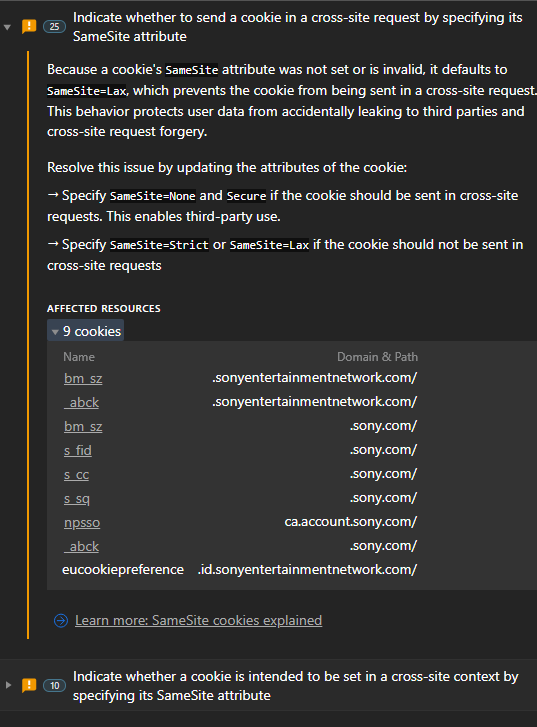
                                      dea5dc0c-87eb-493e-9cfa-3568be7830ae-image.png

                                      opera://flags/#same-site-by-default-cookies
                                      V71: Default [E]
                                      V68: Default [D]
                                      -> Disabling it in V71 allows login again.

                                      (I notified Sony to update their cookie settings as mentioned in the screenshot)

                                      Reply Quote 4
                                        ? R M D D 5 Replies Last reply
                                      • ?
                                        A Former User @Guest last edited by

                                        @jkels yes it works!! thank you sm!

                                        Reply Quote 0
                                          1 Reply Last reply
                                        • R
                                          Rizzelph @Guest last edited by

                                          @jkels worked!!! thank you very much!

                                          Reply Quote 0
                                            1 Reply Last reply
                                          • M
                                            mgyahu @Guest last edited by

                                            @jkels Thank you! Worked.

                                            Reply Quote 0
                                              1 Reply Last reply
                                            • First post
                                              Last post

                                            Computer browsers

                                            • Opera for Windows
                                            • Opera for Mac
                                            • Opera for Linux
                                            • Opera beta version
                                            • Opera USB

                                            Mobile browsers

                                            • Opera for Android
                                            • Opera Mini
                                            • Opera Touch
                                            • Opera for basic phones

                                            • Add-ons
                                            • Opera account
                                            • Wallpapers
                                            • Opera Ads

                                            • Help & support
                                            • Opera blogs
                                            • Opera forums
                                            • Dev.Opera

                                            • Security
                                            • Privacy
                                            • Cookies Policy
                                            • EULA
                                            • Terms of Service

                                            • About Opera
                                            • Press info
                                            • Jobs
                                            • Investors
                                            • Become a partner
                                            • Contact us

                                            Follow Opera

                                            • Opera - Facebook
                                            • Opera - Twitter
                                            • Opera - YouTube
                                            • Opera - LinkedIn
                                            • Opera - Instagram

                                            © Opera Software 1995-
