Looks like the problem got fixed with the update I got today!
R
Posts made by rplaye
-
RE: Display glitches on element corners on Android 16Opera for Android
-
RE: Display glitches on element corners on Android 16Opera for Android
@leocg OK thank you, so this seems to point out to a Samsung specific issue.
I checked on my old phone, a Galaxy S22 running One UI 8 / Android 16, and the glitch also appears. So it's not purely a One UI 8.5 issue.
It would be interresting to have feedback from other forum members if they have the issue on other phones, or maybe if they don't have the issue on a Samsung phone to be able to identify which models / OneUI versions create the issue.
-
RE: Display glitches on element corners on Android 16Opera for Android
Interresting... I hadn't specified it in my post but my phone is a Galaxy S24+ running One UI 8.5 / Android 16.
All the other posters having the problem seem to be also having Samsung phones on One UI 8.5 / Android 16.
@leocg Out of curiosity what phone and android version are you running?
-
RE: Display glitches on element corners on Android 16Opera for Android
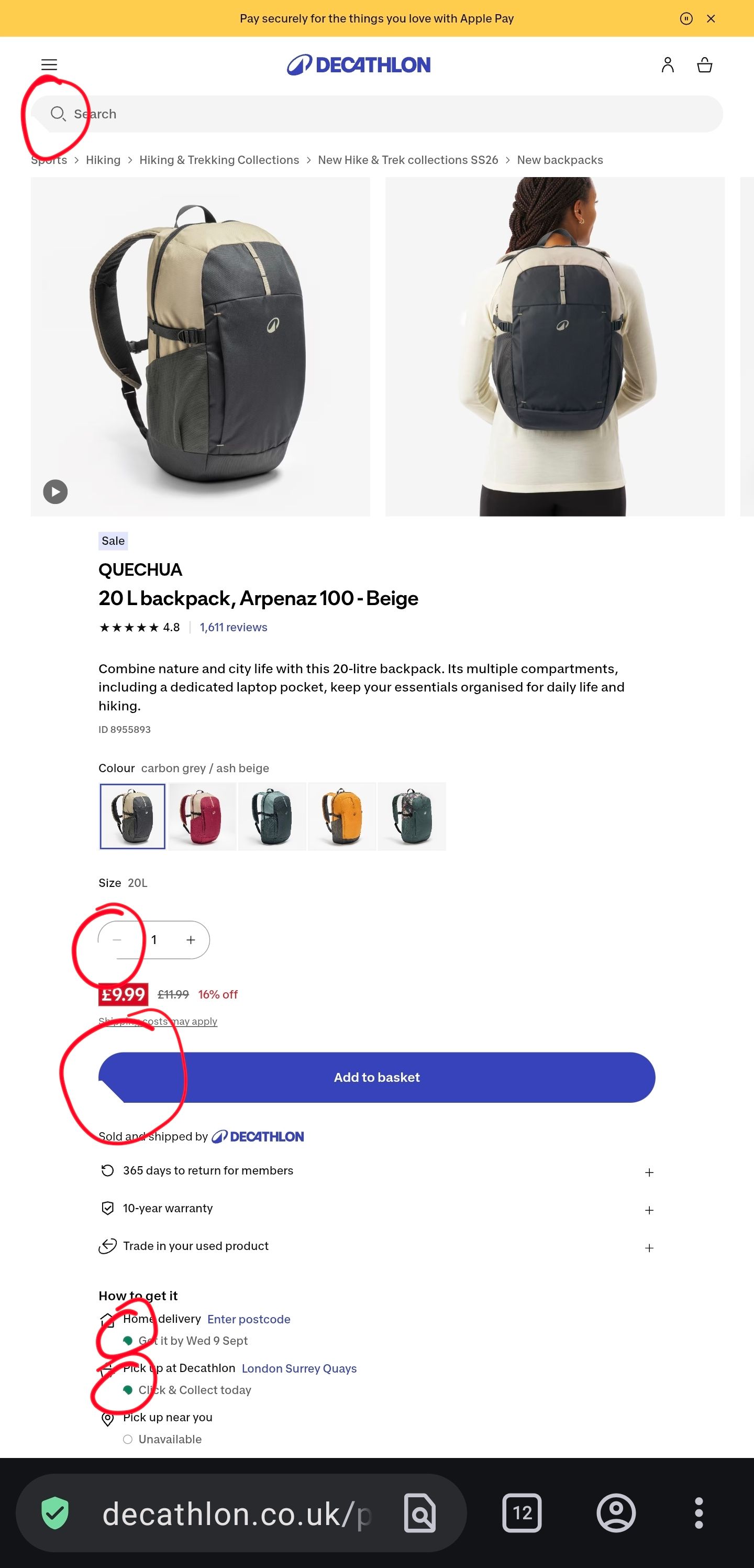
I'm having the same issues. It seems the lower left of many rounded elements are being cut off. Below is an example where I have circled the glitches, the url is https://www.decathlon.co.uk/p/20-l-backpack-arpenaz-100-beige/368816/c71c407m8955893
-
RE: Unable to interact on a zone below the address bar.Opera for Android
Thank you for creating this post, I have been facing the same issue which makes navigating many websites very cumbersome.
I have started noticing this issue in late October so I think it must have appeared with either version 72.1.3767.68311 or 72.2.3767.68393.
-
RE: Speed dial links appear after deletingOpera for Android
I have submitted a bug report, let's see if anything comes out of it.
-
RE: Speed dial links appear after deletingOpera for Android
I have noticed the exact same problem lately, although with links to other websites so it does not seem to be website specific.
-
RE: Extension upgrade requires additional permissions...Opera for computers
I created a shortcut to Opera on my desktop, then right clicked on it to go to its properties, and in the Target field I added the
--show-component-extension-optionswhich in my case made the full target"C:\Program Files\Opera\launcher.exe" --show-component-extension-optionsThen start Opera from that shortcut and go to the extensions settings to update the Rich Hints Agent extension.
I'm not sure if there's an easier way to do this.
-
RE: Extension upgrade requires additional permissions...Opera for computers
@johnd78 said in Opera asking for permission to use user data:
I think I found a workaround. Start Opera with
--show-component-extension-options, after asking for permission, go to the extensions manager and update Rich Hints Agent.I just found this in another thread, tried it and it now seems to be fixed.
-
Allow to remember passwords for all websites (Opera for Android)Suggestions and feature requests
At the moment it seems the password manager in Opera for Android complies with the autocomplete=off tag in sites that want to prevent passwords from being saved. While it as its legitimate uses (banks for examples) unfortunately many other sites use it even for non sensitive contents, which is why most other browsers seem to either ignore this tag by default, or offer an option to do so.
Can we please have an option in Opera for Android to allow to remember passwords for all websites.
-
RE: Opera for android not saving passwordsOpera for Android
This issue has been going on for at least a couple of years. The problem is that Opera does not have a setting to ignore the websites that have the password autosave disabled. For example banks do that for a good reason, but other websites do that too and unfortunately Opera unlike most other browsers do not give the option to override this behavior. This is the main reason why I cannot use Opera exclusively on my phone.
Devs, if you read this thread, please include an option or a flag to enable password saving on all sites.
-
RE: Save passwords on pages with autocomplete=offOpera for Android
It's been one year since my last post, and I haven't noticed any change. Has any progress been made towards giving the users a choice to remember passwords on pages with autocomplete=off? Thanks!
-
RE: Why does opera refresh page when switching between tabs or after phone lock?Opera for Android
I have been suffering from this issue for about a year now, initially on a Galaxy S4 and then on an S6. I initially thought the culprit was Samsung's Touchwiz as has been stated in the posts above, however I now believe it is not the case, as I got a Oneplus X a few weeks ago, running very close to stock android, and am facing the exact same issues. Also, after using my Galaxy S6 over many months I have very rarely run into apps other than Opera having this problem. Can the developpers please comment on this issue? Are there any plans for fixing this? Thanks!
- Opera for Android
-
RE: Save passwords on pages with autocomplete=offOpera for Android
This is exactly what I'm looking for, however this flag only exists on the Mac, Windows and Linux of Opera, and not for Android.
-
RE: Save passwords on pages with autocomplete=offOpera for Android
No comments? Am I the only person who's anoyed by this?
-
RE: Opera mobile reloading tabs after switching tabs and appsOpera for Android
I'm having the same problem with my Galaxy S6 as well. It used to happen too on my Galaxy S4 previously, although not as frequently. The most anoying is when trying to switch back to Opera when offline, the page is briefly displayed for a fraction of a second, then Opera tries to reload it and loses the content since there is no connection...
-
Save passwords on pages with autocomplete=offOpera for Android
Some of the pages I visit have the tag autocomplete=off, thus preventing opera from saving my logon credentials. Other browsers, for example firefox, either disregard this tag by default, or at least offer an option to disregard it. I searched the forum and it seems there used to be a way to do that in opera://flags, but the option seems to be gone. Is there a way to do this at the moment? If not, would it be possible to implement this option? I love Opera, but I'm finding myself forced to use another browser for some of the pages I visit daily, so this back and forth between browsers is becoming tedious.