@Opera-QA-Team I already understand. But why didn't the browser tell me that my version was rejected a long time ago? Am I supposed to constantly read blogs to know which browser version to delete and which to keep? Why didn't you display a big browser notification when you ended support for the beta version? What a disregard for the user... Anyway, thanks for responding.
P
Posts made by Pengguin
-
RE: Opera 137.0.6015.0 developer updateBlogs
-
RE: Opera 137.0.6015.0 developer updateBlogs
@Opera-QA-Team Hello,
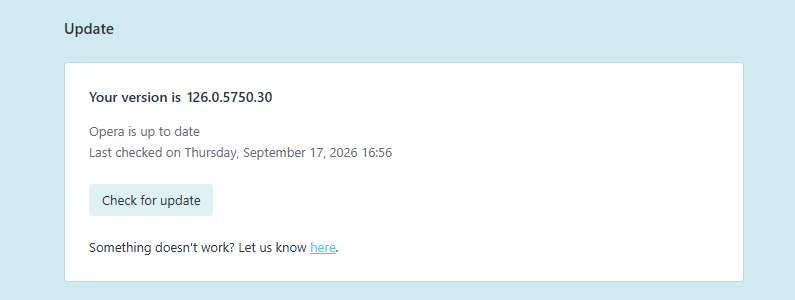
Thanks for the reply, but take a look at the attached screenshot of my opera://update page.
I didn't stay on version 126 out of negligence. I trusted your built-in update mechanism. Every single time I checked for updates, Opera
DeveloperBeta* explicitly assured me: "An updated version is used" (checked right now, September 17, 2026).The entire reason users choose the Developer stream is to test the latest features. Instead, the browser silently broke its update cycle and stranded me nearly a year behind, while actively reporting that no updates exist. If the updater fails to fetch delta patches across older builds, it should trigger a full download or flag an error — not falsely claim that the browser is up to date.
Please forward this to the browser/updater team as a critical update-loop bug. A browser should never report "latest version" when it is 11 major releases behind.
-
RE: Opera 137.0.6015.0 developer updateBlogs
Hi Opera Desktop Team!
Found a reproducible visual repaint glitch in the Bookmarks Bar dropdown menu during Drag & Drop:
When dragging/reordering a bookmark inside an open folder dropdown, the item visually snaps to the very bottom of the menu during the drag operation (reopening the folder reveals that the item was actually saved at the intended position).I have submitted an official bug report via the Bug Report Wizard / Jira Service Desk:
 Ticket ID:
 BUG-28532- Platform: Windows 11 x64
- Affects: Opera Beta 126.x+ / Developer builds
Could you please take a look at
BUG-28532in the internal tracker? Thank you! -
[UI/Light Theme] [Suggestion]Extremely poor visual contrast on Tab Bar: Active tab blends into inactive tabs, appearing as one flat layerTab Islands, Tabs and Workspaces
Problem Statement
When using Opera in the Light Theme (White Theme) with 10-15 tabs open, the active (currently viewed) tab is virtually indistinguishable from the background and adjacent inactive tabs:- Single-layer illusion: The tab strip looks like a single continuous flat surface without clear borders, elevation, or visual separation between tab #1, tab #2, etc.
- Poor active state contrast: The color difference (luminance contrast) between the active tab's pill/container and the inactive tabs is barely noticeable in daytime lighting. Users constantly have to squint or search with their eyes to locate the tab they are currently working on.
Proposed Improvement
- High-contrast active tab background: Make the active tab background distinctly brighter or add a subtle soft drop-shadow / border outline to separate it from inactive tabs.
- Visual accent indicator: Introduce an optional or default accent indicator line (or colored top border / dot) for the active tab, consistent with modern WCAG accessibility guidelines.
- Subtle dividers between inactive tabs: Add subtle divider lines between inactive tabs in the Light Theme so users can clearly see where one tab ends and the next begins.
-
Setting to add newly created bookmarks to the TOP of folders (First-In / Chronological order)Suggestions and feature requests
Summary
Add a user setting inopera://settingsto configure the insertion order for newly created bookmarks: "Add new bookmarks to: Top of folder (Newest first) / Bottom of folder (Default)".Problem Statement
Currently in Opera, whenever a user bookmarks a page (via the address bar heart icon,Ctrl+D, or context menu), the new bookmark is strictly appended to the very bottom of the selected folder.
For users who maintain large folders (30â100+ links), every newly added link requires either:- Scrolling through the entire lengthy dropdown list every single time to access the recently added item; or
- Manually dragging the bookmark from the bottom to the top.
Proposed Solution
Provide a simple toggle inopera://settings(under the Bookmarks section):- Bookmark placement order:
- Top of folder(inserts new bookmarks at
index: 0) - Bottom of folder(classic Chromium append behavior)
This setting should apply both when saving to the default folder and when a different folder is selected in the heart button popup dialog.