@unit8805: this is already in progress.... will be ready very soon!!
Do more on the web, with a fast and secure browser!
Download Opera browser with:
@unit8805: this is already in progress.... will be ready very soon!!
@funkyeuphemism: wouldn't a switch be an overkill? How many times do you switch everyday?
@naltam: why would you keep switching between vertical and horizontal tabs?
@17misha: A keyboard shortcut is also needed to quickly switch between horizontal and vertical tab layouts.
Why do you need a shortcut for switching? what makes you keep jumping frequently between vertical and horizontal tabs?
I switched to vertical once and that's it!
@junkers hey, why on the right side? can you explain your flow and why the right side works better than left side?
@jojo0587: when you have a lot of open tabs you have to move the mouse cursor or scroll all the way down to see the latest open tabs, now they open at the top so they are more reachable
when i comes to opening a bookmark or history link, this did not change they just open after your current active tab as they always did
@Arthur2828 appreciate your feedback, we love that feature and giving it so much attention now, stay tuned over the next few weeks and keep the ideas coming
@Arthur2828 fair point with smaller screen sizes, which Atlas browser were you using? the one from OpenAI? it will be retired on Aug 13th
@Reitei17 currently no tooltip is supported on vertical tabs, as it is quite annoying and stands in your way
@Arthur2828 interesting idea, we consider already, but wouldn't it be the case that you want to see the tabs all time but just hide the sidebar apps? what would you benefit when you autohide everything?
Vertical tabs are released in Opera One
How Vertical Tabs work in Opera One?
When you’re browsing with several tabs open and frequently need to switch between them – be it for work, studies, research, or even some shopping – you might want to switch to the vertical tab strip in Opera One. It makes it easier for you to see which tab is which, as the vertical disposition of the layout avoids the title of the tab from shrinking when you have many tabs open.
How to enable Vertical Tabs in Opera One?
Right click any tab in the current tab bar and select “Use vertical tab strip”
https://blogs.opera.com/news/2026/07/how-vertical-tabs-work-in-opera-one/
@cibron @Craig6969 ~@mattbizio @mixchild @mtbf99 @obahareth @parasite666 @realmaxmillion vertical tabs are live now in Opera One!
https://blogs.opera.com/news/2026/07/vertical-tabs-upgraded-google-lens-opera-one/
Vertical tabs is live!
How to activate Vertical Tabs in Opera One
The easiest way to access Vertical Tabs in Opera One is to right click any tab in your tab bar and select the option that says “Use vertical tab strip” at the very bottom of the menu. When using Vertical Tabs, you can switch back to the horizontal tab strip in the same way: right click any tab, and go to the bottom option of the menu that says “Use horizontal tab strip.”
Another way to access this feature is through the Easy Setup, which sits to the right of the browser’s toolbar, at the top right side of your screen. Once you open it you’ll find the option “Use vertical tab strip” under the Layout section, and you can toggle the feature on and off from here too.
https://blogs.opera.com/news/2026/07/vertical-tabs-upgraded-google-lens-opera-one/
@kljslkj: men 3enaya bas keda  Happy to hear we have Opera fans from Egypt!
@David-Ionescu77 Hi David, i just passed your comments to our team, and it made their day! thank you for trusting us, we are so proud to have you!
@vladbabinets The vertical tab strip is currently resizeable you can make it as small as the fav icon of the opened pages, is there a specific reason to why you would like to fully hide it?
@AkoreJapede Update the browser to the latest version. We released a performance update today (version 116.0.5366.171)
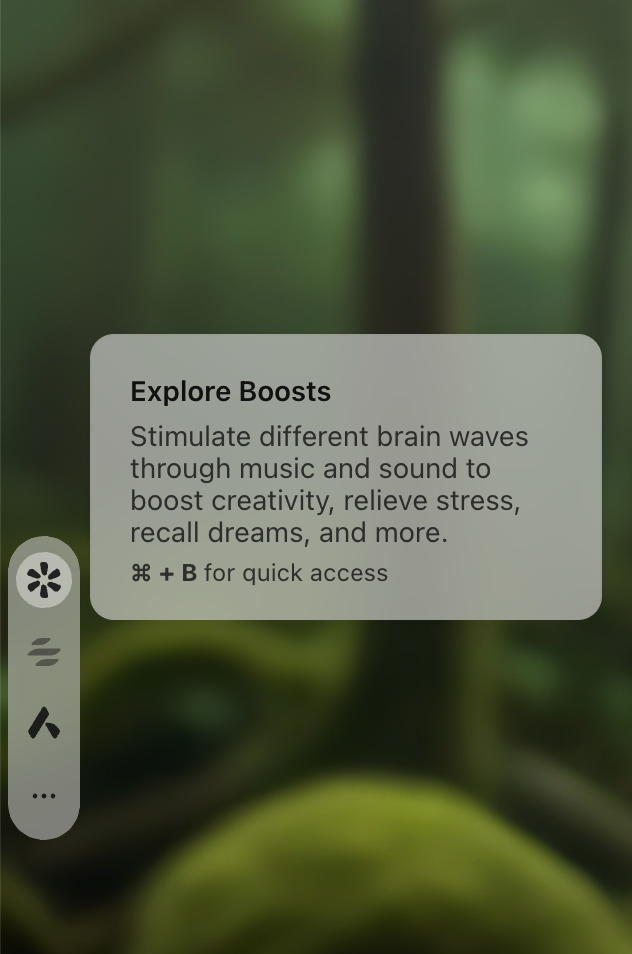
@BongLao You can access binaural beats through the boost functionality in Opera, just go to the sidebar and click on this icon in the image below