@burnout426 said in Can't install latest Opera on Windows 10 Enterprise:
"C:\Users\Thinker\AppData\Local\temp"
Thank you very much!
Tried your method, but the situation is the same.
Have no idea what to do.
Do more on the web, with a fast and secure browser!
Download Opera browser with:
@burnout426 said in Can't install latest Opera on Windows 10 Enterprise:
"C:\Users\Thinker\AppData\Local\temp"
Thank you very much!
Tried your method, but the situation is the same.
Have no idea what to do.
@burnout426
There are several log files created in AppData\Local\Temp.opera\Opera Installer
This is the error info:
[0611/093207.872:INFO:wininet_impl.cc(338)] Starting download from https://autoupdate.geo.opera.com/api/prefs/?product=Opera&version=108.0.5067.40
[0611/093207.922:INFO:wininet_impl.cc(611)] Initial request completion
[0611/093207.922:INFO:wininet_impl.cc(635)] Could not get Content-Length from response: Error (0x13D) while retrieving error. (0x2F76)
[0611/093207.923:INFO:wininet_impl.cc(885)] Download completed
[0611/093207.923:INFO:pref_default_overrides_fetcher.cc(66)] Default prefs overrides fetched successfully
[0611/093207.923:INFO:main_process_installer_runner_impl.cc(263)] Informing the installer backend that the package is ready
[0611/093217.895:ERROR:resource_l10n_handler.cc(57)] Failed to find string: The specified resource name cannot be found in the image file. (0x716)
[0611/093217.896:ERROR:resource_l10n_handler.cc(57)] Failed to find string: The specified resource name cannot be found in the image file. (0x716)
[0611/093222.394:ERROR:installer_controller.cc(371)] Installer error: Installer process did not complete successfully.
[0611/093222.394:INFO:main_process_installer_runner_impl.cc(233)] Stopping installer backend (if running)
[0611/093222.552:INFO:installer_ui_controller.cc(375)] Handling pending error
[0611/093222.553:INFO:root_screen.cc(237)] Displaying error: "An error occurred while attempting to install Opera!" and don't make full package button visible
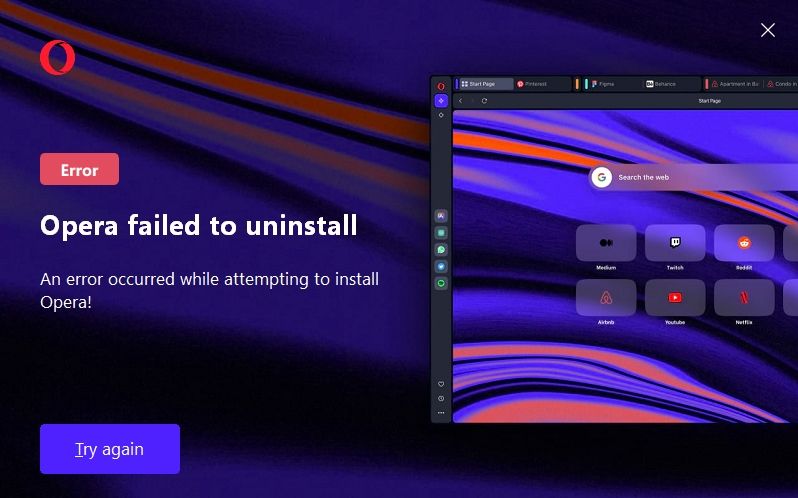
Opera can't be installed, can't be uninstalled.
A lot of people have same problem.
Is it not possible to understand why and fix the cause?
I'm willing to provide any diagnostic information.
After all, it is also useful for Opera itself to find out the cause of the error and fix it.
@burnout426 said in Can't install latest Opera on Windows 10 Enterprise:
"C:\Users\Thinker\AppData\Local\temp"
Thank you very much!
Tried your method, but the situation is the same.
Have no idea what to do.
@chawoobie Tried 10 times with Revo Uninstaller, used offline / online installer = same result.
@leocg Tried latest current version of online installer - same thing.
Yes I can install Opera_89.0.4447.83_Setup_x64.exe but 1) after installation it constantly requires updates. 2) for some reason this old version doesn't support google chrome plugins, they just won't install
Guys,
Trying to install latest Opera_107.0.5045.21_Setup_x64.exe on Microsoft Windows 10 Enterprise 10.0.19045 N/A Build 19045
I keep getting strange errors: Some files are locked in installation folder.
I don't think they are locked actually, logs are attached..

[0217/031731.454:INFO:installer_main.cc(453)] Opera installer starting - version 107.0.5045.21 Stable
[0217/031731.454:INFO:installer_main.cc(456)] Command line: "C:\DISTRIB\NETWORK\Browsers\Opera\Opera_107.0.5045.21_Setup_x64.exe" --backend --install --import-browser-data=0 --enable-stats=1 --enable-installer-stats=1 --consent-given=1 --general-interests=1 --general-location=1 --personalized-content=1 --personalized-ads=1 --launchopera=1 --installfolder="C:\Users\Thinker\AppData\Local\Programs\Opera" --profile-folder --language=en --setdefaultbrowser=1 --pintotaskbar=1 --pintostartmenu=1 --run-at-startup=1 --show-intro-overlay --server-tracking-data=server_tracking_data --initial-pid=32712 --package-dir="C:\Users\Thinker\AppData\Local\Temp\.opera\Opera Installer Temp\opera_package_202402170317261" --session-guid=cd360cf3-496f-43af-a342-929990660a73 --server-tracking-blob=NjFkODk4ZWJjMmNmNGQ1YjllMzkyYmJlMjJiYmQ5MDY3ZjdhY2U0Y2Y1NWMzYTQwM2Q2Zjk0N2YzZTU1NDA1Yzp7InByb2R1Y3QiOnsibmFtZSI6Ik9wZXJhIn0sInN5c3RlbSI6eyJwbGF0Zm9ybSI6eyJhcmNoIjoieDg2XzY0Iiwib3BzeXMiOiJXaW5kb3dzIiwib3BzeXMtdmVyc2lvbiI6IjEwIiwicGFja2FnZSI6IkVYRSJ9fX0= --wait-for-package --initial-proc-handle=840A000000000000
[0217/031731.455:INFO:installer_main.cc(475)] Install folder from command line: C:\Users\Thinker\AppData\Local\Programs\Opera
[0217/031731.455:INFO:installer_main.cc(478)] Uninstall:0
[0217/031731.455:INFO:installer_main.cc(479)] Silent:0
[0217/031731.455:INFO:installer_main.cc(480)] Run Immediately0
[0217/031731.455:INFO:installer_main.cc(482)] Backend1
[0217/031731.455:INFO:installer_main.cc(483)] Inside package0
[0217/031731.455:INFO:installer_main.cc(484)] Autoupdate:0
[0217/031731.455:INFO:payload_manager_impl.cc(97)] Reading Payload
[0217/031731.455:INFO:installer_main.cc(606)] Found full package
[0217/031731.633:INFO:settings_impl.cc(785)] Found 6 paths for standalone install mode.
[0217/031731.634:INFO:resource_l10n_handler.cc(113)] Language not in the available languages list:
[0217/031731.634:INFO:resource_l10n_handler.cc(119)] Trying language from system preferred list: en-US
[0217/031731.634:INFO:resource_l10n_handler.cc(162)] Retrying after adjustments: en-US
[0217/031731.634:INFO:resource_l10n_handler.cc(119)] Trying language from system preferred list: en
[0217/031731.678:INFO:settings_impl.cc(1327)] Install folder set: C:\Users\Thinker\AppData\Local\Programs\Opera
[0217/031731.678:INFO:settings_impl.cc(1382)] Operation: 2
[0217/031731.679:INFO:installer.cc(196)] Beginning installation
[0217/031731.679:INFO:permission_grantor_impl.cc(134)] Write privileges for install folder: 1
[0217/031731.684:INFO:installation_package_impl.cc(70)] Need to wait for actual package
[0217/031731.917:INFO:installation_package_impl.cc(172)] Package is ready
[0217/031731.921:ERROR:replace_file_operation.cc(55)] File replace failed: -5
[0217/031731.921:INFO:installer.cc(842)] Installation cancelled
[0217/031731.922:ERROR:installer.cc(830)]
Cannot create subfolder for package.
[0217/031731.922:INFO:backend_process_installer_runner_impl.cc(187)] Installer backend exiting
I need this option very much too!
Chrome and Mozilla have that!