I have the same issue, my PC opera logs me out of synchronisation all the time. There've been some updates so I thought it has been fixed, but it's not. It keeps me logged for like 30 seconds and I'm out. Very annoying, anyone here can help?
M
Best posts made by mychakk
-
RE: Syncronization keeps logging out.Synchronization
-
RE: Flow logs me out of Opera accountOpera for Windows
Same problem here, it also logs me out of my Opera account all the time, like after 30-60 sec. My Flow does not work, tabs are not sync'ed because I'm logged out on PC all the time. Could it be some firewall working? I'd really want this fixed, I needed tabs from PC on my phone earlier and couldn't access them. Really annoying. Sync has always been one of the best Opera features, I'm really annoyed it doesn't work. I've reported this bug already, no reply and the issue is not fixed. There was another thread about it, but no answer there either. Would really appreciate some help how to fix it.
-
Server verification failureOpera Mini
I have an issue with my Opera Mini on my phone. I can't open any website on it, the only info I get is that there some kind of server certification failure and that I should check the settings of the date and time of the device. But I have an automatic setting for the date and time, And I don't know where else to check. I can't access any of the websites, but on Chrome everything works fine. Other apps use data and connect without problems. How can I fix this? and if I need to re-install Opera, can I save the sessions and all my opened tabs somehow?
-
RE: Other devices active tabsOpera for Windows
@leocg where can I find the "other devices opened tabs" on the side bar? I tried to look for it in settings, I tried to look for info in help guide. I have an impression that this feature has disappeared with latest update. And it's the main reason I use this browser! Also I second the question above, I don't want to have that search option there! I want he other devices button for quick access. If it possible, please make screen prints how can I set up the feature on side bar or top bar. Thank you!
-
RE: Server verification failureOpera Mini
@mychakk EDIT: I tried to reinstall the Opera Mini, but it didn't help at all, not a single website, including Opera forums opens. There is only the information about the server certificate failure. I tried both wifi, and mobile data, the same result. And hour ago everything worked fine, now nothing works on Opera mini. I tried switched off and on my phone, didn't help either.
Does anyone have the same issue?
What is wrong with Opera in general lately? There are also some serious issues with Windows version.... -
RE: Other devices active tabsOpera for Windows
@leocg Hi! It's about my previous message. I managed to solve the problem, there was some sync issue, I have a new comupter and tried to set up all software. But now the extention/quick access to tabs button is on the sidebar so I can quikly access them from there. I still think it would be nice to have the recently closed/tabs quick access on the main top bar like it used to be in older versions. If you can pass this suggestion, it will be great. Wish you all the best!
-
RE: Other devices active tabsOpera for Windows
@MrPatyk As I said, I have a new computer so I did the set up from scratch. I was setting Opera up when I saw the missing button on top. I think I saw it yesterday on the sidebar but I couldn't find it today at all. In the end I logged out of Opera and logged in once more. Once the synchronisation finished, the Tabs Icon/button apperaed on the sidebar.
To do sync you can go here: https://help.opera.com/en/opera36/sync-your-browser/
or just click here:
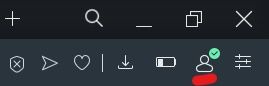
Click on the human bytton or check if it's with a tick like on this picture above (this is in your right top corner).
Once you are logged in, you should see the Tabs Icon in the side bar like here:
 The sidebar is on the left side of Opera and I have it permamnently visible. You can do this by going to settings or clicking on the last button next to the human one here: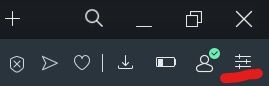
I still hope to not have this in top, but the tab button there:

hope this helps. -
RE: Discord - white screen on login pageOpera for Windows
@burnout426 said in Discord - white screen on login page:
As a test, not a solution, does it load fine in a test standalone installation?
unfortunately that is not an option at all, unless there is a way to save the session, as I have about 10 workspaces with tons of tabs for work and volunteer work. so yeah. thanks anyway
Thanks I tried this before I posted here and mentioned this in my original post as it didn't help. But the latest update of the browser seemed to have helped, fingers crossed.
thanks for trying to help anyway:)
Latest posts made by mychakk
-
RE: Discord - white screen on login pageOpera for Windows
@burnout426 said in Discord - white screen on login page:
As a test, not a solution, does it load fine in a test standalone installation?
thanks for the suggestion, that one is a the last resort, as I have like tons of workspaces with even more tabs in them, and can't lose that as they are connected with work and volunteer work too.
thankfully latest update seemed to have helped as the issue resolved itself on its own
-
RE: Discord - white screen on login pageOpera for Windows
@burnout426 said in Discord - white screen on login page:
As a test, not a solution, does it load fine in a test standalone installation?
unfortunately that is not an option at all, unless there is a way to save the session, as I have about 10 workspaces with tons of tabs for work and volunteer work. so yeah. thanks anyway
Thanks I tried this before I posted here and mentioned this in my original post as it didn't help. But the latest update of the browser seemed to have helped, fingers crossed.
thanks for trying to help anyway:) -
Discord - white screen on login pageOpera for Windows
Hello everyone,
I have tried to see if the issue is solved, but couldn't find anything recent, so I'm posting it here.I've just noticed that Discord doesn't work on my Opera. I have the basic one on desktop. The side bar is black and the app doesn't load there at all. When I try to access the website itself I can open the discord.com page, but when I click on login button I get white screen. Reloading doesn't work. Neither helped clearing of the cache.
I have the Windows app and it works fine, and I tried to open it on Edge, and there was no issue there either. So it looks like the problem lies with my beloved Opera.
I think I might have done an updated of the browser today (while closing and opening it), and the issue has been probably happening less than 24h. Not sure if I'm the only one with it atm, or if it's a bigger thing.
thanks in advance for any help you can give me.
PS I tried to report this, but I'm unsure which page to do it on...
-
RE: Flow logs me out of Opera accountOpera for Windows
Same problem here, it also logs me out of my Opera account all the time, like after 30-60 sec. My Flow does not work, tabs are not sync'ed because I'm logged out on PC all the time. Could it be some firewall working? I'd really want this fixed, I needed tabs from PC on my phone earlier and couldn't access them. Really annoying. Sync has always been one of the best Opera features, I'm really annoyed it doesn't work. I've reported this bug already, no reply and the issue is not fixed. There was another thread about it, but no answer there either. Would really appreciate some help how to fix it.
-
RE: Syncronization keeps logging out.Synchronization
I have the same issue, my PC opera logs me out of synchronisation all the time. There've been some updates so I thought it has been fixed, but it's not. It keeps me logged for like 30 seconds and I'm out. Very annoying, anyone here can help?
-
RE: Other devices active tabsOpera for Windows
@Gustistereo I work on Windows, and my version is 70.0.3728.95, and I have both the Tabs button (no issues there from what I've see so far) on the side bar, and the search in tabs button on the top bar, but there definitely seems to be only the list of opened and closed tabs of the device (not all the devices).
-
RE: Other devices active tabsOpera for Windows
@MrPatyk hi, I didn't notice the option is gone until you mentioned it, but if you click on the magnifying glass, there is a set of closed tabs, so I think they may have merged the old function with this new button.
As for the Tabs icon, if you click on the three dots at the bottom of the side bar you should be able to add the features you have there, and one of those is Tabs Button, I added it I think two or three days ago.
-
RE: Other devices active tabsOpera for Windows
Maybe the developers' flag is no longer available?
also try entering just flags:
opera://flags
then type search in the box that opens as you enter the flags,
then you look for: Improved search in open tabs
and try to disable it
@CorneyTheGhost @MESWEB-0 - Opera Mini
-
RE: Server verification failureOpera Mini
@leocg I haven't tried the data saving mode at all.
In the end I downloaded Opera for Android, and logged there and that version works fine. BUT! as I was trying to reinstall Opera Mini (before getting Opera for Android), it not only installed the app again, it also saved all my settings, speed dial, and ...all opened tabs (which was a positive surprise although I didn't know if it's suppose to work like that), but the issue with server certification was still not solved.
So I decided to try Opera for Android, and as I was setting it up, I tried to recreate all my speed dial from Opera Mini, so I downloaded it again (once again it saved all my settings and all opened tabs), AND I noticed that the websites started working fine by then.
So now both Opera Mini and Opera for Android works fine and I have both of them on my phone.
I'm going to keep both apps on my phone, unless it's not advisable to do so?