• Login
    • Search
    • Categories
    • Recent
    • Tags
    • Users
    • Groups
    • Rules
    • Help

    Do more on the web, with a fast and secure browser!

    Download Opera browser with:

    • built-in ad blocker
    • battery saver
    • free VPN
    Download Opera

    Updating the Opera One browser to last version doesn't work with ffmpeg library

    Opera for Linux
    4
    6
    258
    Loading More Posts
    • Oldest to Newest
    • Newest to Oldest
    • Most Votes
    Reply
    • Reply as topic
    Log in to reply
    This topic has been deleted. Only users with topic management privileges can see it.
    • L
      LeviaKirin last edited by

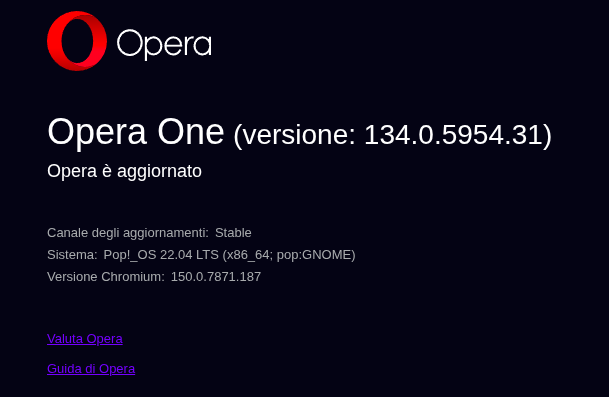
      Schermata del 2026-08-05 15-16-20.png

      After updating to the last version the browser would not open and terminal will return the error:

      opera: symbol lookup error: opera: undefined symbol: av_dynamic_hdr_smpte2094_app5_to_t35
      

      I noticed that the problem resolves if I remove the libffmpeg.so file from the lib_extra folder but then I cannot watch any video on the browser.
      I tried newer libffmpeg.so but they gave error:

      opera: /lib/x86_64-linux-gnu/libc.so.6: version `GLIBC_ABI_DT_RELR' not found (required by /usr/lib/x86_64-linux-gnu/opera-stable/lib_extra/libffmpeg.so)
      

      Does anyone have any idea about this?

      Reply Quote 0
        T 1 Reply Last reply
      • T
        tephyr @LeviaKirin last edited by

        @LeviaKirin Also hit this problem; the only site in my limited testing that works is Youtube.

        Reply Quote 0
          1 Reply Last reply
        • A
          alexs last edited by alexs

          Here’s how it looks on my system (Debian/unstable):
          In /usr/lib/x86_64-linux-gnu/opera-stable/, I have a folder named lib_extra:
          /usr/lib/x86_64-linux-gnu/opera-stable/lib_extra/
          In $HOME/.local/, I have a folder named opera:
          $HOME/.local/lib/opera/

          I always place the appropriate libffmpeg.so file in $HOME/.local/lib/opera/ (without root privileges).
          Then I create a symlink from $HOME/.local/lib/opera/libffmpeg.so to /usr/lib/x86_64-linux-gnu/opera-stable/lib_extra/libffmpeg.so:
          As root:
          ln -s /home/[username]/.local/lib/opera/libffmpeg.so /usr/lib/x86_64-linux-gnu/opera-stable/lib_extra/libffmpeg.so

          Currently, the libffmpeg.so file from the Vivaldi browser is included there.
          As a user (without root privileges):
          cp /var/opt/vivaldi/media-codecs-8.1/libffmpeg.so $HOME/.local/lib/opera/libffmpeg.so

          It works for me without any problems.

          Of course, you can copy the libffmpeg.so file directly—without the symlink—into the lib_extra folder:
          cp /var/opt/vivaldi/media-codecs-8.1/libffmpeg.so /usr/lib/x86_64-linux-gnu/opera-stable/lib_extra/

          Reply Quote 0
            L 1 Reply Last reply
          • L
            LeviaKirin @alexs last edited by

            @alexs I tried the Vivaldi one and it doesn't work

            Reply Quote 0
              A 1 Reply Last reply
            • A
              alexs @LeviaKirin last edited by

              @LeviaKirin
              A good alternative to the Vivaldi browser is to use the following prebuilt version of libffmpeg.so:
              Go to https://github.com/nwjs-ffmpeg-prebuilt/nwjs-ffmpeg-prebuilt/releases/latest and download the *-linux-x64.zip file. Extract the libffmpeg.so file from it and copy it to /usr/lib/x86_64-linux-gnu/opera-stable/lib_extra/

              Warning! There is also a file named libffmpeg.so in the Opera program directory; this file is installed along with Opera and should remain unchanged.

              Reply Quote 0
                1 Reply Last reply
              • burnout426
                burnout426 Volunteer last edited by

                If the one from https://github.com/nwjs-ffmpeg-prebuilt/nwjs-ffmpeg-prebuilt/releases/latest doesn't work, try the one from https://github.com/nwjs-ffmpeg-prebuilt/nwjs-ffmpeg-prebuilt/releases/tag/0.113.0.

                Reply Quote 0
                  1 Reply Last reply
                • First post
                  Last post

                Computer browsers

                • Opera for Windows
                • Opera for Mac
                • Opera for Linux
                • Opera beta version
                • Opera USB

                Mobile browsers

                • Opera for Android
                • Opera Mini
                • Opera Touch
                • Opera for basic phones

                • Add-ons
                • Opera account
                • Wallpapers
                • Opera Ads

                • Help & support
                • Opera blogs
                • Opera forums
                • Dev.Opera

                • Security
                • Privacy
                • Cookies Policy
                • EULA
                • Terms of Service

                • About Opera
                • Press info
                • Jobs
                • Investors
                • Become a partner
                • Contact us

                Follow Opera

                • Opera - Facebook
                • Opera - Twitter
                • Opera - YouTube
                • Opera - LinkedIn
                • Opera - Instagram

                © Opera Software 1995-