endless checking that I’m not a robot.
-
 proshor last edited by proshor
Certainly, Ad blocker is turned off. Excuse me, I don't understand, what options should I turn off?

-
fitzydj last edited by fitzydj
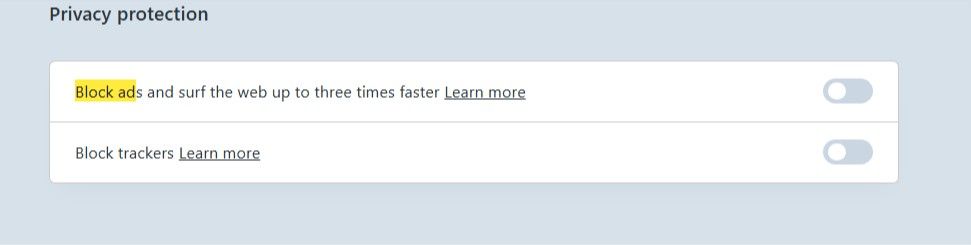
@proshor In the Settings Menu when you select Privacy and Security, in main window there is a Title
Privacy protection
Block ads and surf the web up to three times faster
Block trackers
Make sure these 2 settings are off.
I use uBlock Origin as my Blocker including while using Yandex and they work fine together in my situation.
If you still have trouble try another Browser for Yandex and if you have issues with the other Browser it is more than likely a system issue. -
-
burnout426 Volunteer last edited by
You said you reinstalled, but you didn't say if you uninstalled and deleted your profile data before reinstalling. So, it'd be best to see if the issue happens in a test standalone installation too to rule out issues with your normal installation and settings etc.
If the issue doesn't happen there, in your normal Opera, you probably need to goto the URL
opera://settings/clearBrowserDataand clear "Cookies and other site data" and "Cached images and files" for all time.If it still happens in the test standalone installation, it's probably something outside of Opera causing it (like some anti-virus or security software on your system) or it's an issue with the Yandex site.
You can try a couple things though. One is to clear cookies and site data, goto the URL
opera://browserjs, disable browser.js for the session and try things.The other is to close Opera, hit Windows key + r to open the run dialog, type
cmdand press enter to open a command prompt and use the following command to start Opera."%localappdata%\Programs\Opera\opera.exe" "--user-agent=Mozilla/5.0 (Windows NT 10.0; Win64; x64) AppleWebKit/537.36 (KHTML, like Gecko) Chrome/151.0.0.0 Safari/537.36"
That will cause Opera to pretend to be Chrome.
Once Opera is started, goto the URL
opera://browserjsagain, disable browser.js for the session, clear cookies and other site data and try things again. If that does the trick, it's an user-agent detection problem with Yandex. -
proshor last edited by proshor
I reinstalled Opera with deleting browser data, I even reinstalled Windows 10. The problem remains. I think, the issue is in Yandex site, It appears in Google Chrome too,. But in Chrome I just repeat my request and the window with captcha, torturing me, doesn't appear, In Opera it doesn't work.
-
-
fitzydj last edited by
@proshor
If Chrome is okay, it is something in your Opera setup.
Last resort install Revo uninstaller free and totally blow Opera away.
https://get.opera.com/ftp/pub/opera/desktop/ grab an older version if you remember one that worked with Yandex issues, install and see if the issue is resolved. -
-
fitzydj last edited by fitzydj
@proshor There are not a lot of people in the forum complaining about Opera and Yandex so it is your setup.
The reason I posted to uninstall Opera and use an older version I assumed that Yandex worked previously with Opera in your setup.
I have not read in your post that this was your first try to use Opera and Yandex or that you a new Opera User. Trying to remote help is impossible if essential information is missing.If you have Mobile Data on your phone disconnect the Computer from your main internet and share the Mobile Date Connection and try Yandex. If Yandex works then it it something to do with the main connection if not it is something on the PC and Opera.
Have you tried a Private Browsing Window in Opera?Copy and Paste from below into Google
When I use Yandex on my Windows 10 Computer in Opera Browser I get flagged as a Robot but I have no issues using Chrome Browser. Both Browsers are the latest version.
Opera has no extensions running, Opera Adblocker and VPN are disabled.
I have cleared browsing data, a clean reinstall of Windows 10 and Opera.