• Login
    • Search
    • Categories
    • Recent
    • Tags
    • Users
    • Groups
    • Rules
    • Help

    Do more on the web, with a fast and secure browser!

    Download Opera browser with:

    • built-in ad blocker
    • battery saver
    • free VPN
    Download Opera

    Gx rewards error

    Opera GX
    6
    14
    1362
    Loading More Posts
    • Oldest to Newest
    • Newest to Oldest
    • Most Votes
    Reply
    • Reply as topic
    Log in to reply
    This topic has been deleted. Only users with topic management privileges can see it.
    • M
      Mrdoge311 last edited by leocg

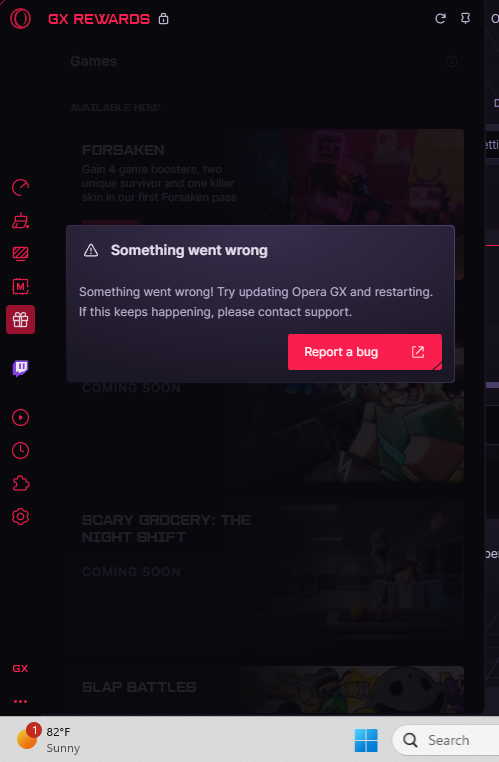
      why is the gx rewards saying something went wrong

      image_2026-05-20_190425124.png

      Reply Quote 0
        leocg 2 Replies Last reply
      • leocg
        leocg Moderator Volunteer @Mrdoge311 last edited by

        @Mrdoge311 As said, it's not available yet

        Reply Quote 0
          K M 2 Replies Last reply
        • K
          Karako-kara @leocg last edited by

          @leocg But it´s supposed to be ready already, so why can´t we claim the rewards?

          Reply Quote 0
            leocg 1 Reply Last reply
          • M
            Mrdoge311 @leocg last edited by

            @leocg what is not available? i dont get it

            Reply Quote 0
              1 Reply Last reply
            • leocg
              leocg Moderator Volunteer @Karako-kara last edited by

              @Karako-kara Page was put online before it should. Just checked and it should be working now

              Reply Quote 0
                PaToLOL1298 1 Reply Last reply
              • leocg
                leocg Moderator Volunteer @Mrdoge311 last edited by

                @Mrdoge311 Are you on version 131.0.5877.57?

                Reply Quote 0
                  M G 2 Replies Last reply
                • PaToLOL1298
                  PaToLOL1298 @leocg last edited by

                  @leocg it still doesn't work

                  Reply Quote 0
                    1 Reply Last reply
                  • M
                    Mrdoge311 @leocg last edited by

                    @leocg yeah im on that version of GX. and its still saddly saying it and idk why man.

                    Reply Quote 0
                      leocg 1 Reply Last reply
                    • G
                      goldenfreddyFN4F @leocg last edited by

                      @leocg Im having the same problem and im on version 131.0.5877.57

                      Reply Quote 0
                        1 Reply Last reply
                      • leocg
                        leocg Moderator Volunteer @Mrdoge311 last edited by leocg

                        @Mrdoge311 Try this:

                        If You Got The Something went wrong Error, try the following before making a post about it :

                        Check your browser version at opera://about or opera://update
                        Version should be : 131.0.5877.57

                        Go to your windows settings (WIN + I), then "Date & Time" tab
                        Check that both

                        • Set time zone automatically
                        • Set time automatically
                          Are set to On.
                          Click on "Sync now" in additional settings

                        Close OperaGX
                        Reopen it
                        Go to https://www.opera.com/gx/forsaken
                        Click Activate then the Claim

                        Reply Quote 0
                          PaToLOL1298 M F 3 Replies Last reply
                        • PaToLOL1298
                          PaToLOL1298 @leocg last edited by

                          @leocg Tytytytytytyy It Worked OMG TY

                          Reply Quote 0
                            1 Reply Last reply
                          • M
                            Mrdoge311 @leocg last edited by

                            @leocg yo thank you. its now fixed man

                            Reply Quote 0
                              1 Reply Last reply
                            • F
                              Flynnlovescats @leocg last edited by

                              @leocg uh were do i do it? sorry

                              Reply Quote 0
                                leocg 1 Reply Last reply
                              • leocg
                                leocg Moderator Volunteer @Flynnlovescats last edited by

                                @Flynnlovescats On Windows Settings, search for "time", it will give you a list of options.

                                Reply Quote 0
                                  1 Reply Last reply
                                • First post
                                  Last post

                                Computer browsers

                                • Opera for Windows
                                • Opera for Mac
                                • Opera for Linux
                                • Opera beta version
                                • Opera USB

                                Mobile browsers

                                • Opera for Android
                                • Opera Mini
                                • Opera Touch
                                • Opera for basic phones

                                • Add-ons
                                • Opera account
                                • Wallpapers
                                • Opera Ads

                                • Help & support
                                • Opera blogs
                                • Opera forums
                                • Dev.Opera

                                • Security
                                • Privacy
                                • Cookies Policy
                                • EULA
                                • Terms of Service

                                • About Opera
                                • Press info
                                • Jobs
                                • Investors
                                • Become a partner
                                • Contact us

                                Follow Opera

                                • Opera - Facebook
                                • Opera - Twitter
                                • Opera - YouTube
                                • Opera - LinkedIn
                                • Opera - Instagram

                                © Opera Software 1995-