• Login
    • Search
    • Categories
    • Recent
    • Tags
    • Users
    • Groups
    • Rules
    • Help

    Do more on the web, with a fast and secure browser!

    Download Opera browser with:

    • built-in ad blocker
    • battery saver
    • free VPN
    Download Opera

    What files to Backup?

    General
    4
    12
    284
    Loading More Posts
    • Oldest to Newest
    • Newest to Oldest
    • Most Votes
    Reply
    • Reply as topic
    Log in to reply
    This topic has been deleted. Only users with topic management privileges can see it.
    • leocg
      leocg Moderator Volunteer @JimMayor last edited by

      @JimMayor In opera://version or opera://about, check the path to the profile directory

      Also export your saved passwords and use Sync.

      Reply Quote 0
        1 Reply Last reply
      • JimMayor
        JimMayor @leocg last edited by

        @leocg Opera One(version: 126.0.5750.59)

        Reply Quote 0
          Nearmelab 1 Reply Last reply
        • Moved from Opera for Windows by  leocg leocg 
        • Nearmelab
          Nearmelab @JimMayor last edited by

          Welcome @JimMayor

          It is recommended that you regularly back up your most important Opera files, also before upgrading as well.

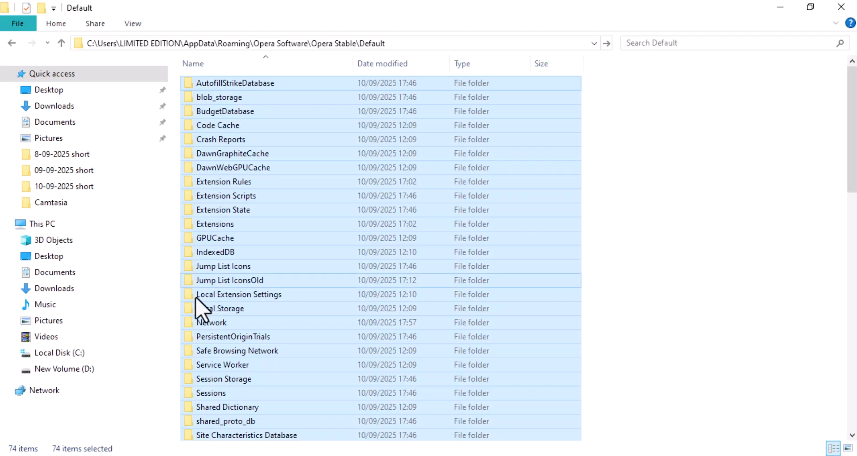
          Locating your files is the first step. Go to About Opera, or go to opera:about/ to find the exact paths for your profile and data folders.

          Not all files and folders listed below will be relevant for all users.

          Files to back up

          | File name        | Description                                                                                             |
          |------------------|---------------------------------------------------------------------------------------------------------|
          | Bookmarks        | Your bookmarks’ metadata, such as name and location                                                     |
          | BookmarksExtras  | Your bookmarks’ associated thumbnail images                                                             |
          | Cookies          | Your cookies (may not be essential, but you’ll need to sign back in to web services if deleted)         |
          | Current Session  | Data about your current browsing session including open tabs, location on the page, form data, etc.     |
          | Extension Cookies| Cookies associated with your installed extensions, such as location data for a weather extension        |
          | Favicons         | Favicons associated with pages added to your bookmarks bar                                              |
          | History          | Your browsing history                                                                                   |
          | Local State      | Your internal browser preferences, such as the last-seen version number and download location           |
          | Login Data       | Your saved, encrypted passwords, readable only on the machine that created them                           |
          | Preferences      | Your current browsing preferences and information about your profile                                    |
          | Visited Links    | The location of links you’ve already visited, used by Opera to display them as visited                  |
          | Web Data         | Your autofill and other data imported from IE7                                                          |
          
          Reply Quote 0
            leocg 1 Reply Last reply
          • JimMayor
            JimMayor last edited by

            Thank you, Nearmelab!!! At last there is someone out there that doesn't assume I am a computer nerd. Your reply was completely understandable, something I have come to expect from Opera and Thunderbird "support" people.

            Reply Quote 0
              Nearmelab 1 Reply Last reply
            • Nearmelab
              Nearmelab @JimMayor last edited by

              You're welcome @JimMayor

              Join the best productive moments using Opera browser.

              Reply Quote 0
                1 Reply Last reply
              • leocg
                leocg Moderator Volunteer @Nearmelab last edited by

                @Nearmelab That information may be out of date

                Reply Quote 0
                  Nearmelab 1 Reply Last reply
                • Nearmelab
                  Nearmelab @leocg last edited by

                  We don't have a windows machine to test it but from the Opera help portal it still shows them, @leocg !

                  Maybe @JimMayor , can confirm if they are there or not in Windows machine by accessing the path of profile in the attachment below.

                  0c4548e0-d6f2-4c09-992a-c098fbef50c1-image.png

                  4889e602-74e6-473c-878a-3a26c8381494-image.png

                  Reply Quote 0
                    1 Reply Last reply
                  • JimMayor
                    JimMayor last edited by

                    Sorry, helpful guys. Yes, all three paths appear to be correct for Win 11.

                    No matter how much I hate Windows (I actually dislike Apple more than MS) I am too old to try to learn anything new..., not that Win11 wasn't enough different than Win 10 that my hair turned a bit greyer. I just hope before I die that WordPerfect gets updated. But when I die I hope either DOS is in heaven (assuming that's where I end up) or there are no computers.

                    Reply Quote 0
                      Nearmelab 1 Reply Last reply
                    • Nearmelab
                      Nearmelab @JimMayor last edited by

                      Thanks for confirming @JimMayor ,

                      There are more to do before death, science / knowledge is one among the best things in life just little by little you arrive.

                      Best intents

                      Reply Quote 0
                        1 Reply Last reply
                      • roseanglina
                        roseanglina last edited by

                        A good informative platform

                        Reply Quote 0
                          1 Reply Last reply
                        • First post
                          Last post

                        Computer browsers

                        • Opera for Windows
                        • Opera for Mac
                        • Opera for Linux
                        • Opera beta version
                        • Opera USB

                        Mobile browsers

                        • Opera for Android
                        • Opera Mini
                        • Opera Touch
                        • Opera for basic phones

                        • Add-ons
                        • Opera account
                        • Wallpapers
                        • Opera Ads

                        • Help & support
                        • Opera blogs
                        • Opera forums
                        • Dev.Opera

                        • Security
                        • Privacy
                        • Cookies Policy
                        • EULA
                        • Terms of Service

                        • About Opera
                        • Press info
                        • Jobs
                        • Investors
                        • Become a partner
                        • Contact us

                        Follow Opera

                        • Opera - Facebook
                        • Opera - Twitter
                        • Opera - YouTube
                        • Opera - LinkedIn
                        • Opera - Instagram

                        © Opera Software 1995-