• Login
    • Search
    • Categories
    • Recent
    • Tags
    • Users
    • Groups
    • Rules
    • Help

    Do more on the web, with a fast and secure browser!

    Download Opera browser with:

    • built-in ad blocker
    • battery saver
    • free VPN
    Download Opera

    How to use Opera in a language different from the system one?

    General
    system language
    3
    12
    533
    Loading More Posts
    • Oldest to Newest
    • Newest to Oldest
    • Most Votes
    Reply
    • Reply as topic
    Log in to reply
    This topic has been deleted. Only users with topic management privileges can see it.
    • leocg
      leocg Moderator Volunteer @grasshoppers last edited by

      @grasshoppers When you run the installer, you can click on Options in the bottom left and change the language.

      Reply Quote 0
        grasshoppers 1 Reply Last reply
      • grasshoppers
        grasshoppers @leocg last edited by

        @leocg Thanks I will try that, but when I downloaded it I don't remember seeing any options. In fact, it went so fast there did not seem to be anything to do but accept it. But I will try again.

        Reply Quote 0
          leocg 1 Reply Last reply
        • leocg
          leocg Moderator Volunteer @grasshoppers last edited by

          @grasshoppers The link to the options appears on the first screen of the installer, when you run it.

          Reply Quote 0
            1 Reply Last reply
          • Nearmelab
            Nearmelab @grasshoppers last edited by Nearmelab

            @grasshoppers said in How to use Opera in a language different from the system one?:

            And the language cannot be changed on my system. Also, it is very difficult to follow instructions in a language that is not yours.

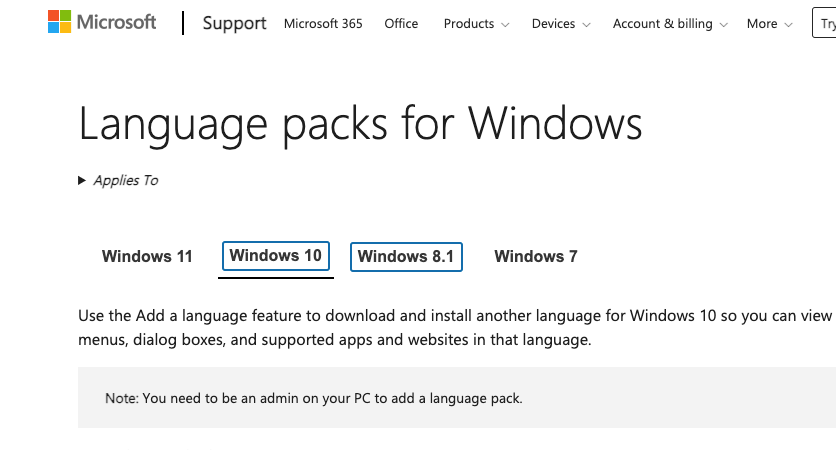
            Why you can't? Windows 10 has packages for languages!
            87350586-00a3-4a7e-99f1-e7e6eb3753e7-image.png

            Also it is wondering how you are having English as language of the software while the system language is Spanish! can you share an example?

            Reply Quote 0
              grasshoppers 1 Reply Last reply
            • grasshoppers
              grasshoppers @Nearmelab last edited by

              @Nearmelab I have a Lenovo Desktop (Idea Center) and it only allows one language at a time. I was going to change it, but there are Spanish speaking persons in my home so I didn't.
              Though the system is in Spanish it allows APPs in English. I have Word and others in English. Until now this was sufficient. I can't send you an example because I do not know how to do that. But, believe me, the system is in Spanish and apps in English.

              Reply Quote 0
                Nearmelab 1 Reply Last reply
              • Nearmelab
                Nearmelab @grasshoppers last edited by

                @grasshoppers no doubt, to recover your Spanish language in the Opera browser try the following:

                • Go to Settings.
                • Click Advanced in the left sidebar, and click Browser.
                • Under Languages, click Language.
                • Click next to a language and click Display Opera in this language.

                Check this video How to Set Opera Browser to Your Preferred Language.

                Reply Quote 0
                  grasshoppers 1 Reply Last reply
                • grasshoppers
                  grasshoppers @Nearmelab last edited by

                  @Nearmelab That sounds interesting, but I'm not sure it will work on a computer defined by its rigid "one language only" policy. Right now I am on my beloved Word 7 computer and won't be back on that Word 10 for a day or so. I will definitely try and let you know if it works. Thanks.

                  Reply Quote 0
                    Nearmelab 1 Reply Last reply
                  • Nearmelab
                    Nearmelab @grasshoppers last edited by

                    @grasshoppers said in How to use Opera in a language different from the system one?:

                    Right now I am on my beloved Word 7 computer and won't be back on that Word 10 for a day or so. I will definitely try and let you know if it works. Thanks.

                    An advice in case you're restricted by Window operation system there is an option to install Linux distributions i.e Fedora, Ubuntu...

                    Best intents

                    Reply Quote 0
                      grasshoppers 1 Reply Last reply
                    • grasshoppers
                      grasshoppers @Nearmelab last edited by

                      @Nearmelab Thanks, but at 87 I am loathe to try a new system. The learning curve may be too steep. But thanks.

                      Reply Quote 0
                        Nearmelab 1 Reply Last reply
                      • Nearmelab
                        Nearmelab @grasshoppers last edited by

                        @grasshoppers , Valuable to read that a heart of 87 sees and says that estimate like a young looking for the best choice.

                        Have a great experience with Opera browser.

                        Reply Quote 0
                          1 Reply Last reply
                        • grasshoppers
                          grasshoppers last edited by

                          Thank you so much for your kind words.

                          Reply Quote 0
                            1 Reply Last reply
                          • First post
                            Last post

                          Computer browsers

                          • Opera for Windows
                          • Opera for Mac
                          • Opera for Linux
                          • Opera beta version
                          • Opera USB

                          Mobile browsers

                          • Opera for Android
                          • Opera Mini
                          • Opera Touch
                          • Opera for basic phones

                          • Add-ons
                          • Opera account
                          • Wallpapers
                          • Opera Ads

                          • Help & support
                          • Opera blogs
                          • Opera forums
                          • Dev.Opera

                          • Security
                          • Privacy
                          • Cookies Policy
                          • EULA
                          • Terms of Service

                          • About Opera
                          • Press info
                          • Jobs
                          • Investors
                          • Become a partner
                          • Contact us

                          Follow Opera

                          • Opera - Facebook
                          • Opera - Twitter
                          • Opera - YouTube
                          • Opera - LinkedIn
                          • Opera - Instagram

                          © Opera Software 1995-