• Login
    • Search
    • Categories
    • Recent
    • Tags
    • Users
    • Groups
    • Rules
    • Help

    Do more on the web, with a fast and secure browser!

    Download Opera browser with:

    • built-in ad blocker
    • battery saver
    • free VPN
    Download Opera

    The language used in the AI interface

    AI tools: Sidebar, Prompts, AI tooltip
    3
    4
    2677
    Loading More Posts
    • Oldest to Newest
    • Newest to Oldest
    • Most Votes
    Reply
    • Reply as topic
    Log in to reply
    This topic has been deleted. Only users with topic management privileges can see it.
    • SmokDiplodok
      SmokDiplodok last edited by

      Does anyone know why, after forcing the browser to start in a specific language (the --lang option), the AI interface remains in English? This effect isn't present in Windows 11. It's a minor detail, but it's one of those annoying things.
      Has anyone encountered this behavior?

      Linux Mint 22.1 "Xia" x64
      Opera 120.0.5543.93
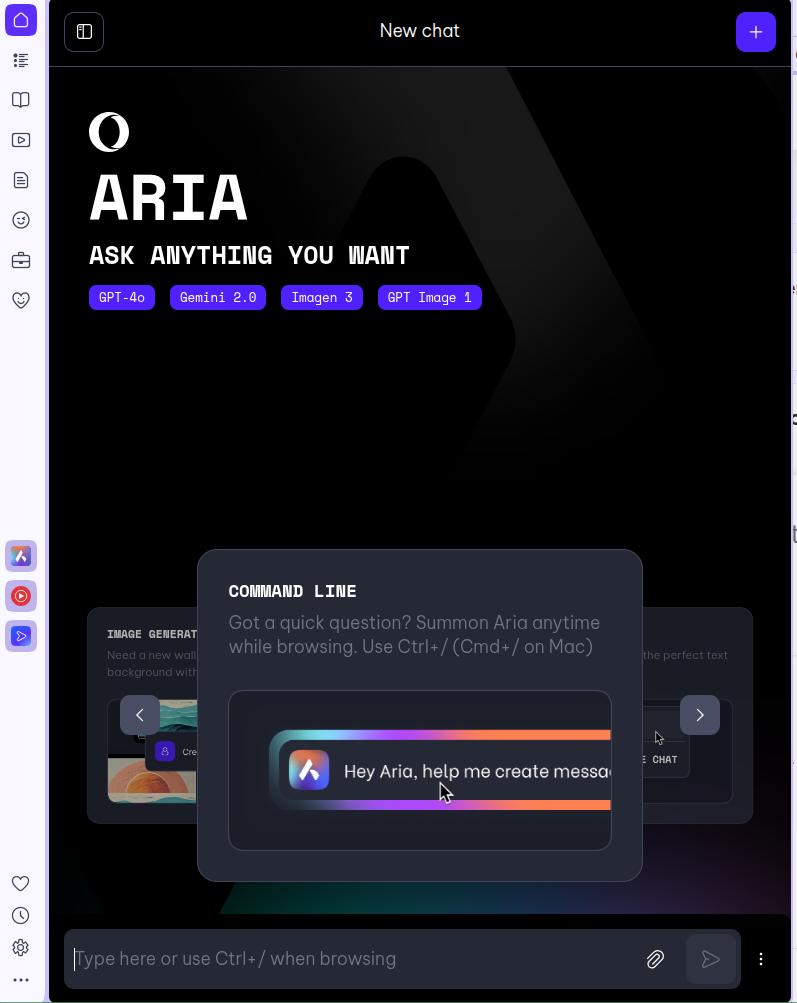
      obraz_2025-07-26_152411641.png

      Reply Quote 0
        1 Reply Last reply
      • krishnnadutt112
        krishnnadutt112 last edited by

        @SmokDiplodok said in The language used in the AI interface:

        Does anyone know why, after forcing the browser to start in a specific language (the --lang option), the AI interface remains in English? This effect isn't present in Windows 11. It's a minor detail, but it's one of those annoying things.
        Has anyone encountered this behavior?

        I noticed this too. On some OS like Linux, even if you start Opera with --lang=your-language, the AI interface stays in English. It seems the AI reads the browser’s content-language headers differently than the UI language setting. On Windows 11, it works fine. A workaround is to change the language in your Opera settings or use a translation extension for now.

        Reply Quote 0
          SmokDiplodok 1 Reply Last reply
        • SmokDiplodok
          SmokDiplodok @krishnnadutt112 last edited by

          @krishnnadutt112 But where can I find the setting that forces Opera to change this language?
          I don't see anything like that in the preferences (that's why I have to use the --lang option in Linux).
          But I don't see any other options related to the language of the AI ​​itself.

          Reply Quote 0
            1 Reply Last reply
          • Henryjames1
            Henryjames1 last edited by

            @SmokDiplodok said in The language used in the AI interface:

            Does anyone know why, after forcing the browser to start in a specific language (the --lang option), the AI interface remains in English? This effect isn't present in Windows 11. It's a minor detail, but it's one of those annoying things.
            Has anyone encountered this behavior?
            Linux Mint 22.1 "Xia" x64
            Opera 120.0.5543.93

            This appears to be a limitation on Linux rather than a bug. In Opera, the --lang flag changes the browser UI, but the AI interface stays in English because it’s tied to account or default settings. On Windows 11, the integration is more complete, so this issue doesn’t occur. Likely something Opera needs to fix in a future update.

            Reply Quote 0
              1 Reply Last reply
            • First post
              Last post

            Computer browsers

            • Opera for Windows
            • Opera for Mac
            • Opera for Linux
            • Opera beta version
            • Opera USB

            Mobile browsers

            • Opera for Android
            • Opera Mini
            • Opera Touch
            • Opera for basic phones

            • Add-ons
            • Opera account
            • Wallpapers
            • Opera Ads

            • Help & support
            • Opera blogs
            • Opera forums
            • Dev.Opera

            • Security
            • Privacy
            • Cookies Policy
            • EULA
            • Terms of Service

            • About Opera
            • Press info
            • Jobs
            • Investors
            • Become a partner
            • Contact us

            Follow Opera

            • Opera - Facebook
            • Opera - Twitter
            • Opera - YouTube
            • Opera - LinkedIn
            • Opera - Instagram

            © Opera Software 1995-