Can't stop Aria extension from running
-
andrew84 last edited by andrew84
@Robertiano I don't very much familiar with all these AI related stuff and I don't want to be. I just opened 'News' section in the Opera blog and 80% of the recent posts there relates to AI.
I could understand if some always running AI stuff in the background process would be involved into existing (or new) features functionality improvements. For example the poor themes feature, it's quite easy to understand that dark blue text looks bad on the dark blue background. -
 Robertiano last edited by
@andrew84 said in Can't stop Aria extension from running:
@Robertiano I don't very much familiar with all these AI related stuff and I don't want to be. I just opened 'News' section in the Opera blog and 80% of the recent posts there relates to AI.
I could understand if some always running AI stuff in the background process would be involved into existing (or new) features functionality improvements. For example the poor themes feature, it's quite easy to understand that dark blue text looks bad on the dark blue background.Yep i too)
-
Moved from Opera for Windows by
 leocg
leocg
-
franzdrobny last edited by
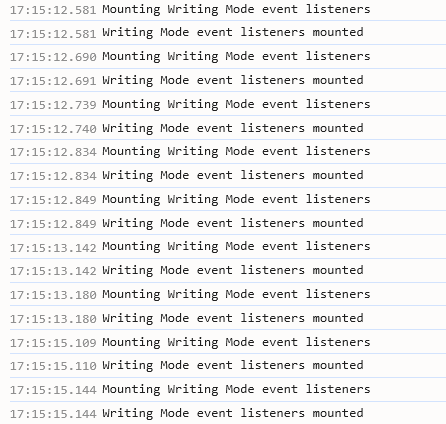
I totally agree with the author. Activating extensions like this in the background (that furthermore spam the browser console with unnecessary logs is a nuisance.
-
Robertiano last edited by Robertiano
@franzdrobny said in Can't stop Aria extension from running:
I totally agree with the author. Activating extensions like this in the background (that furthermore spam the browser console with unnecessary logs is a nuisance.
Yeah .. Its sick(( Opera Dev ignore disable/eneble that F* crazy extention
-
Robertiano last edited by Robertiano
@franzdrobny Try using YouTube normally. The console is so chaotic, plus this extension is generating millions of notifications, which means it's working in a cycle and constantly triggering loading, causing critical freezes. Logically, some people will support these AI tricks, but sorry, the average person will think they just have an outdated PC and will upgrade their hardware. This is why many don't like that I asked to turn off this nonsense, which I don't need, and it consumes resources, constantly loading on any page. Developers are really leaving the user with no choice, and the fans just don't notice this internal operation, and they're fine with it — if it lags, they'll just go and upgrade their PC. I'm not okay with that, and if it's possible to improve it, why should I have to switch browsers after 20 years of using one?
-
 MichaIng last edited by
100% agreed, a way to fully disable Aria is desperately needed. That it would not be possible as integrated too much into Opera is nonsense, it is just a question whether this is wanted or not.
One can disable the Aria background process for a while by manually editing the
Preferencesfile in profile data (while the browser is closed), search for"igpdmclhhlcpoindmhkhillbfhdgoegm":key within extension block, and add"blacklist_state":1to it, like the case for a number of hardcoded extension IDs, Opera obviously chose to prevent from running in this browser. However, the key gets removed in certain circumstances, probably on browser updates, not 100% sure yet. -
Grollschwert last edited by
Jumping in on this. The Aria extension runs and hogs nearly 2GB of RAM even though it is never used.
-
 roseanglina last edited by
I’ve faced a similar issue before, and it usually happens because the extension is set to start automatically or is being triggered by the browser on launch. Checking the extension settings and disabling background permissions can help. Curious to see what solution works best here.
