• Login
    • Search
    • Categories
    • Recent
    • Tags
    • Users
    • Groups
    • Rules
    • Help

    Do more on the web, with a fast and secure browser!

    Download Opera browser with:

    • built-in ad blocker
    • battery saver
    • free VPN
    Download Opera

    How to remove Google AI overview in search results?

    Opera for Android
    11
    32
    27642
    Loading More Posts
    • Oldest to Newest
    • Newest to Oldest
    • Most Votes
    Reply
    • Reply as topic
    Log in to reply
    This topic has been deleted. Only users with topic management privileges can see it.
    • H
      Halfabee last edited by

      Why does Opera now show Google AI overview in search results, and how do I remove this irritating 'feature'?

      Reply Quote 3
        L A 2 Replies Last reply
      • L
        leocg Moderator Volunteer @Halfabee last edited by

        @Halfabee Are you using Google to search? If so, then you already have your answer for why it's being displayed.

        Reply Quote 0
          H J 2 Replies Last reply
        • H
          Halfabee @leocg last edited by

          @leocg
          But why does Google AI overview only appear when I use Opera, but not when I use Chrome or Firefox?
          And to repeat my question, can it be removed when using Opera?

          Reply Quote 1
            L DrackenDarck 2 Replies Last reply
          • A
            AnilVcube last edited by leocg

            Go to Settings > Search engine > Manage search engines and site search
            Select Add next to the Site search section
            Add a nickname for your AI-less version of Google
            Paste in this URL: {google:baseURL}search?q=%s&udm=14
            Select Save or Add

            Reply Quote 0
              H 1 Reply Last reply
            • H
              Halfabee @AnilVcube last edited by

              @AnilVcube
              Thanks Anil. How do I do this is Opera on my Android Phone?
              I can go Account - Settings - Search which tells me Google is my default search engine and lets me change the search engine from the list - but not add a new search engine?

              Reply Quote 0
                1 Reply Last reply
              • L
                leocg Moderator Volunteer @Halfabee last edited by

                @Halfabee Where are you seeing it? Do you have a screenshot?

                I don't seem to be getting it here

                Reply Quote 0
                  H 1 Reply Last reply
                • H
                  Halfabee @leocg last edited by

                  @leocg
                  If you aren't getting it then think yourself lucky.

                  Reply Quote 0
                    L 1 Reply Last reply
                  • L
                    leocg Moderator Volunteer @Halfabee last edited by

                    @Halfabee But do you have a screenshot?

                    Reply Quote 0
                      H 1 Reply Last reply
                    • H
                      Halfabee @leocg last edited by

                      @leocg
                      Stupid question - how do I upload a screenshot? I tried both of the image icons on the toolbar. One lead to this
                      ![alt text](image url)
                      And the other this, when I selected the screenshot I want to share.
                      Screenshot_20240820-125934.png

                      Reply Quote 0
                        L 1 Reply Last reply
                      • H
                        Halfabee last edited by

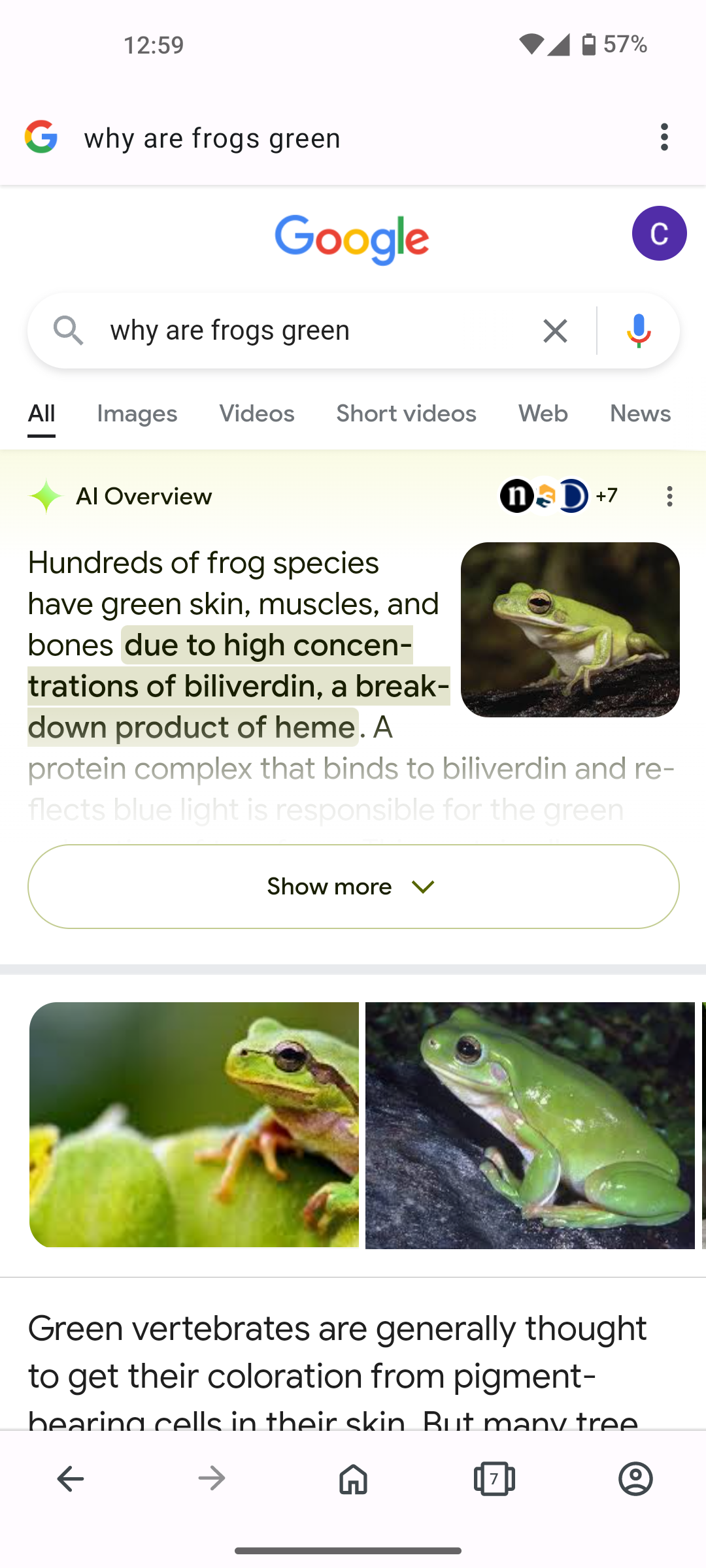
                        Ah, it shows the image when I post...Anyway, that's what I get, the Google AI overview is always the first result to a search, it only appears when I use Opera, and I would like to remove it. Running Android 14 on a Nothing 1.

                        Reply Quote 0
                          L 1 Reply Last reply
                        • L
                          leocg Moderator Volunteer @Halfabee last edited by

                          @Halfabee It seems to be something from the page itself.

                          I got it a couple of times when checking it yesterday, by the way.

                          Reply Quote 0
                            1 Reply Last reply
                          • L
                            leocg Moderator Volunteer @Halfabee last edited by

                            @Halfabee It's a Google Labs experiment, you probably can disable it in your Google settings.

                            Reply Quote 0
                              O 1 Reply Last reply
                            • H
                              Halfabee last edited by

                              That's my issue: nowhere can I find where to turn off Google AI overview.

                              Reply Quote 2
                                C 1 Reply Last reply
                              • O
                                Opie247 last edited by

                                I hope some kind soul can create an Opera extension that will block the "AI Overview" paragraph that is now at the top of Google search results (it's beyond my abilities to create one). There are a few Chrome extensions that do this, but when installed in Opera, none of them work (usually Chrome extension do work with Opera, but not in this case).

                                I know the simplest solution is to use another search engine, but I've tried them all and I like Google best -- but I do hate their new AI Overview section which clutters the search results page -- and they don't have an option to turn it off.

                                A native Opera extension to block the AI Overview section would be pure awesomeness!

                                Reply Quote 0
                                  1 Reply Last reply
                                • O
                                  Opie247 @leocg last edited by

                                  @leocg Unfortunately, there is no option to disable it.

                                  Reply Quote -1
                                    H 1 Reply Last reply
                                  • H
                                    Halfabee @Opie247 last edited by

                                    @Opie247 Why can't this be disabled? It's a PITA, mainly because it is usually wrong.
                                    This only appears in Opera, so please can someone find a way to turn this off?
                                    In the meantime, I shall use another browser.

                                    Reply Quote 0
                                      1 Reply Last reply
                                    • M
                                      mkolom last edited by

                                      This addon adds udm-14 param to all google queries. Works for me as of now. Mind that you have to check "Allow access to search page results" for it to work.

                                      https://chromewebstore.google.com/detail/google-udm14/ackpmepblmioeoofggbipphdaooogjga

                                      Reply Quote 0
                                        L 1 Reply Last reply
                                      • L
                                        leocg Moderator Volunteer @mkolom last edited by

                                        @mkolom Opera for Android doesn't support extensions

                                        Reply Quote 0
                                          1 Reply Last reply
                                        • C
                                          Chi-oma @Halfabee last edited by Chi-oma

                                          @Halfabee
                                          AI Overviews in Search is a Google Experiment and has nothing to do with Opera, rather it has something to do with your search settings in your Google Account.
                                          You said that you use Nothing phone 1, and I don't know the exact OS Nothing phone run, so I will just state the two general ways of solving the problem.


                                          Method 1 (If you have a normal Android phone and the latest version of the Google app (or Google app beta), whichever one works).

                                          • Tap the labs icon at the top left of the screen. Google Labs loads.
                                          • You will see Google AI overviews for Search and Viola the Bird (depending on your region, you might see more or less).
                                          • You will see a three dots at the top of the screen. Tap it.
                                          • Manage and Help pops up. Tap manage
                                          • In the next window, you will see a toggle to turn AI overviews on/off. Flip the toggle to turn it off.
                                          • Start searching.

                                          Method 2 (If you have Android Go edition / Don't have Google installed / Don't have the latest version of Google / Have Google Go installed / Can't find the Labs icon)

                                          • On Opera browser, go to Google AI Overview for Search's website and wait for the page to load
                                          • You will see Google AI overviews for Search and Viola the Bird (depending on your region, you might see more or less).
                                          • You will see a three dots at the top of the screen. Tap it.
                                          • Manage and Help pops up. Tap manage
                                          • In the next window, you will see a toggle to turn AI overviews on/off. Flip the toggle to turn it off.
                                          • Start searching.

                                          Alternatively
                                          You can go to Google Labs Website and look for AI Overviews for Search, tap it and follow the instructions in Method 2.
                                          Note: This method is resource consuming because Google Labs website can use a lot of your data or internet connection. I recommend using data saving mode on Opera if you want to try this method.

                                          Reply Quote 0
                                            1 Reply Last reply
                                          • akanido
                                            akanido last edited by

                                            Thanks this was helpful

                                            South African Entertainment Website https://mp3gist.co.za/

                                            Reply Quote 0
                                              1 Reply Last reply
                                            • First post
                                              Last post

                                            Computer browsers

                                            • Opera for Windows
                                            • Opera for Mac
                                            • Opera for Linux
                                            • Opera beta version
                                            • Opera USB

                                            Mobile browsers

                                            • Opera for Android
                                            • Opera Mini
                                            • Opera Touch
                                            • Opera for basic phones

                                            • Add-ons
                                            • Opera account
                                            • Wallpapers
                                            • Opera Ads

                                            • Help & support
                                            • Opera blogs
                                            • Opera forums
                                            • Dev.Opera

                                            • Security
                                            • Privacy
                                            • Cookies Policy
                                            • EULA
                                            • Terms of Service

                                            • About Opera
                                            • Press info
                                            • Jobs
                                            • Investors
                                            • Become a partner
                                            • Contact us

                                            Follow Opera

                                            • Opera - Facebook
                                            • Opera - Twitter
                                            • Opera - YouTube
                                            • Opera - LinkedIn
                                            • Opera - Instagram

                                            © Opera Software 1995-