Opera GX + Roblox interference.
-
CormanTheWolf last edited by
Whenever i open Opera GX, and go to the website www.roblox.com, A lot of things show up white, like my avatar, some of my friend's avatars, Accessories etc.
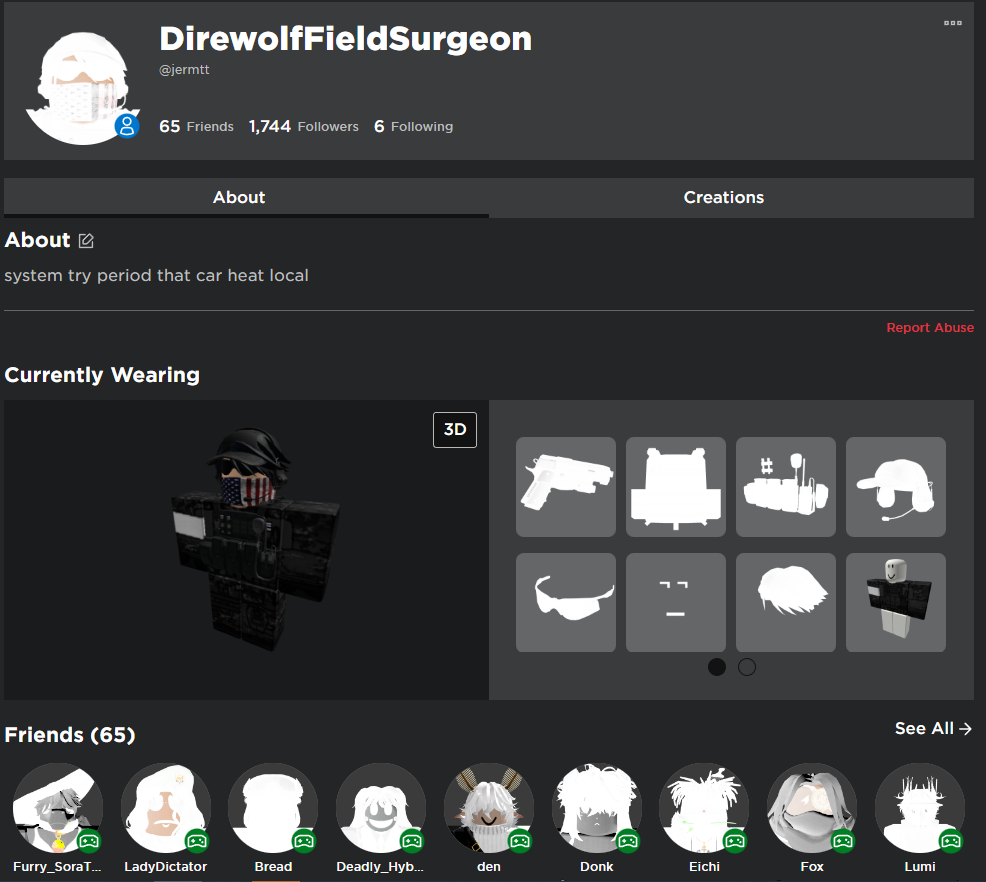
Tried to edit the easy setup theme and colors, but im not sure what to do. Can anyone help?
-
A Former User last edited by
This is probably caused by the "Force Dark Pages" Feature, it tries to change some Images to simulate a dark page version, normally used for background images
you can easily fix this by adding roblox to the exceptions here. -
CormanTheWolf last edited by
@chromex said in Opera GX + Roblox interference.:
here
Thank you! It worked
-
kovac last edited by
@chromex Need to bump this as I don't quite understand what "here" is supposed to be. I am having the same issue.
-
musicofthenight last edited by
@ryszardwo you can just right click on the page you're on and turn off force dark pages
-
Locked by
 leocg
leocg