• Login
    • Search
    • Categories
    • Recent
    • Tags
    • Users
    • Groups
    • Rules
    • Help

    Do more on the web, with a fast and secure browser!

    Download Opera browser with:

    • built-in ad blocker
    • battery saver
    • free VPN
    Download Opera

    iCloud Passwords extension

    Opera add-ons
    15
    19
    24363
    Loading More Posts
    • Oldest to Newest
    • Newest to Oldest
    • Most Votes
    Reply
    • Reply as topic
    Log in to reply
    This topic has been deleted. Only users with topic management privileges can see it.
    • j-op
      j-op @patrickkrs last edited by

      @patrickkrs said in iCloud Passwords extension:

      @j-op Which extension did you use for authentificator app?

      I am using the official Microsoft Authenticator extension from the Chrome Store.

      Reply Quote 0
        1 Reply Last reply
      • Karthurai
        Karthurai @icebluelugia last edited by

        @icebluelugia it worked for me by just doing what @knownasWoolf said and then just re-opening opera gx

        Reply Quote 0
          icebluelugia 1 Reply Last reply
        • icebluelugia
          icebluelugia @Karthurai last edited by

          @karthurai Maybe the iCloud Keychain extension is broken because I just tried it on Edge and Chrome and got the same error. Wonder if it's somehow related to me putting off those Windows updates.

          Reply Quote 0
            1 Reply Last reply
          • Cadenpalmtree
            Cadenpalmtree @j-op last edited by

            @j-op It worked for me just fine, I downloaded the chrome extension through opera and when it opened, I put in the code, refreshed the page, and it worked.

            Reply Quote 1
              j-op 1 Reply Last reply
            • j-op
              j-op @Cadenpalmtree last edited by

              @cadenpalmtree I tried it again and this time it worked. I assume they've updated either iCloud for Windows, the Chrome extension or both and that has resolved the issue.

              Sidenote: To get the iCloud Passwords App inside of iCloud for Windows to sync my passwords I had to log out and log in again.

              Thanks for pointing out that it worked for you!
              As I said earlier, I switched over to Microsoft Authenticator on all my devices but it's good to know that I have iCloud available as a fallback solution.

              Reply Quote 0
                1 Reply Last reply
              • DennisJB
                DennisJB last edited by

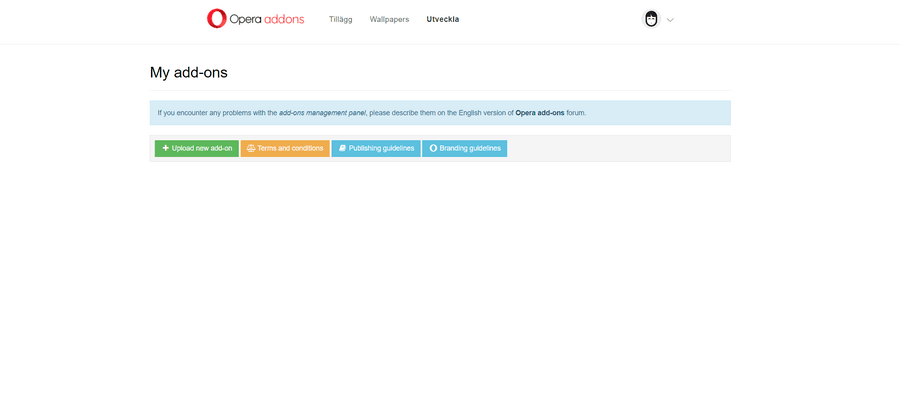
                Hi i tried this aswell but couldnt get it to work, dont know if i do it wrong ? i extracted the extension folder and saved it on another location, but when i go to extensions and "dev" i only get the button "upload new addon" and when i click that button i can only upload 1 file and not the folder. Am i missing something ?
                ad031f8f-8571-4c87-9b54-81c7ca923775-image.png

                Reply Quote 0
                  1 Reply Last reply
                • gleester
                  gleester last edited by

                  Not sure if this may help, but I had to disable my antivirus protection before I could get the iCloud for windows app to enable password and keychains.

                  It's still not seemless though -- the browser forms do not autofill username/passwords, but it does trigger the extension and allow you choose "Manage Passwords..." with icloud and then copy/paste into the username and password fields.

                  Reply Quote 0
                    1 Reply Last reply
                  • adrian5223-apple
                    adrian5223-apple last edited by

                    @redzacke this worked for me thanks 🙂

                    Reply Quote 0
                      1 Reply Last reply
                    • pctechwill
                      pctechwill @redzacke last edited by

                      @redzacke Thank you, that worked great!

                      Reply Quote 0
                        1 Reply Last reply
                      • FredL
                        FredL @redzacke last edited by

                        @redzacke Tried this and it worked well, thank you !

                        Reply Quote 0
                          1 Reply Last reply
                        • First post
                          Last post

                        Computer browsers

                        • Opera for Windows
                        • Opera for Mac
                        • Opera for Linux
                        • Opera beta version
                        • Opera USB

                        Mobile browsers

                        • Opera for Android
                        • Opera Mini
                        • Opera Touch
                        • Opera for basic phones

                        • Add-ons
                        • Opera account
                        • Wallpapers
                        • Opera Ads

                        • Help & support
                        • Opera blogs
                        • Opera forums
                        • Dev.Opera

                        • Security
                        • Privacy
                        • Cookies Policy
                        • EULA
                        • Terms of Service

                        • About Opera
                        • Press info
                        • Jobs
                        • Investors
                        • Become a partner
                        • Contact us

                        Follow Opera

                        • Opera - Facebook
                        • Opera - Twitter
                        • Opera - YouTube
                        • Opera - LinkedIn
                        • Opera - Instagram

                        © Opera Software 1995-