PSA: Opera's Ad-Blocker is Broken
-
CommanderKetchup0 last edited by
Re: Websites Visited on Opera are not Loading Properly
I've discovered the culprit. The built in Ad-Blocker Opera offers is breaking websites. I guess something must have changed in the most recent update that caused the Ad-Blocker to bug out and recognize a whole lot more things on a web page as ads than they should've been.
Disable your Ad-Blocker and things should return to normal.
-
Rhadazeroz last edited by
The same issue with ad-blocker its blocking everything
Opera version 135.0.5973.133
Please fix it
Best regards -
OperaBrowserUser last edited by
Yep, confirmed as well. It's blocking all assets and CSS from most websites I've tried, even if I disable all of the filter lists. Turning off the adblocker altogether resolves it.
-
b4st3r last edited by
Same issue here.
It works, if you disable acceptable ads, while ad blocker is enabled.Opera One Version: 135.0.5973.133
-
Rhadazeroz last edited by Rhadazeroz
@Rhadazeroz
In the post (body) you should include the following information:Windows 11 25h2 26200.9445
135.0.5973.133
All pages
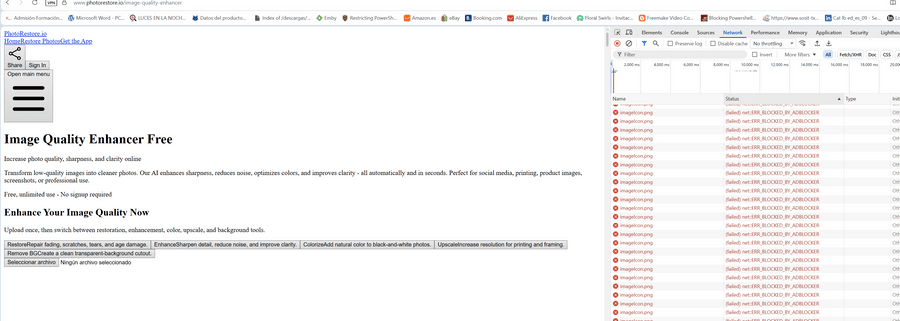
all css and scripts, png is bloqued by opera ad-blocker (See image)
afeter update opera desktop for windows opera ad-blocker block every css and script I think this extension in this update is broken!
-
revalenz last edited by revalenz
While trying to figure out the reason behind this issue, I was trying to disable some of the AdBlocker lists (
opera://settings/adBlockerLists), and those are broken too. If I unselect one or more, after a few seconds they get selected again out of nowhere. -
-
octex4 last edited by octex4
@CommanderKetchup0 said in PSA: Opera's Ad-Blocker is Broken:
The built in Ad-Blocker Opera offers is breaking website
Same here (Win10)
Upd
@rick2 said in PSA: Opera's Ad-Blocker is Broken:Just disable "Acceptable Ads"
Yes it helps.
