• Login
    • Search
    • Categories
    • Recent
    • Tags
    • Users
    • Groups
    • Rules
    • Help

    Do more on the web, with a fast and secure browser!

    Download Opera browser with:

    • built-in ad blocker
    • battery saver
    • free VPN
    Download Opera

    PSA: Opera's Ad-Blocker is Broken

    Opera for Windows
    7
    9
    322
    Loading More Posts
    • Oldest to Newest
    • Newest to Oldest
    • Most Votes
    Reply
    • Reply as topic
    Log in to reply
    This topic has been deleted. Only users with topic management privileges can see it.
    • C
      CommanderKetchup0 last edited by

      Re: Websites Visited on Opera are not Loading Properly

      I've discovered the culprit. The built in Ad-Blocker Opera offers is breaking websites. I guess something must have changed in the most recent update that caused the Ad-Blocker to bug out and recognize a whole lot more things on a web page as ads than they should've been.

      Disable your Ad-Blocker and things should return to normal.

      Reply Quote 3
        R B 2 Replies Last reply
      • R
        Rhadazeroz @CommanderKetchup0 last edited by

        @CommanderKetchup0

        The same issue with ad-blocker its blocking everything

        Opera version 135.0.5973.133

        Please fix it
        Best regards

        Reply Quote 1
          R 1 Reply Last reply
        • O
          OperaBrowserUser last edited by

          Yep, confirmed as well. It's blocking all assets and CSS from most websites I've tried, even if I disable all of the filter lists. Turning off the adblocker altogether resolves it.

          Reply Quote 0
            1 Reply Last reply
          • B
            b4st3r @CommanderKetchup0 last edited by

            @CommanderKetchup0

            Same issue here.
            It works, if you disable acceptable ads, while ad blocker is enabled.

            Opera One Version: 135.0.5973.133

            Reply Quote 0
              1 Reply Last reply
            • R
              Rhadazeroz @Rhadazeroz last edited by Rhadazeroz

              @Rhadazeroz
              In the post (body) you should include the following information:

              Windows 11 25h2 26200.9445

              135.0.5973.133

              All pages

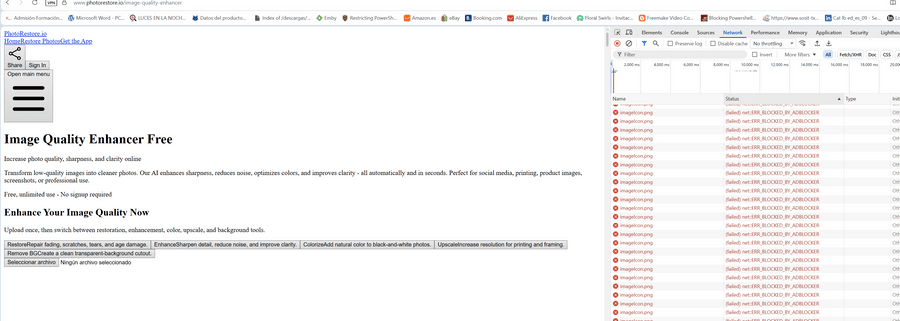
              all css and scripts, png is bloqued by opera ad-blocker (See image)

              afeter update opera desktop for windows opera ad-blocker block every css and script I think this extension in this update is broken!
              5a5aaf3b-68ed-4a94-98f3-6715d2fb197d-image.png

              Reply Quote 1
                1 Reply Last reply
              • R
                revalenz last edited by revalenz

                While trying to figure out the reason behind this issue, I was trying to disable some of the AdBlocker lists (opera://settings/adBlockerLists), and those are broken too. If I unselect one or more, after a few seconds they get selected again out of nowhere.

                Reply Quote 1
                  1 Reply Last reply
                • B
                  bvitnik last edited by

                  I can confirm this. Can't find a fix.

                  Reply Quote 0
                    1 Reply Last reply
                  • rick2
                    rick2 last edited by

                    Just disable "Acceptable Ads"

                    https://forums.opera.com/post/409354

                    Reply Quote 0
                      1 Reply Last reply
                    • rick2
                      rick2 last edited by This post is deleted!
                      Reply Quote 0
                        1 Reply Last reply
                      • First post
                        Last post

                      Computer browsers

                      • Opera for Windows
                      • Opera for Mac
                      • Opera for Linux
                      • Opera beta version
                      • Opera USB

                      Mobile browsers

                      • Opera for Android
                      • Opera Mini
                      • Opera Touch
                      • Opera for basic phones

                      • Add-ons
                      • Opera account
                      • Wallpapers
                      • Opera Ads

                      • Help & support
                      • Opera blogs
                      • Opera forums
                      • Dev.Opera

                      • Security
                      • Privacy
                      • Cookies Policy
                      • EULA
                      • Terms of Service

                      • About Opera
                      • Press info
                      • Jobs
                      • Investors
                      • Become a partner
                      • Contact us

                      Follow Opera

                      • Opera - Facebook
                      • Opera - Twitter
                      • Opera - YouTube
                      • Opera - LinkedIn
                      • Opera - Instagram

                      © Opera Software 1995-